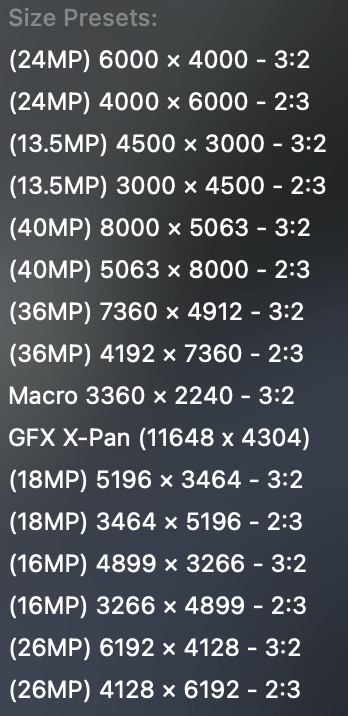
Is there a way to save custom crop sizes so I don’t have to keep fudging each photo to have a certain size? For example: 6000x4000 (24MP), 5196x3464 (18MP), 3266x4899 (16MP), etc…
There are many times I wish to crop an image but target/mimic a certain resolution. Something similar to the included screenshot (Pixelmator Pro).
The crop tool is not designed to resize, simply to re-proportion. You can only resize when exporting. But don’t! The options for scaling are very limited. Better use something like Topaz Photo AI.
If you want to add a new crop ratio, just type into the text box at the bottom of the list and it will be added to the list for future use.
I’m not talking about resizing. I’m just talking about having presets for resolution cropping (for wildlife, for example). In other words, let’s say I have a bird in a photo taken with a 60MP sensor. I want to crop into the bird, which essentially enlarges the bird. But I want to limit the crop resolution to no less than 24MP photo (6000x4000) or whatever I choose. I hope this makes sense. I know it can be a bit confusing. But I only want a subsection of the original image but have the resolution to be of my choosing as a preset. It gets a bit tiring trying to get the “crop window” to be exactly 6000x4000 repeatedly
My workflow has been to process the image in PL8/9. Export JPG. Load up Pixelmator and choose one of the resolution presets I have created within Pixelmator. Move the crop window around to what I want the final crop to look like, then press Apply/Enter. It would be great if I can eliminate this needing to load up Pixelmator just to speed up applying cropping presets.
Thank you. I will check those feature requests out. But in the meantime, I hope someone from DxO will see this and add this feature in. I can’t imagine it being difficult to do at all. I used to be a software/apps developer. These types of requests are my favorite because you can knock them out with minimal effort.
Looks like those feature requests you linked are several years old. I guess these kinds of features are too hard for DxO to implement. I guess my fragmented workflow will continue.
It’s worth considering that PhotoLab has an option in the Export window to set the size in megapixels, rather than dimensions. I use this for my Flickr photos. I always export at 6 megapixels. This got around a problem I had always had with dimensional sizing, in that I had to have a different preset for square images or they came out looking huge!
Now I crop to the ratio and composition that suits the photo then use my 6 megapixel preset. The only caveat is I need to be careful when doing deep crops that I don’t go too far and give myself less than 6 megapixels to start with.