@marcelloromani You don’t state what platform you are running on (Mac or Windows) nor what release or releases you are experiencing issues with.
If there is a mismatch between the release levels on the two machines that can cause issue, i.e. PL8 will not read a PL9 DOP but PL8 or PL9 should read a later release DOP from the same major release BUT problems have been experienced with that.
So PL9 will read DOPs from PL8 but PL8 won’t read any DOPs from PL9. PL8.2 will read DOPs from PL8.1 but the reverse may or may not be true. DxO only guarantee that any DOPs from a previous release will be acceptable to a later release not vice versa.
My tests below were on PL9.4 on a Windows machine, my 5600G(32GB) + 3060(12GB + 591.74) to be overly precise 
The “picked” image data is only held in the DOP, ‘Keywords’, ‘Rating’ and ‘Colour Label’ are also held in the DOP (always unless you have turned automatic DOP use off) and will also be written to the image (for RGB images) or to the xmp sidecar file (for RAW images), if permitted by your settings..
If you are not producing any xmp sidecar files, deliberately or accidentally, then that data should be being carried between system via the DOP!
You stating that it isn’t present is somewhat worrying!?
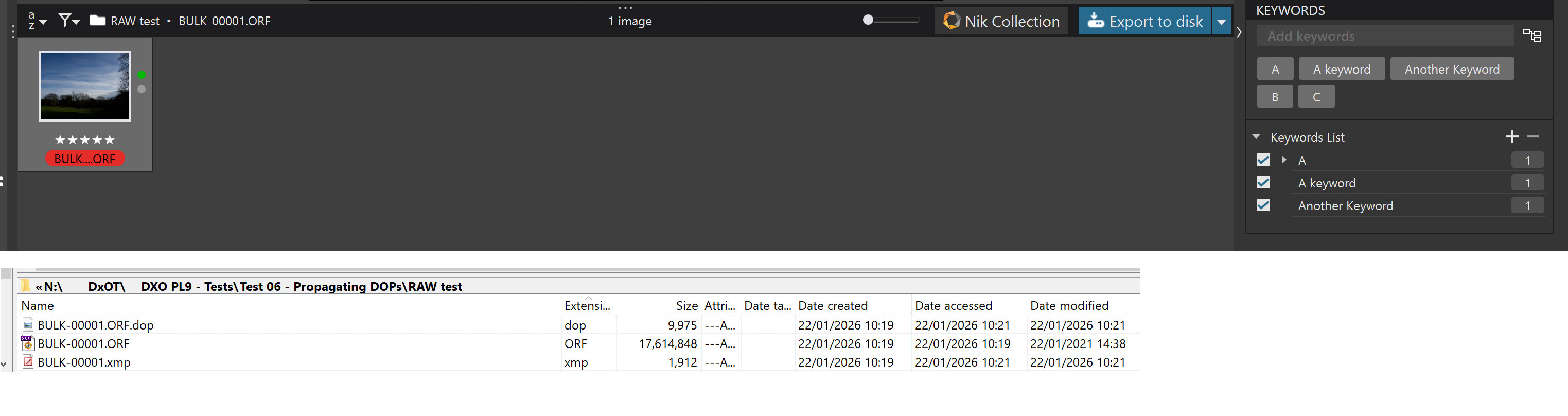
So I just created a directory with a single image and assigned ‘Keywords’, ‘Colour Label’, ‘Rating’ and set the ‘Picked’ status and it looks like this
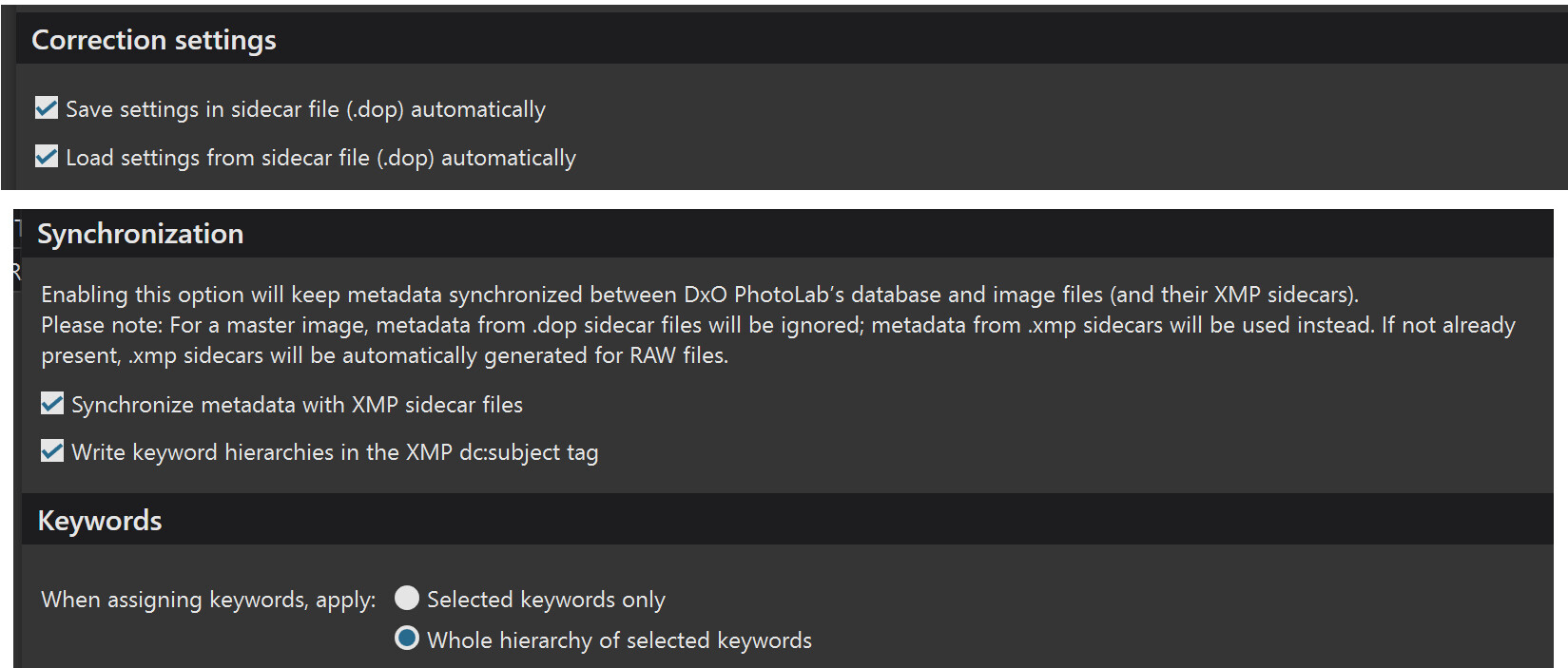
With settings
The DOP contains
Sidecar = {
Date = "2026-01-22T10:21:04.0421596Z",
Software = "DxO PhotoLab 9.4",
Source = {
CafId = "C60996b",
Items = {
{
Albums = "",
CreationDate = "2026-01-22T10:18:47.4949170Z",
IPTC = {
contactCreator = "",
contentDescription = "OLYMPUS DIGITAL CAMERA",
statusCopyrightNotice = "",
}
,
Keywords = {
{
"A keyword",
}
,
{
"Another Keyword",
}
,
{
"A",
}
,
{
"A",
"B",
}
,
{
"A",
"B",
"C",
}
,
}
,
ColorLabel = "Red",
ModificationDate = "2026-01-22T10:19:55.8683533Z",
Name = "BULK-00001.ORF",
Orientation = 1,
OutputItems = {
}
,
ProcessingStatus = 1,
Rating = 5,
Settings = {
and at the end of the DOP we have the ‘ShouldProcess = 0’ for a ‘Pick’
ShotDate = "2021-01-22T14:38:25.0000000",
ShouldProcess = 0,
Uuid = "A02ABE02-03F3-46FB-87CE-A3F642DE0537",
}
,
}
,
Uuid = "4BCEEDDB-AE36-4181-ACD9-021C68B33736",
}
,
Version = "20.0",
}
The value for ‘Reject’ is 1
ShouldProcess = 1,
and the value for an unassigned is 2
ShouldProcess = 2,
The xmp sidecar will only be created automatically if this setting is set
 or an explicit export is made
On the main machine the data will only be automatically taken from the xmp sidecar file if the ‘Synchronise’ setting has been selected otherwise the data will be taken from the DOP.
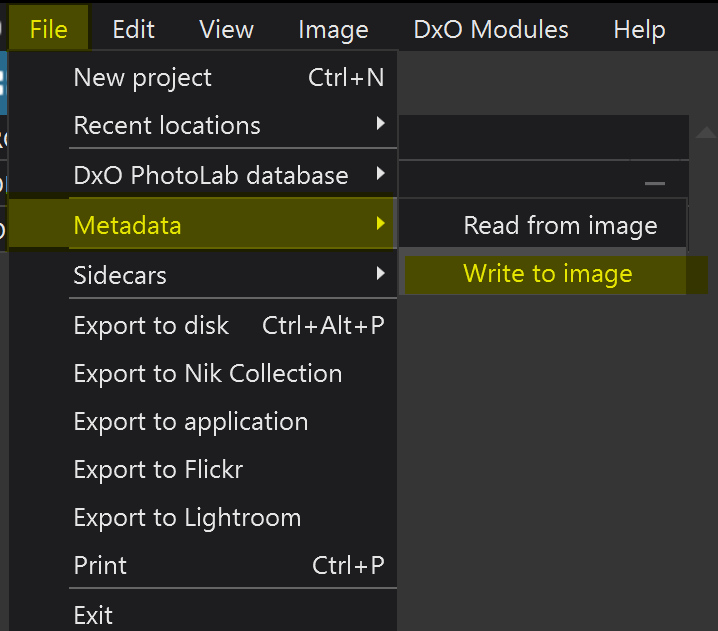
You can force input from the xmp sidecar file using the ‘Metadata’/‘Read from image’ command
The xmp sidecar file contains
<?xpacket begin="" id="W5M0MpCehiHzreSzNTczkc9d"?>
<x:xmpmeta xmlns:x="adobe:ns:meta/" x:xmptk="XMP Core 5.5.0">
   <rdf:RDF xmlns:rdf="http://www.w3.org/1999/02/22-rdf-syntax-ns#">
      <rdf:Description rdf:about=""
            xmlns:dc="http://purl.org/dc/elements/1.1/"
            xmlns:xmp="http://ns.adobe.com/xap/1.0/"
            xmlns:photoshop="http://ns.adobe.com/photoshop/1.0/"
            xmlns:tiff="http://ns.adobe.com/tiff/1.0/"
            xmlns:exif="http://ns.adobe.com/exif/1.0/"
            xmlns:lr="http://ns.adobe.com/lightroom/1.0/"
            xmlns:xmpMM="http://ns.adobe.com/xap/1.0/mm/">
         <dc:format>image/x-olympus-orf</dc:format>
         <dc:description>
            <rdf:Alt>
               <rdf:li xml:lang="x-default">OLYMPUS DIGITAL CAMERA</rdf:li>
            </rdf:Alt>
         </dc:description>
         <dc:subject>
            <rdf:Bag>
               <rdf:li>A</rdf:li>
               <rdf:li>B</rdf:li>
               <rdf:li>C</rdf:li>
               <rdf:li>A keyword</rdf:li>
               <rdf:li>Another Keyword</rdf:li>
            </rdf:Bag>
         </dc:subject>
         <xmp:Label>Red</xmp:Label>
         <xmp:Rating>5</xmp:Rating>
         <xmp:RatingPercent>99</xmp:RatingPercent>
         <photoshop:SidecarForExtension>ORF</photoshop:SidecarForExtension>
         <tiff:Orientation>1</tiff:Orientation>
         <exif:DateTimeOriginal>2021-01-22T14:38:25</exif:DateTimeOriginal>
         <lr:hierarchicalSubject>
            <rdf:Bag>
               <rdf:li>A</rdf:li>
               <rdf:li>A keyword</rdf:li>
               <rdf:li>Another Keyword</rdf:li>
               <rdf:li>A|B</rdf:li>
               <rdf:li>A|B|C</rdf:li>
            </rdf:Bag>
         </lr:hierarchicalSubject>
         <xmpMM:PreservedFileName>BULK-00001.ORF</xmpMM:PreservedFileName>
      </rdf:Description>
   </rdf:RDF>
</x:xmpmeta>

<?xpacket end="w"?>
Hope that helps.