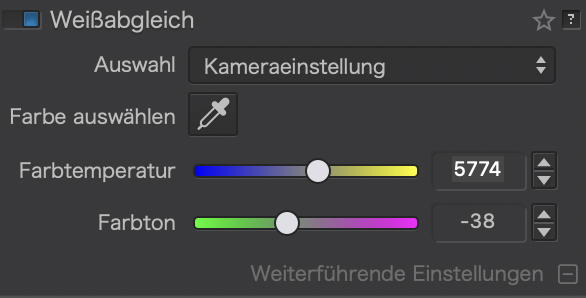
I recently bought a Canon R5 mark II and I notice when I am shooting with manual white balance set to 5500K and open a raw file in PL9 (current 9.8.1) the As Shot white balance is indicated to be 6498K with a tint value of -38. I am wondering if other R5 II owners have noticed this behavior. The images look good with the As Shot value but if I select the built in white balance settings such as Daylight, for a photo shot in daylight conditions the image looks a bit too cool. I checked and I see this same behavior with PL8 so it isn’t something new. I had been shooting a 5D mark IV and didn’t see this issue with that camera’s raw files.
I have checked two 5D mark IV cameras and with manual white balance set to 5500K PL9 reports 5437K with +2 tint for one and 5429K with tint +1 for the other. Of course these cameras produce .CR2 raw files while the R5 II produces .CR3 raw files.
A few posts have already addressed WB numerical values.
Looking at what different apps display, we can simply accept that differences exist, differences that might be caused by how apps read metadata, by their respective working colour spaces, colour profile noted in the file’s metadata and whatnot.
A CR3 file from DPReview has, according to ExifTool, a “as shot” temp. of 5189:
WB RGGB Levels As Shot          : 1913 1024 1024 1586
Color Temp As Shot              : 5189
WB RGGB Levels Daylight         : 1913 1024 1024 1586
Color Temp Daylight             : 5200
WB RGGB Levels Shade            : 2231 1024 1024 1327
Color Temp Shade                : 7000
IMO, WB values are values that relate to the lighting situation due to procedures that each device choses. If we knew those procedures, we might recognize the equivalence of the values presented by cameras and apps.
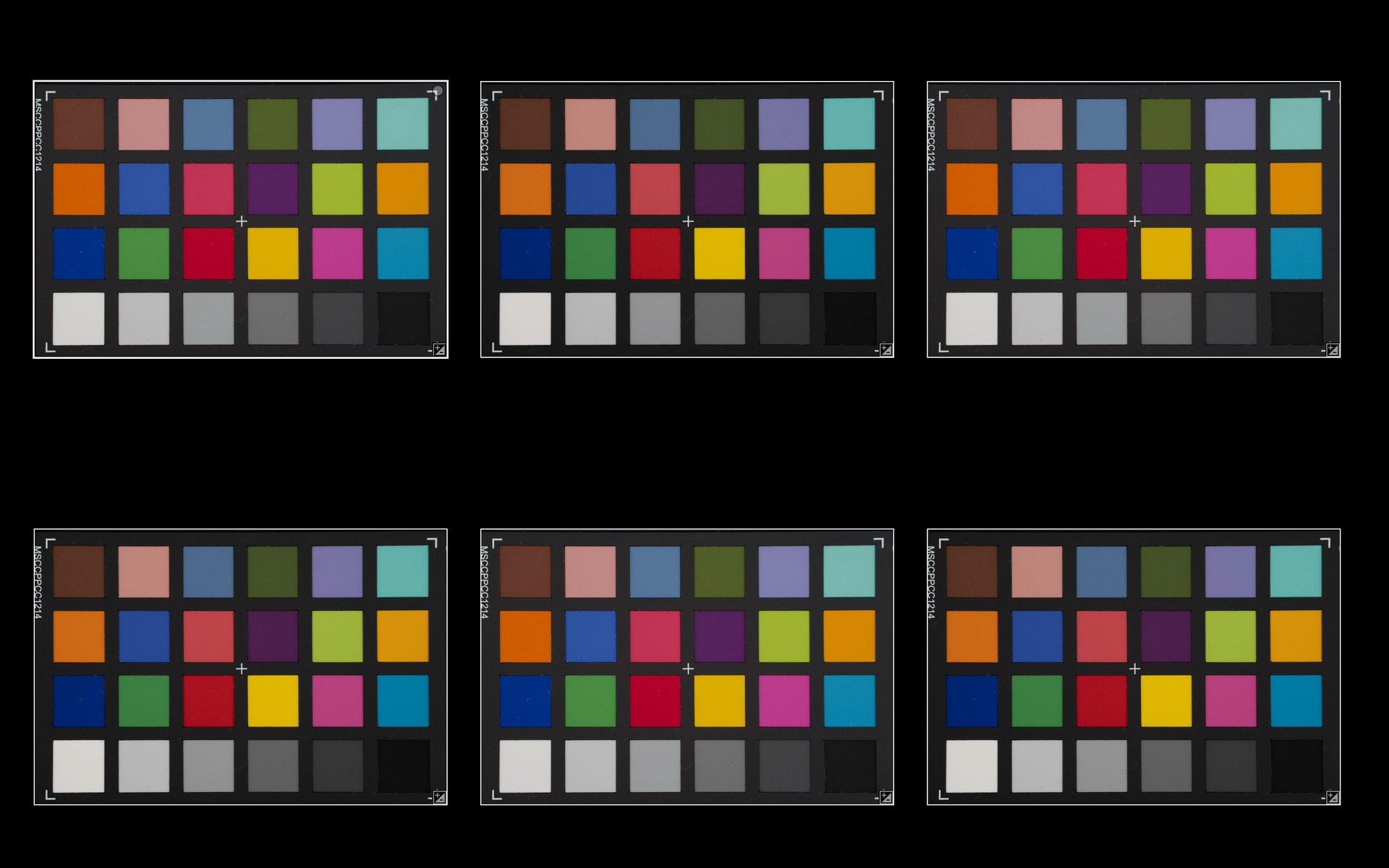
Be it as it may, exported images look fairly similar, except for the slightly different contrast of images by DxO (upper row) and by Lightroom Classic:
Yes, this is well known but, to my reading, that’s not what is being questioned by the OP, who clearly states he is shooting with a manually set WB yet PL does not honour that setting:
This is where I’m a little confused as - if DxO’s interpretation of “5500K” is different from OP’s R5Mk2 interpretation…
…what the camera sees and captures isn’t exactly what DxO shows, even if colour spaces etc. match up - because one interprets colour temp. slightly differently to the other?
PL not showing what was set in camera is a consequence of the differences illustrated above. I just verified the differences with the color checker taken with a Canon R7 set to display a WB of 5000K. But: Whatever WB we set in our cameras only concerns the screen display and jpegs. The sensor records what it gets as lighting. And the light is what it is, and it doesn’t care about the WB we set.
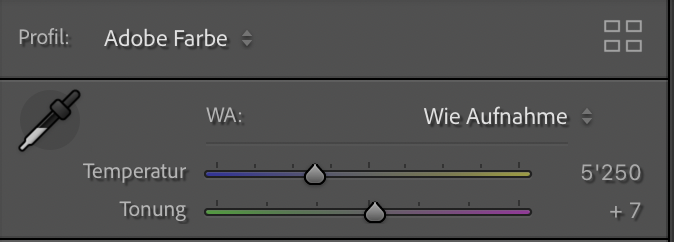
WB of the RAW is always “as shot”. Lightroom’s setting is called “Wie Aufnahme” (as shot) while PL says “Kameraeinstellung” or “as shot”, depending on localisation…and even if we ignore the different words, PL and LrC seem to calculate colour temperature and tint with their own algorithms. Other apps might read metadata from the files. I’ve never seen “Tint” in metadata of Canon files.. This is evidence for the DIY approach the apps use for Temp and Tint values.
Same here, with my R5II and PL9, I use a fixed Kelvin of 5400 and PL9 shows a Temp 5975 and tint -37, image looks good. It’s the same with PR4 which I’ve used with C1Pro, different values but always negative tint. My R1 does not have this, there the values are almost as the in-camera ones.
PhotoLab looks at WB multipliers found in makernotes and maps that to temperature/tint in UI. The mapping depends on camera CFA. If tint=0 in UI, then I would expect the temperature reported by the camera to be about the same as shown by PL, at least this is the case for several Z8 raws I’ve checked. The strongly negative tint=-48 reported for 5500K camera preset (assuming no tint correction setting in camera) looks strange indeed. But, for given WB multipliers and the camera, each software would usually report different temp/tint values. Anyway, I wouldn’t worry about these numbers.
R5II uses 5200K for its Daylight preset, while true daylight may be often like 5400-5600K, sometimes with a bit of tint. Then the result usually looks too cool, which is normal.
Maybe the difference comes from factory calibration. The difference is too small to perceive but still it’s strange. Were the WB multipliers in metadata the same for both raws?
EDIT: It seems that Temp/Tint displayed by PhotoLab depends only on WB multipliers, since it does not seem to depend on the lens (checked with Nikon D780, preset 5260K and two lenses, one of them blueish). The lens transmittance spectral characteristics may still have an impact on rendering (?).
Thanks for all of the replies.
It would seem that there must be some calibration in the camera that relates the color channel coefficients to the set color temperature since different cameras of the same model with the same manual white balance setting produce different color channel coefficients and hence as shot WB values in PL9. With PL9 using a set algorithm to calculate color temperature from the coefficients, it would seem that the sensor in my camera has more deviation from what the algorithm expects (about 1000K difference vs about 500K difference for others) along the temperature axis. The tint axis seems to be similar (a value of -38).
Since the EXIF data contains both the color channel coefficients and the as shot color temperature it would be nice if PL could use this information to calibrate the programs WB calculation algorithm to the sensor. This would allow the canned settings (Daylight, Cloudy, Shade, etc) in PL to make sense. Canon’s DPP software does this just fine (no surprise there I suppose) reporting the camera setting and providing canned WB settings which make sense in the image appearance - for example very little difference between 5500K and Daylight. With my R5II, if I select the “Daylight” WB setting in PL9, rather than “As Shot”, what I see is more equivalent to a true WB setting of ~4000, very much on the cool side and very different than when using the “As Shot” setting.
Since there seems to be fairly wide variations between different cameras of the same model, attempting to put a specific algorithm into DxO camera module data wouldn’t work very well. I don’t know if that is what we are seeing or if PL just uses a single algorithm for all .CR3 files or perhaps all raw files.
I don’t think it’s that simple. With WB we correct for a non-white exposure. During the demosaicing process the different channels are corrected according the used/wanted color temperature. No relation with JPG or screen. That’s a next chapter.
Correct, with WB, we tell the rendering process how to combine data from the sensor to make the image we want.
Data from the sensor depends on what kind of light and how much of it was accumulated during the exposure. And that is the data we get from a RAW, at least from cameras that don’t preprocess such data for noise reduction etc.
And again, and as you wrote, WB settings are used during demosaicing.
This is how Panasonic illustrates the process:
In your link an image processing engine is shown. It starts with demosaicing and then as third WB correction. In this case the WB correction is done on the RGB pixels. From what I’ve learned it’s done on the raw R,G and B sensels, before demosaicing. In PL you can’t change the color temperature on RGB images, only make the image looking warmer or cooler.
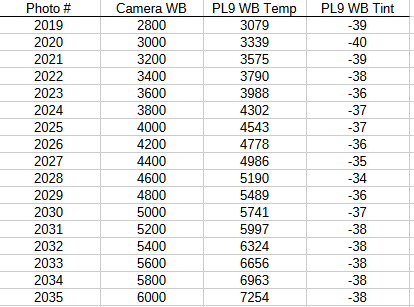
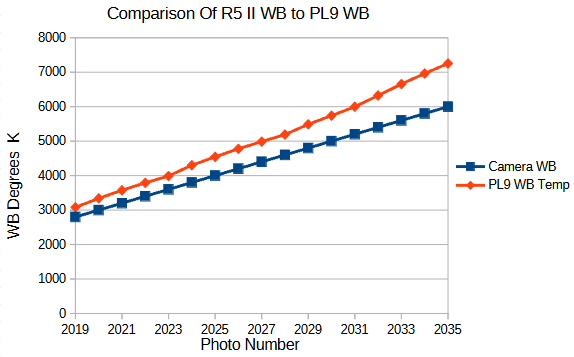
I collected some data with various white balance settings, from 2800K to 6000K in the R5 II and looked at the images in PL9. The setup used a 100mm focal length lens at f/11, shutter 1/160 and ISO 100 for all photos - just the manual WB setting varying. The camera was on a tripod so the image framing and lighting was identical for all photos.
So for what it is worth, the PL9 values are closest to the camera setting at lower camera WB settings and diverge more at higher values. Of course this is for my camera. If Canon does individual calibrations for each sensor other cameras will differ which from information provided by other posters would seem to be the case.
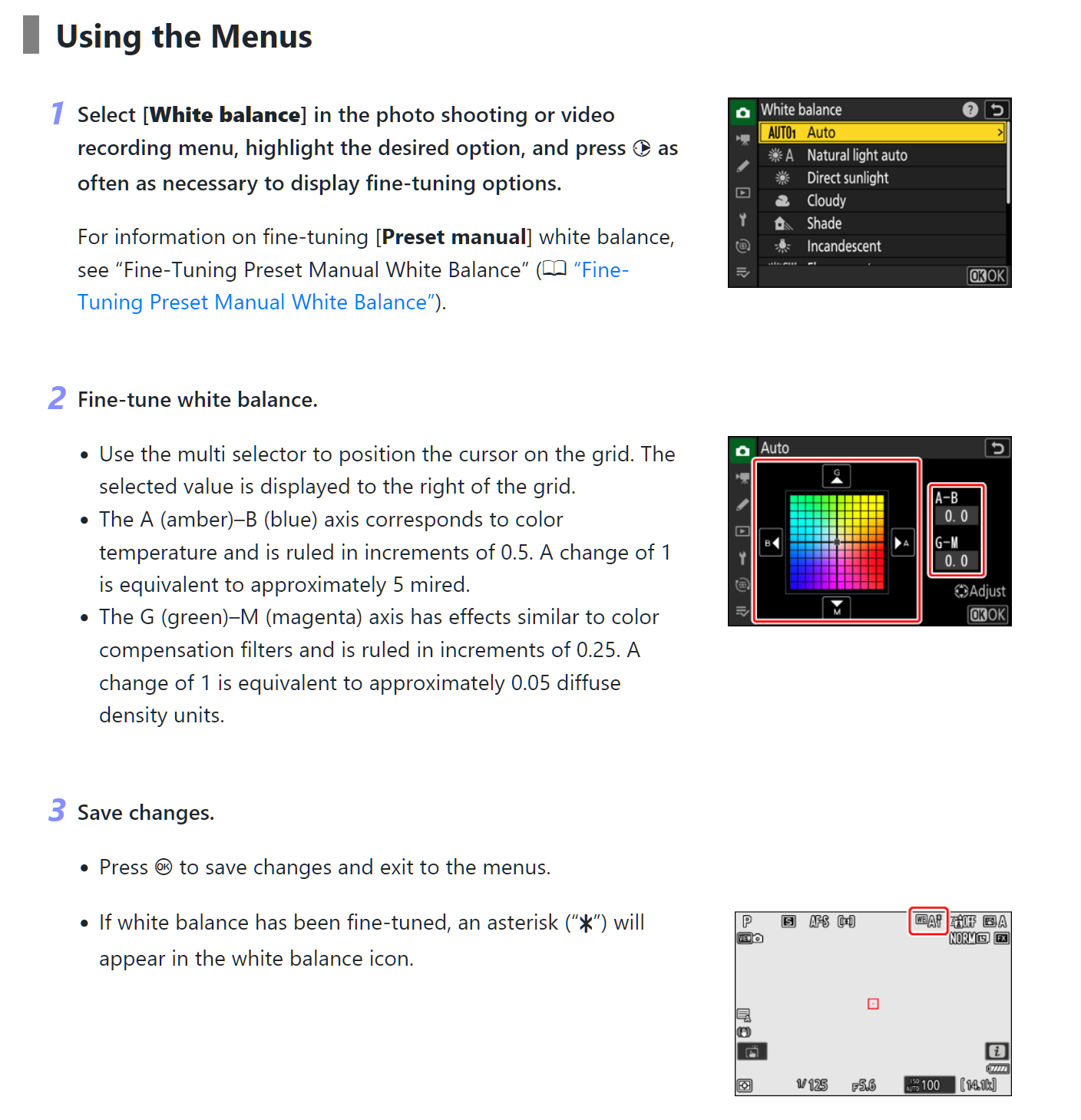
I don’t know if your question about being able to adjust the WB was directed to me but yes, the R5 II allows similar settings to what the Nikon menu shows, however I was setting a manual WB value in degrees Kelvin so I knew what the camera’s WB setting was and could compare it to what PL9 reported when I opened a CR3 raw file from the camera. I have done no fine tuning of the white balance and actually I don’t know if the R5 II supports that in camera or not. I will have to look.
If you set the color temperature in your camera manual then I don’t understand why there is a rather constant tint value of 38-40.
I would start with a white card to investigate. I know PL used 5400K for standard white, not corrected light.
Apparently the algorithm that PL uses to calculate the as shot white balance that is displayed in the program is making some assumptions that aren’t valid for my camera and others with the R5 II. They don’t use the WB temperature listed in the maker notes in the raw file but apparently calculate the temperature and tint values from color channel data in the file.
I checked and indeed I have a setting to shift the white balance on both the temperature and tint axes in the R5II menu similar to what Nikon provides. I verified that the shift had been zero on both axes up to this point. I started playing with the temperature axis and found that two steps towards cooler temperature reduced the PL9 as shot WB temperature value from 6498K to 6025K with the camera set to manual WB and 5500K. I didn’t have time to do much further but I will use a white card and see what shift on both axes produces an accurate white value with the camera set to daylight (5200K according to the manual) when rendered in PL9 as shot.
I think I have finally gotten past the support gate keepers at DXO, so hopefully someone with knowledge of the algorithm used can take a look at the issue.
The camera just catches light through the Color Filter Array. The analoge values are digitized to 12 or 14 bit values, mostly
A color temperature is used to correct these values for using non-white illumination. Mostly a correction of the R and B channels.
The color temperature of the image is not the color temperature but a correction of the colors related to a white/gray point. That’s the reason why cold and warm are the opposite of what it must be.
When using a white card in relation to the the color temperature you measure the light source.
When calculating the color temperature the algoritme needs a white/gray point. If a white/gray point has been selected, it calculates the deviation from the theoretical values. I don’t know how that’s done.
Color temperature /WB is only used in the demosaicing proces from R,G,B to RGB.