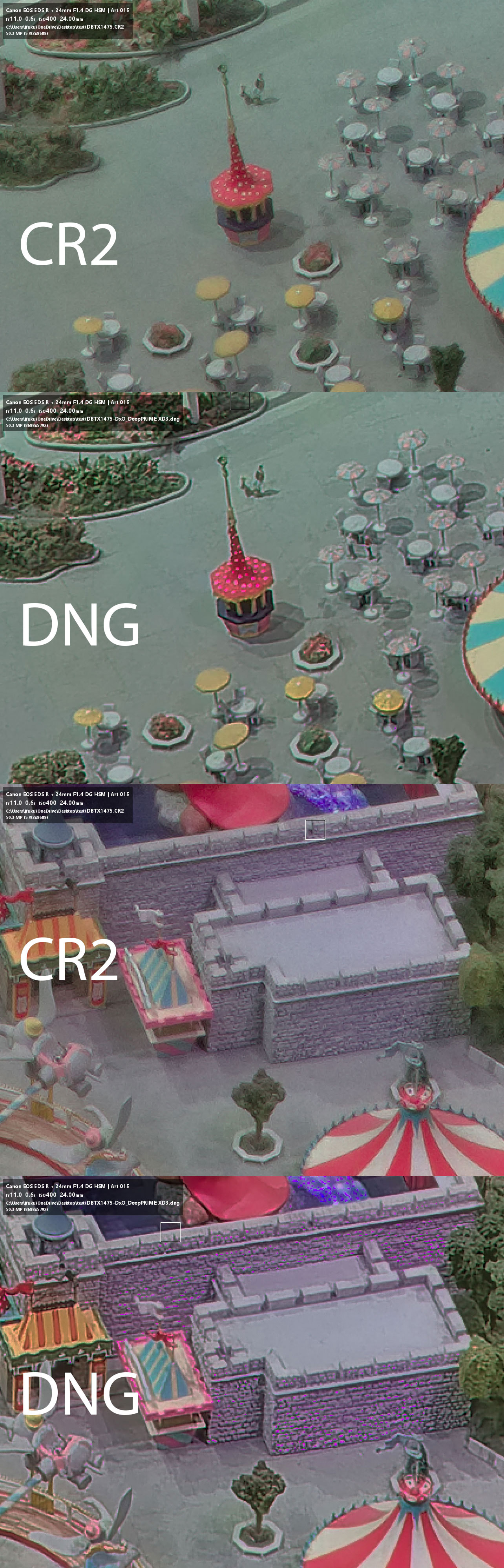
I just purchased PureRaw today and was doing some tests with my regular workflow.
I processsed a CR2 from the Canon 5DS R and the only setting I changed was un-ticking lens distortion, then exported to DNG.
I then loaded the original CR2 and the DNG in RawTherapee, loaded an DCP profile I had previously generated with ColorChecker, and then made a white balance adjustment.
I started comparing the 2 images and of course was impressed with the sharpeness and smoothness of the DNG. However, I noticed that several areas in the DNG had these weird magenta clipped looking pixels. I have included two different examples from different areas of the image.
I really hope someone can shed some light on this as it would be a show stopper for using PureRAW for my images.
What does it look like if you leave on the lens correction and without any white balance adjustment? I’m just asking for trouble shooting purposes and not to suggest you shouldn’t perform those steps.
Per DxO, try viewing your DNG with Adobe Camera RAW or another program besides RawTherapee. If the problem persists, seek support via support.dxo.com. Otherwise, it’s probably a RawTherapee problem.
Thanks, Egregious. I did try opening the photo in an older version of Lightroom, albeit my really old version of Lightroom, and saw the same issue. Perhaps I need to use a new version of ACR.
I’ll test around with fingers crossed and report back.
The magenta pixels popped a lot after doing a WB adjustment. Also, it seems related to my applying the DCP profile created with ColorChecker. There was indeed some color lighting on the subject, some of it being of the magenta color, so I don’t think it came from nowhere. The way those pixels clip is the worst part of the issue.
I did test on some of the other bracketed exposures, 2 ev steps below and above, and they seemed to be fine or a lot better. I suppose the issue could be related to this unique lighting situation.
I could forego applying the color profile, but it seems like a big compromise. Once again, if the issue is related to this scene, I can live with that.