To release the shutter cleanly, it’s necessary to use a timer (or a remote shutter control, but timers are built in and remote shutter controls are yet another something to buy, carry and lose – I use both but timers more often). There’s some more complex issues with shutter shake which are a whole separate chapter in books on Nikon cameras by Thom Hogan. Nasim Mansurov has published some good guides on PhotographyLife.com: How to Use Exposure Delay Mode on Nikon DSLRs or How to Reduce Camera Shake on a Tripod.
I do hope the recent tripod you bought does reach minimum quality standards. There’s a trade-off between stability and weight. Originally I didn’t like carbon fibre tripods as I didn’t care much about the weight difference. The secret with carbon fibre tripods is they are much more stable as metal vibrates more easily.
Next up we tried the carbon fiber models, starting with the smaller 190CXPRO3 with its centre column down. This time the vibrations dissipated in an average of just 1.7 seconds, around twice as fast as the aluminium 055 and roughly three times quicker than the aluminium 190.
The best compromise in terms of weight and price I’ve found has been the Manfrotto 290 xtra. Similar trade-offs exist with tripod heads. Too light a version for too heavy a camera/lens combination not only risks a camera fall but won’t be steady enough. My main head is a Manfrotto MHXPRO-BHQ2 but older steel heads are fine. Even though that’s a fair amount of tripod and head, most of the landscape gurus would consider neither of these good enough (Really Right Stuff is what they often recommend and generally only like Arca-Swiss quick releases despite compatibility issues between brands).
The good part of tripod and quick release technology is that it works across all brands and generally only has to be bought once or every ten years if you use your gear heavily. The best deal is an old Manfrotto 055PROB with something like 496RC2 which can be found together used for €100. Very stable and easy to work with but quite a bit heavier than the first combo above.
For maximum resolution as a Photolab user as Joanna suggested, it’s preferable to use a supported camera lens combination. The DxO profiles will substantially improve complex lens distortion and sharpen up the corners and edges nicely with adequate lenses (nothing helps poor lenses). Finally, an older good lens without Photolab correction is often good enough. There’s nothing wrong with lens character in many situations. Perfectly flat photos with ideal edge to edge sharpness with no distortion risk sterility. Technical landscapes like this reveal lens flaws far more than most subjects.
All of Henri Cartier-Bresson’s lenses were worse than your best lenses (maybe at the end of his life, the last set of Leica gear was at the same level). Cartier-Bresson is still a photographic genius and we’re still, well, us.
All meters work to 18% grey (0 EV) and that doesn’t equate to the middle of the histogram.
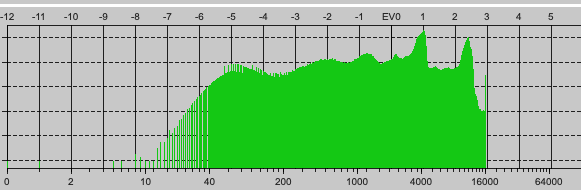
Here’s a screenshot from RawDigger showing the distribution of EVs, from the shot of the van I used as an example, with lots of negative numbers to the left and only up to 3.
This uneven distribution is typical of both film and digital. For example, Fuji Velvia 100 transparency film has 5 stops range, distributed with 3 stops below 0 EV and 2 stops above. Likewise, for my D810, it has 14.6 stops range at ISO 100, with 12.6 stops below 0 EV and 2 stops above.
If you set EV button to +1 in manual, the exposure doesn’t change but the offset of the exposure bar changes. To get the right EV=+1 you must adjust exposure to the middle of the exposure bar again. That’s also with Nikon. There’s no need to use the EV button in M.
Look at the manual where RawDigger places it EV0. From the manual Set Histogram EV0 by – sets the choice of the maximum value that is used for automatic calculation
of midpoint (EV0). EV0 is calculated as 3 stops below the chosen maximum:
In the conversion there’s a gamma applied. If you look at the formula of that gamma, you will see it never can create over exposure.
I’m looking to that shot of your grey card a while ago. Maybe you know where it is.
One thing needs to be in mind when using aperture priority, most used semi automated program.
AE meatering is still aiming for 18%grey.
And if auto iso is active and shuttertime is already at “i need OIS” level the camera will raise ISO when you do a plus 2 on EVC and not enlarge shutter open time.
This looks like you expose more in LCD preview and oocjpeg but not in your rawfile.
So to force camera to expose more you must lock ISO value first and then do a plus 2 in EVC. (aperture is already locked in this mode.)
With snapshots and reasonable lightend scenery no problem if auto ISO is active and you use EVC if you want to raise a shadow but in post it’s the same.
Some camera’s have minimum shutter time setting to avoid motionblur and keep auto ISO active to cope with different scene lightnes when aperture is set by user.
So camera’s EVC control only controls exposure(time) if Aperture ánd ISOvalue is manual set. If not you could be fooled by the system.
Stil it’s a great tool to use.
And dxo’s DeepPrime is great in solving highISO noise so be lazy if it’s suits the purpose. (aslong as you know the technique behind it and it’s cons.)
My point is that there are data a lot further below EV 0 than there are above it and, by measuring and testing my camera, I can reliably state that my, over-exposure limit is +2 EV, which is where I place maximum highlights.
Setting the maximum to +2 gets me whites with details, if the exposure meter is supposed to be set to zone 5, this would be zone 7. While zone 10 is really gone, I get usable info down to zone -1, lower than that is still discernible and (more or less) buried in noise. (5 stars mark zone 5)
Note that I’ve changed exposure in the shots marked in red to see wha’s still left in them. With that, I get details (usable for “forensic” work) down to zone -2. Zone 10 saturates the wells completely.
Wonder what PhotoLab can do with DeepPrime? Basically the same, but needs more processing steps because PhotoLab can only adjust exposure by 4 stops max., which is not enough for the complete zone system (needs ± 5 stops). Additional intermediate exports don’t improve the overall quality.
I tried to post a question in the Leica forum asking how the M10 meter works, and while I didn’t get the information I was looking for, I did find this thread which gave me all the information on how the Leica metering works in the M10. It is nothing like what I expected.
This also shows that it is rather useless to set a fixed exposure compensation, as the amount of compensation needed depends entirely on the position of the highlights and shadows.
The best way to go about it is to treat it as a real spot meter and point the centre of the viewfinder at the essential part of the image and recompose, much as you are doing with the focusing.
So: point-focus-half-press-recompose-shoot.
Or, even better, don’t use “A” and half-press, but manual exposure. That is basically what the camera does best.
Reading that thread, I found that the M10 metering can be thrown way off if there is a single bright light somewhere within this coverage, resulting in what looks like a very underexposed image.
I also found out I may have been wasting my time selecting spot metering. Spot metering on the M10 only works if I use “Live View” or attach the Visoflex viewfinder on top of my M10. Most of the time, I just use the combination rangefinder/viewfinder on the camera.
"The M metering is very sensitive to a light source in the frame and in my experience seems to try and preserve highlights. Were I taking a similar shot I would point the camera down just far enough so that the light sources are no longer in the frame and half-press the shutter release to lock exposure. Then re-compose and take the shot.
It is a bit of a change if one is used to modern matrix metering cameras."
Other useful information:
…coming from Nikon D700 (having the best metering I’ve ever experienced), had to go through a learning curve as well. After some time, you will acknowledge the metering of the M10 under specific circumstances. Now, my exposure is almost always correct. Saying that, I never use the +/- option, but If necessary, I compensate by metering downwards or upwards.
The M10’s image processing in the camera imposes a very strong default contrast curve on the image data. That is, the shadows can look very dark straight from the camera, but so long as one is shooting .DNG (raw, 12/14-bit data) there is lots of actual detail there, that can be restored on the computer with a “curves” or “shadows” adjustment.
I did a test with the M10 “classic” meter against a hand-held Sekonic, and metering a gray card filling the metering area. Both gave the same exposure - a correct value for 18%-reflectance gray (120-ish on the digital 0-255 brightness scale). So the meter calibration is fine, but what it is pointed at has to been given more consideration than most “center-weighted” systems, that read the whole scene, and just give more weight to the center (but not only the center).
I think the best thing is to use fully manual exposure. That’s the only way to get 100% reliable results. I may take a look at the exposure metering (red dot and arrows) in the viewfinder before the first shot, but only as a clue for my manual settings.
…with Leica it is not so much about the camera creating the perfect shot for you, but more about the camera providing the information to allow the photographer to get it right.
I also read in the manual that those 3 exposure modes only apply when using Live View. If you are using the M10 like a film M (using the rangefinder exposure meter) then there is only one photo diode receiving the light reflected off the shutter curtain so spot, centre weighted, multi setting has no affect on the actual exposure. Like an M7 you need to move the camera around the scene to understand the (zones) and decide on the one you want, or apply some exposure compensation, or half press while on the subject (without the bright highlights) to fix the required shutter speed then reframe and shoot.
Now I realised the M10 is basically the M7 with a digital sensor it makes sense, and I have to forget the Sony A7 behaviour I’m used to for digital cameras.
It’s center-weighted if you’re not in live view. Exposure locks with a half-press and hold on the shutter. Too dark? Aim more toward a darker part of your framing, lock, and recompose. Too light? Do the opposite.
…set the camera to manual, measure the light in the essential area and happily shoot away.
I find manual exposure the simplest and most accurate to use in such situations. It is just a question of who is in control: you or the camera.
These people know the rangefinder based Leica M10 far better than I do. My gut feeling right now is that if I am shooting with DSLR with my Nikon D750, Df, (or D880??), I will follow Joanna’s advice for photographs I want to control, as Joanna has taught me. On the other hand, if I’m using my Leica, I will adapt those ideas to what I’ve read in the Leica forum, as posted above.
For shooting film, which I’ll probably do every so often, things are different, as then I need to worry about the shadow detail, not the highlights (which I wasn’t really aware of until reading these discussions.
When it comes to “serious photography”, I now know how to do what you’ve shown me, when I’m using my Nikon. The metering is so different in my rangefinder Leica, that I don’t think I can do it this way with that camera. I’d like to be using either camera, as I wish, but if my goal is what I’ll call a “serious photo”, your techniques will help me the most if I use my Nikon.
No, I am not at all satisfied with this new, small, light tripod - I don’t trust it. I am completely satisfied with my Bogen tripod, but it would take up a lot of my trunk space, and is far too heavy for me to carry around - but it is rock stable. My “cure” for the light tripod was to hold the camera in my hands, and rest my hands on the tripod. That worked best. Maybe I should try to find a better “light” tripod, and give away the one I recently bought… That, or buy a monopod? Any advice?
So, for your night shots, you should be able to use spot metering in manual mode (using live view), then you don’t have to semi-press the shutter release or anything, just meter, set, reframe and shoot.
I think the only thing you will need to adapt to is using live view instead of the optical finder. Just think of it as a very small ground glass screen with the image the right way up
Although, once you’ve used the live view for metering and set the exposure, you could then revert to framing and focusing with the viewfinder.
I think you ought to…
put what you know to the test with the D750
try the “hybrid” approach I just talked about with the Leica to the same test
So I expect to see two amazing, well exposed images here sometime tonight
I’ll give this a try - I’ve mostly been using the viewfinder, but “live view” is more like my Nikon D750. So I should meter, adjust, then re-frame and shoot. The meter reading is almost certainly going to be off, as most of the night photo is so dark. Sure, I’ll try. I leave for my brother’s home tomorrow, so I’ll be out “in the country”. It will be a challenge to photograph his large pond at night. Then there’s sunrise, and sunset. I’m bringing a tripod - he also has one, but I’d rather use my own.
I never thought of it that way before, but you’re right. Focusing with live view is more precise, because not only does the camera enlarge the image, a lot, it also has a high-tech solution to show when things are sharpest by “fringing” them in red. That’s how I focus on my iguanas now, but I use the Visoflex that goes on top of the camera - and I can aim it towards my eye if I wish to. The Visoflex shows what I would otherwise see on the rear screen using “live view”. You would probably love something like the Visoflex that goes on your LF camera!
Sure! I’m not sure about getting this done for tonight, as I’m busy packing. I’ll try to get the Nikon shot done today, as I’ll have the Leica with me for a week on my trip, and I’ll have lots of time to experiment…
Yes, the analog signal of 1 pixelcharge not the one who’s gone through the ADC…
Wasn’t that clear enough?
The (analoge) charge which is made in the photowell due the photon’s hitting the sensor.
A digital signal is just data, 0 and 1. Lots of them in a row.
Every thing after the ADC isn’t DR but a derivative of DR.
(precise spoken everything other then Base ISO and before ADC made analoge signal isn’t real DR of a sensor). But the raising ISO value and the smaller getting DR is a measurement to show the working area of a camera (sensor plus controls like isovalue and ADC) to create a rawfile.
General we speak of DR of a camera about that diagram.
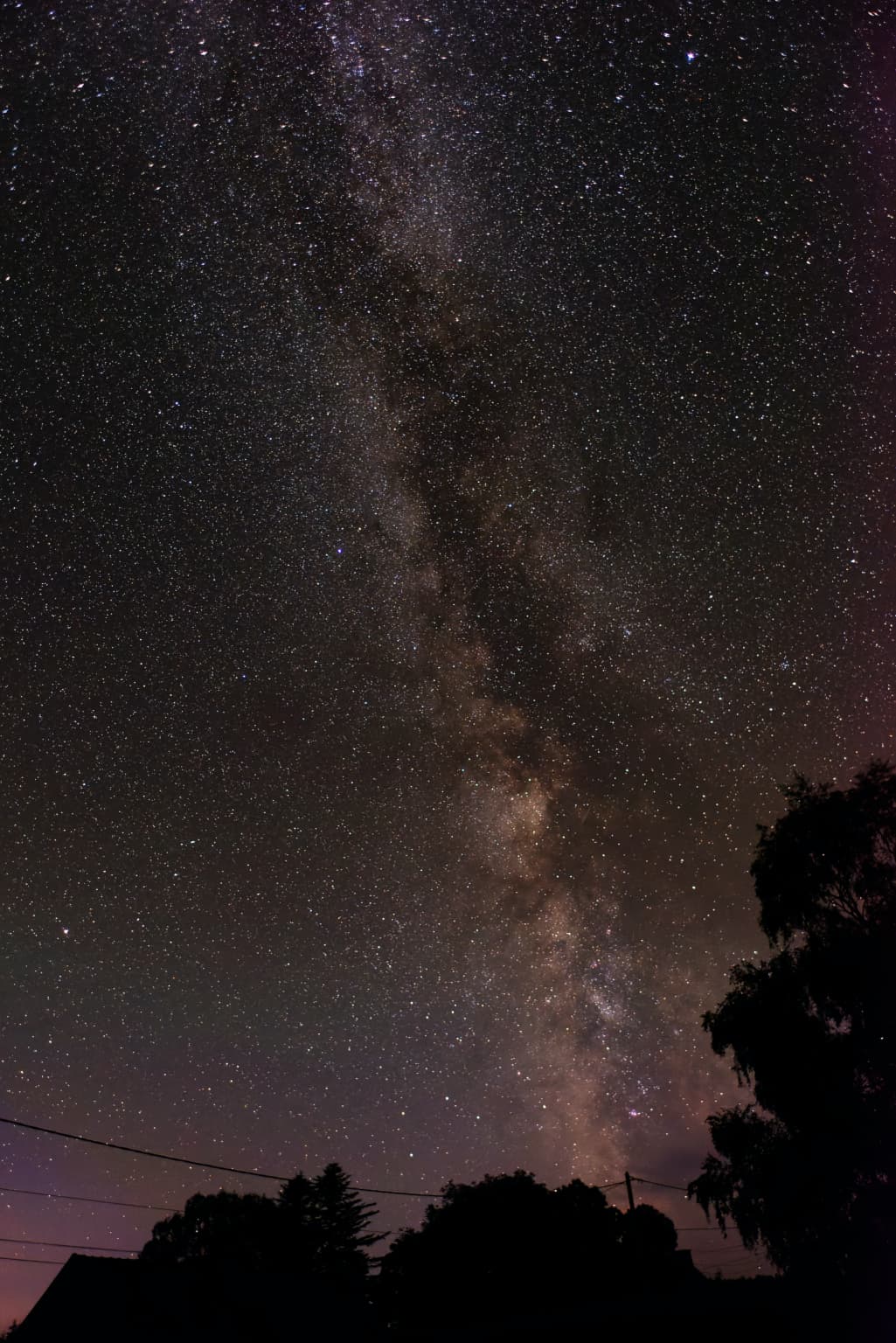
You may have to juggle the numbers if you want to use the Leica with a smaller aperture. Just remember, to get round stars instead of lines, you need a maximum exposure of 500 / focal length. In other words, for a 28mm lens, that would be 500 / 28 or 18 secs.
I have an app on my iPhone called Sky Guide, which shows where the Milky Way will be at any given time.
I was making breakfast, but glanced outside - the sun came out, so I had time to take two photos of a different scene, one with a LOT of details, both at the exposure recommended by the cameras. If I get my car ready, and get my packing done, I’ll work on them before dinner.
OK, so with a 35 or 50mm lens, 1/500th would be enough? I’m not sure how well this tripod will do for 18 second or so exposures…
I will install that app on my phone.
Thanks!! I’ll mostly just relax, and try not to put on too much weight from his wife’s cooking!!!
I get an error message that this page does not exist. I’m confused, which post was that, or was this meant for someone else?
I’m lost once again, but I’m getting used to feeling lost. Eventually things make sense to me.
Nope. you will never get enough light in anything like 1/500 sec.
For 35mm, you’re going to need no more than 14 secs and for 50mm, no more than 10 secs. But, from the exposure numbers in my example, you’re going to have to extrapolate the ISO from whatever your maximum aperture is, jacking up the ISO if necessary.
At least you’ve got a wife to blame. In our house I’m the cook and I do like… well… food
Aha! OK, take 500, divide by the focal length of my lens, perhaps the 50, which would get ten second exposure. I read that wrong, sorry. And if I want to use 35, or 200, same technique. Got it! Since the stars appear to be moving (although it is me, standing, that is moving relative to the stars), longer exposures will create lines, probably arcs. Where I live, there is too much ambient light, but out in the country I can see the stars clearly!
Once I figure out the meaning of pixelcharges, ADC, photocell…
Ha! I’m not part of that “we”… at least not yet. At some point I should do a lot of reading, but at this point in my life, I think I prefer “directions”, as in “do this______”.
Ditto, but it’s just me. I’m learning cooking too, whenever I get something new.