Hi. I’m currently using Photolab 8 with Filmpack 7. I’ve not got FP7 installed as a separate app - just activated within PL8.
If I upgrade to PL9, do I need to upgrade to FP8 too… or will the activation key recognise that it’s for FP7 and only activate those features?
Thanks.
I’m running PL9 with FP7.
see also → https://download-center.dxo.com/Support/docs/FilmPack_v7/release-notes/FP7_release-note_mac_EN.pdf
2 Likes
Thank you, Wolfgang.
It is mentioned in the release notes of Filmpack:
“Compatible host applications
• DxO PhotoLab 7, 8, 9• Adobe® Photoshop CC ® 2022, 2023, 2024, 2025, 2026
• Adobe® Photoshop Elements ® 2022, 2023, 2024, 2025
• Adobe® Photoshop® Lightroom® Classic 2022, 2023, 2024, 2025”
1 Like
I was underwhelmed by FilmPack 8. The new film emulations add nothing to what is already there, all DxO fancy time machine software leaves me cold and does nothing to improve images and the negative development tool (which I did want) is for the moment a complete failure. CaptureOne 12 does a better job with no additional tools (just inverting the image).
FilmPack 7 runs fine with PhotoLab 9. The one irritation and it’s a huge one, is that the unwanted film emulations show up everywhere greyed out.
This kind of blatant crippleware marketing is yet another reason I would hesitate to recommend DxO products to another photographer.
1 Like
I have FP 7 installed next to PL 9,
but don’t see any “unwanted film emulations show up everywhere greyed out”.
3 Likes
Thanks for the replies. I’ve upgraded to PL9 and installed the trial of FP8.
I’ll make a decision on FP8 next month.
Here’s what the greyed out FilmPack 8 Colour Negative presets look like.
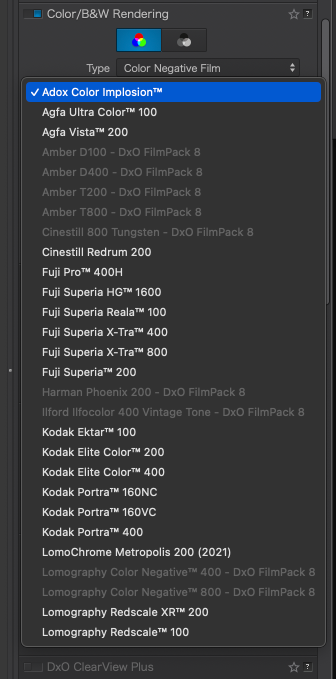
If anyone has any idea about how to get rid of these greyed out items, please let me know. I don’t have FilmPack 8 on my Mac and I have searched for words like Lomography (not using Spotlight but the full file list with Find Any File) and only found the FilmPack 7 presets on my hard drive.
I used FilmPack8 trial on top of licensed FilmPack7. Decided not to buy FP8. IIRC, removing %LOCALAPPDATA%\DxO\Licenses\filmpack8.key did the trick. On Macs the license file is said to be in ‘~/Library/Application\ Support/DxO\ Labs/Licenses/’.
1 Like
That’s a good tip, and I gave it a try. Here’s the correct path for Macs:
~/Library/Application Support/DxO/Licenses/
Unfortunately, I only had the filmpack7.key along with photolab8.key, photolab9.key, viewpoint4.key, viewpoint5.key. No sign of the old filmpack8.key.
Still looking to unlock the mystery and clean out those unavailable Colour Negative presets.
Hi Alec,
maybe you should contact support now.
Wolfgang
Thanks for the suggestion. I have a life to live and it’s too short to spend squabbling with DxO Support. I don’t have any interest in reinstalling PhotoLab from scratch, recreating all my preferences. Or worse yet, reinstalling macOS Sonoma and rebuilding all my apps from scratch.
The only useful support I’ve ever enjoyed for DxO products has been from other users here on this forum.