Apologies if this has been asked before (I’ve searched the help guide and forums but found little - last post 2022). I’m using W11 and Photolab 9.2. I want to upgrade to the latest version (9.9xxx). I know in the past upgrades seemed to go on as parallel clean installs and didn’t automatically pull over settings from the already installed version (like presets, palletes etc) and moving these across had to be laboriously done by digging into the file system and copying and pasting files. Do the new upgrades now automatically pull over all settings files? Thanks.
Not true, at least for v7 and newer, probably also for some earlier versions.
I own PhotoLab versions 7,8,9. All major or minor version upgrades/updates have flawlessly migrated the main database, presets, UI config, preferences, etc., keeping the originals unchanged in case of major upgrades. This applies also to Nik Collection, at least since v7.
Maybe you had Capture One in mind 
1 Like
You have PhotoLab 9.2. Upgrading to PhotoLab 9.9.x will overwrite PhotoLab 9.2, since it’s the same major iteration of the software (9.x).
For ages now, if you install a new major iteration (e.g., having PhotoLab 3 and installing PhotoLab 4 or 5), it is installed separately without overwriting the previous iterations - but user settings / other data are copied from the most recent past iteration. This is nothing new or recent.
1 Like
A few words about Mac:
- I usually keep a few subversions of e.g. PL7 and run one of them as I like
→ they share common settings though
→ occasionally, they use different database schemas which is a major pain.
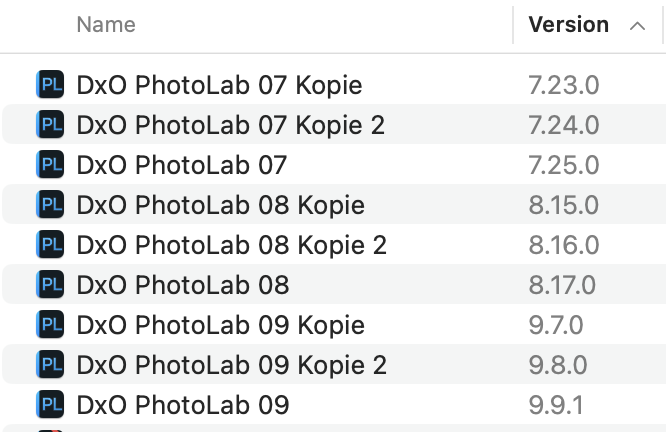
I suppose that no such thing is doable on Win.
1 Like
Thanks for your reply. I’ve had previous versions and unfortunately have had experience of upgrades not keeping settings, hence my question. Glad its at least not normal should this happen again. I’ll upgrade later.
Thanks for your reply. I’ve had previous versions and unfortunately have had experience of upgrades not keeping settings, hence my question. Glad its at least not normal should this happen again. Thanks for the extra info about the major iterations, that probably explains what happened previously.
I’m also going to install a second copy on a laptop. Do you know if there’s an article/post anywhere that explains how I can move my settings from my PC install to the laptop? (both running W11).
Thanks
Thanks for your reply. I think this is possible in Windows too. I know I’ve definitely had 2 different annual versions installed simultaneously but don’t how if that messes databases.
Installing point updates, like from version 9.2 to version 9.9.1, will always overlay your current version and you should have no issues with any settings from the pervious version.
Installing new annual upgrade versions does not overlay the previous version. Some users on this site still have every major version of PhotoLab they have ever used installed and working side by side. Annual installs should always pull over all settings from the previous versions. I have heard that some people have occasionally experienced issues with that which is likely a result of some installation glitch which does not seem to affect everyone.
Mark
1 Like
Databases are different between major versions, e.g. PL8 and PL9.
But I’ve seen the database change (rarely) and it only showed when I went from the newer subversion to the older. Only then would PL produce a popup saying that a new database had been created. The old DB was saved though.
In PL for Win, you can define a location for the DB, so there might be a means to run two subversions with minimal interference. And as always: BACKUP before trying anything bold.
1 Like
I don’t think DxO would make any commitments about similar questions.
In practice, I have copied presets using locations documented in “User Manual → Menus, Preferences and Functions → Useful information about how DxO PhotoLab works”. Since my laptop does not have a decent GPU, I had to edit my presets there, to use Standard denoising instead of DeepPRIME.
I don’t do too many permanent UI changes, so I did those manually, like e.g. “Preferences–>Display–>Image Browser section–>Info panel” set to ‘always OFF’, setting Workspace to ‘DxO Advanced’, Cache size, perhaps Background color, and enable High Quality and DeepPRIME previews on my workstation only.
1 Like