When I am culling my photos after a shoot, I press ‘X’ to reject photos, ‘P’ to Pick etc. I have a filter set to not show the rejected photos, so when I reject a photo is ‘disappears’ from the library.
However, if I reject the photo accidentally, I have to reset the filter, find the photo and then unreject it. It would be a lot easier and more user friendly if Undo would undo that.
that’s a difference between Mac and windows to have a look for in my opinion
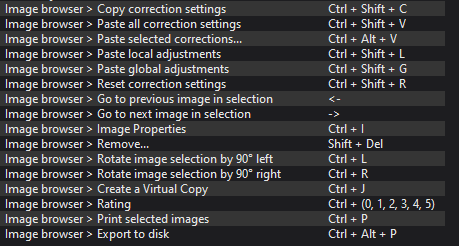
Remove(Reject) = Shift + Del
Pick I haven’t found
‘X’ and ‘P’ would be a dream … configurable would be…I don’t have words for
I should add, once I reject a photo is disappears from the library, so I would not be able to unreject it without disabling the filter, unrejecting it, then enabling the filter. An Undo using Command Z on the Mac would be a lot better.
On a Mac, pick is 7 and 9 is reject. 8 clears the pick/reject, but only if the photo is still selected, i.e. not filtered out immediately after a reject, for example. An undo of each of those commands would indeed be massively useful. My method of culling photos is to have my filter not include rejected photos, then select all photos, set them all to picked and then just move right with the cursor key to keep the pick or hit 9 to reject it (which due to the filter moves to the next photo as well).
Otherwise, I would have had to select 7 to pick and then an additional cursor right to move to the next image. This way it is a single key stroke to move on.
I was just culling some photos and had a filter to show only the rejected ones. I selected all and was about to delete them when I noticed two photos that probably shouldn’t have been in that set. So I unchecked the reject tag. Guess what? All of the photos got un-rejected. And there was no way to undo the operation. I already voted for this feature request, but now would like to see more people vote for it. What do you say, folks?
mwsilvers
(Mark - New Jersey, USA, Win10, RTX 4060, PL9, FP8, VP5, Nikon Zf )
6
That is not surprising. Any changes you make to a selected group of images are applied to all of them and tags are not added to the undo stack. It is the same as when you delete a an individual or selected group of images. It can’t be undone.
There are a number of features within PhotoLab that are not automatically added to the undo stack. The advanced history is just a visual representation of the standard undo stack. The pick and reject tags are not image edits but are just used for filtering, and to the best of my knowledge selecting or deselecting filter tags, or setting and unsetting filters, does adds entries to the undo stack.
I am fairly confident, based on earlier conversations with DxO, that they will not make changes to the structure of the undo stack to add non-standard entries that are not, strictly speaking, image edits.
Yep, this is similar to my workflow (although usually using 9 or 7 instead of X and P) with the filter set to show only untagged images. It’s how I cull.
Just ludicrous in this day and age that Photolab does NOT let you simply ‘undo’ a tag like that. Instead I have tooo goooo tooo the filterrrrrr, change the setttinngggggg tooooo includeeeee the appropprriiatttteeeee tagggggg and thennnnn re-tag it correctllllyyy, theeennnnn turrnnnnn the fillllttterrrr backkkk onnnn!
Just absolute bloody nonsense that this completely faff of a time-wasting annoyance is how it has to be done.
Lightroom, simple undo. No fuss. No drama. But apparently this is too difficult for DxO to put into Photolab.
Pathetic!

 I already voted for this feature request, but now would like to see more people vote for it. What do you say, folks?