Hi. I just purchased a license from DXO. When i tried to start the software. a message showed up.
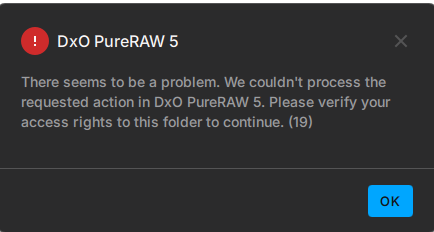
Is there any problem with my PC settings or my licenses ? What should I Do?
Hi. I just purchased a license from DXO. When i tried to start the software. a message showed up.
Is there any problem with my PC settings or my licenses ? What should I Do?
Likewise, I purchased a license yesterday and am faced with the same error.
Did you manage to find a solution or make any progress?
Not that it’s relevant, but I purchased the Nik and PureRAW bundle, and Nik installs and runs without any issues.
contact DXO support team - they’ll give u instructions how to fix it.
Thx, they really helped.
Problem solved.! Thanks a lot.
Sorry, we away from home for a while.
Thanks, spoke to support and the problem has been fixed.
Nice to hear that you fixed it…but how?!? Is there a common solution or I have to wait for the support reply?
I have the same problem, just bought Pureraw and i get this error. Whats the fix?
@tommy86 @ruimoura for you too.
The solution is as follows:
“Please copy & paste this path to your Windows file Explorer’s top path and press Enter:
%LOCALAPPDATA%\DxO\Licenses
please then delete the PureRAWv5 file within, launch DxO PureRAW 5 and activate once again. “
Worked perfectly for me. Basically delete the old license key, then it should work.