Downloaded to my Win11 system yesterday. Began editing OM 1 ii RAWs today and noted odd behavior in the image line-up. Some images edited the day prior (1st batch with PL9.5) were displacing today’s files and claiming their number. If I selected the old file, the new one from today would appear.. I ran the memory card with PL 6 and found no evidence of this oddity. Aside from one to three crashes in each edit session, PL has been working pretty well.
I wonder if it’s rebuilding its internal database. Might be worth starting it up and letting it sit for a while (maybe check CPU usage to see if its doing something behind the scenes).
The PL database needs to be rebuilt from time to time.
At important points in time, I’d recommend to
- manually create, in PhotoLab, a backup of its database
- point PL to an empty folder, then quit PL
- trash the database (with Finder or Explorer)
- restart PL, navigate to the root of the photo archive
- re-index the whole lot
Caveat: all changes will be lost if .dop sidecars are missing. How to prevent that can be found in other posts. Search for “force sidecar export” and similar expressions. PL is set to export .dop files automatically by default. Most people should therefore be on the safe side.
Indexing performance is at about 1k to 2k images per minute depending on several things. Be prepared to wait.
Aren’t you editing your photos directly from the memory card?
Pascal
If so, you need to STOP!!! 
I edit from a card. Not ok?
Two edit sessions since report. No crashes or recurrence of odd finding - mixing of images.
Not OK at all. Never edit from an SD card. Transfer the files to a hard drive or SSD first.
Never ever do this. Transfer your images to your machine
and then format the card in the camera!
Very likely, the generous responders to my concern have identified the problem. Thanks for that. For 25 years I have worked off cards for editing without trouble until this week. First feeds from new OM System gear. I will offload to SSD before sending to the line-up in PL. Thanks to all responders.
For 25 years you have been very lucky. It is considered poor practice to do that with any post procesing program.
Mark
@platypus Why?
Some users have databases that go back to the start of PhotoLab, and with its very simple database then that should be fine.
If you work on those images outside of PhotoLab, in particular moving them around or changing the name of an image or a directory then problems will ensue. The limited search capabilities of PhotoLab will be compromised, i.e. detritus will build up in the database and “corrupt” the search results.
Even that situation should be possible to fix except that DxO seem incapable of getting the code right.
@Wolfgang Why?
I would suggest that formatting the card in the camera card is the wrong strategy entirely!
It should ensure that future images taken with the camera are actually taken and stored in a way that the camera “likes” but will anything else “like” those images!?.
From my perspective the reason for not editing on the card, apart from speed, is that the sole source of data is “potentially” at risk with no recourse to a backup copy!?
But if anything happens to the batch of images just taken off the card then there is no backup if the card has been formatted. Essentially untrue for a normal delete on a computer because recovery software can typically “rescue” the images but after a camera format is that always possible?
I have used one version of ACDSee or another to transport my images from the card to my machine for a very long time but I admit to using an option that is almost as hazardous as your proposal, except that it is used in conjunction with another option.
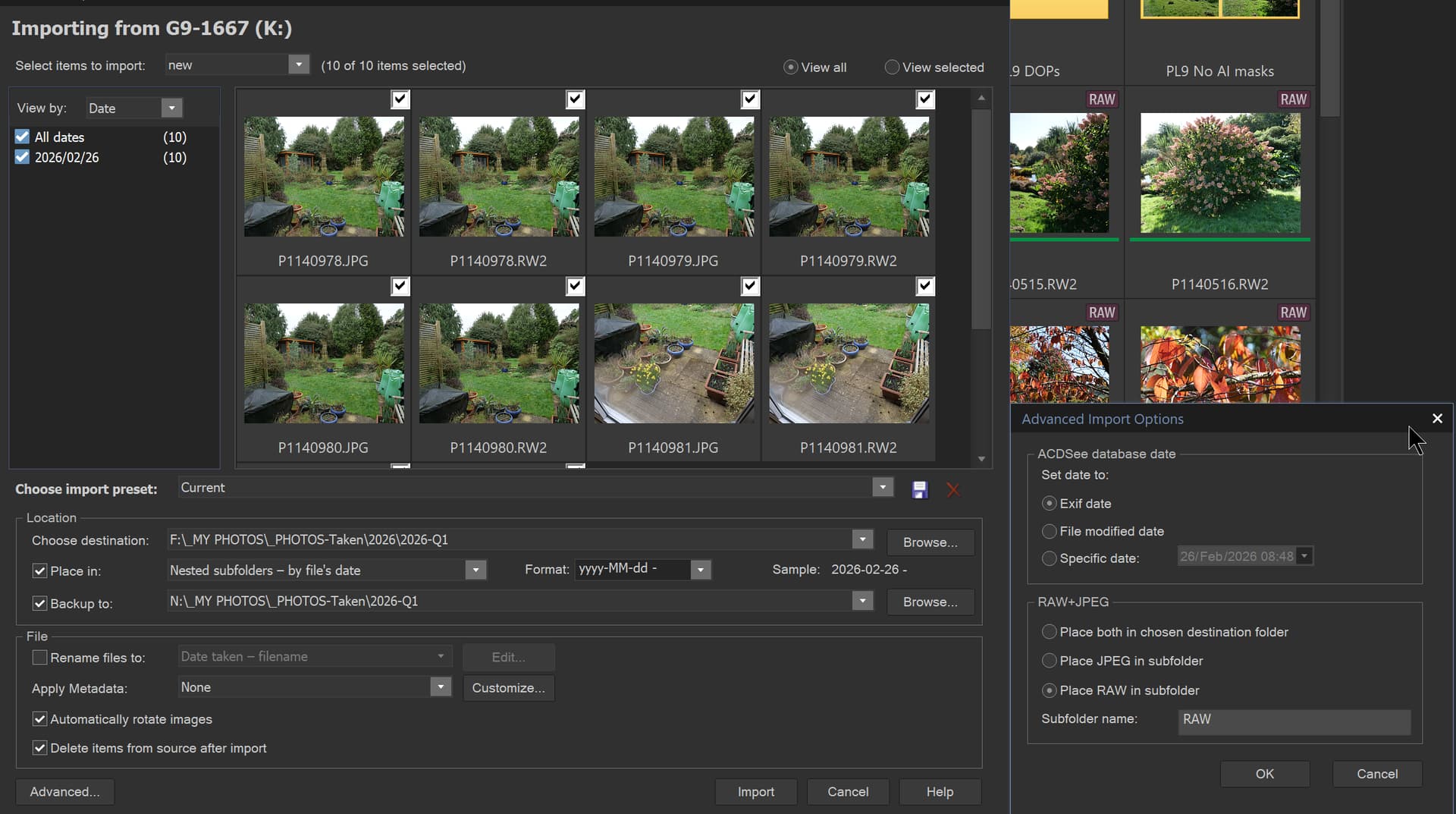
I delete my images after they have been imported in the importation process, but recovery software should be able to recover those if I or PhotoLab destroy the originals and the backup copy created automatically when I am importing the images.
If the images are super critical then I can use the second card in the camera to capture the images twice when they are taken and I take JPG and RAW @Joanna because I want to!
However, this does not protect against any editing software corrupting the original images and that actually happened a very long time ago, when an editing package corrupted the metadata on JPGs, which was all I took at that time. The author fixed the problem very quickly but the images were permanently damaged, but they were only some daffodils and other early flowers in the front garden.
@mwsilvers Why? I actually know why @mwsilvers but actually it shouldn’t be any more dangerous than using any editing program on any images regardless of where they are located if you only have the one copy of that image!
@acphotography The advice about not using PhotoLab in particular to edit using the original card is sound, although PhotoLab does not change the RAW image in any way, the edits will go into the DOP, along with Metadata, and the metadata will go into the xmp sidecar file onto the card, so the RAW should remain intact.
But RGB images will be altered by PhotoLab, as they are with most other editing software.
So editing straight from and to the card actually shouldn’t be that dangerous except that you are working with the only copy of the image. It is something I don’t do and neither do most/ all of the responders to this topic.
But arguably any program used to “scrape” the images from the card could do damage to the images. Plus having neatly and safely captured them to some other media, e.g. an HDD, SATA SSD, NVME, memory stick etc. what is to say that the editing program you then use isn’t going to damage those images.
However, @acphotography I don’t see that any of this alters your original problem or helps in understanding what exactly was happening!
Have you edited images taken from the card and did the strange PL9.5 behaviour re-appear or better still disappear?
The camera needs to “like” the storage medium, and for this purpose, it’s recommended to format the memory card in the camera. – If you/others don’t believe this, well … no problem for me. 
After copying the images to my computer (where … I then sort and rename them), I keep the originals on the memory card for safety until I’ve created a backup !
This is pretty self-explanatory, though …
@Wolfgang I also format the media in the camera, but only once (obviously that will be repeated in the event of failures or the card will be abandoned and a new one used, after being formatted in the camera) .
Thereafter I delete the images automatically in ACDSee as they are imported but it has also made a copy at the same time as the images are transfered to the PC.
So your procedure is much the same as mine but that is not what you wrote, you left out a number of important steps that you have now included.
In my case, images will be in two locations, until I back the systems up with each other (3 systems), which will include any other “detritus” they may have acquired in the meantime, e.g. DOPs, xmp sidecar files etc. plus the images on N:\ which will remain until space gets tight when older directories will be deleted.
Plus if a disaster strikes the images are still on the card, in a deleted state, until they are overwritten. The most vulnerable are the DOPs, xmp sidecar files, any Presets created and the database but I have separate utilities, if I ever finish coding, them to back those up to anywhere I choose.
Formatting on the pc will give me to choose several parameters, among several might be wrong. Formatting in the camera will always use the right parameters.
I don’t know if the cards also have e recycle bin. If so deleting just the images will not release the used space.
George
There is another, and I’d argue more important, reason.
SD cards are generally formatted using the exFAT filesystem.
exFAT, unlike APFS, NTFS, etc. is not a journaled filesystem.
According to OWC (software/hardware retailer):
exFAT lacks many of the safety features found in more modern or platform-native file systems. Most importantly, it is not a journaled file system. Journaling is a safety mechanism used by macOS Extended (HFS+), APFS, and Windows NTFS that keeps a log of changes about to be made to the volume. If a crash, power outage, or improper disconnection occurs — like a cable being yanked accidentally — a journaled file system can use that log to recover to a stable state. exFAT has no such mechanism, meaning any interruption carries a much higher risk of corruption or data loss.
Original poster here. I now copy SD from reader to folder on an SSD which I empty after using as a catch pen for images to be edited. I export edits from PL to a folder on another drive. No longer seeing the intermingle chaos of initial post. Now I only note that newly exported images can be inserted anywhere among images from the previous edit session. Folder name is “February Images”. Most saved edits go to empty slots in the sequence, b/c those file numbers were not worth editing on previous edit session. Where there is overlap, I get message I have already saved this file. So I rename and press on. I may have to set up a separate folder for each edit session.
SD card formatted in camera after each use.
Here’s the answer (part 1)
part 2:
Nothing guarantees that assets aren’t handled by some other app…and PL can’t fix mixed-up assets…and only trashing and rebulding can help - but only if sidecars are present where necessary.
OK. Willing to try most anything to fix this. How does one “rebuild”?
-
Make a backup of the database using PL’s respective menu entry
-
Quit PL
-
Delete the DB
-
Open PL
-
Point PL to the root of the archive (1) and have it index from there (2)
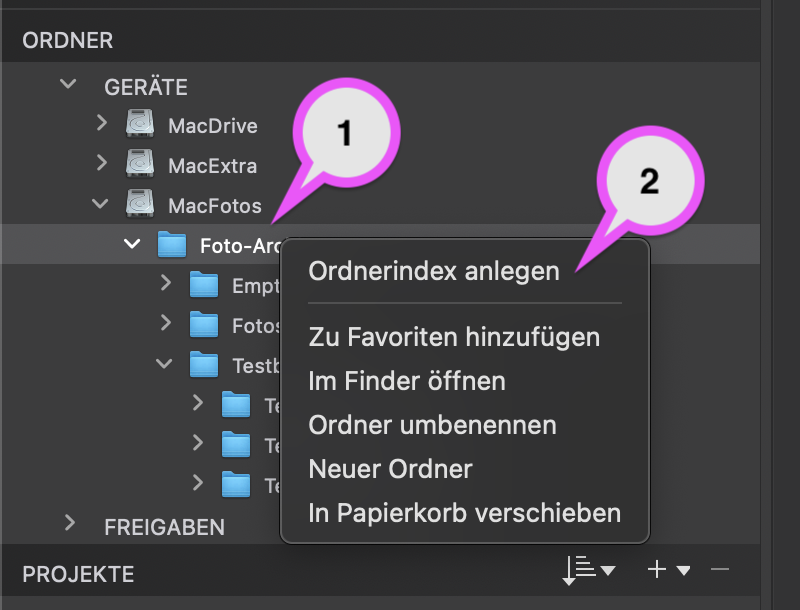
For more details, check out PL’s User Guide, e.g. through support.dxo.com.
CAVEAT: read the previous posts and check if all the needed sidecars are next to the image files.
Do you have any data for re-indexing time?
My DB is over 2 years old, 1.6GB/150,000 items, full of orphans, perhaps time to refresh.