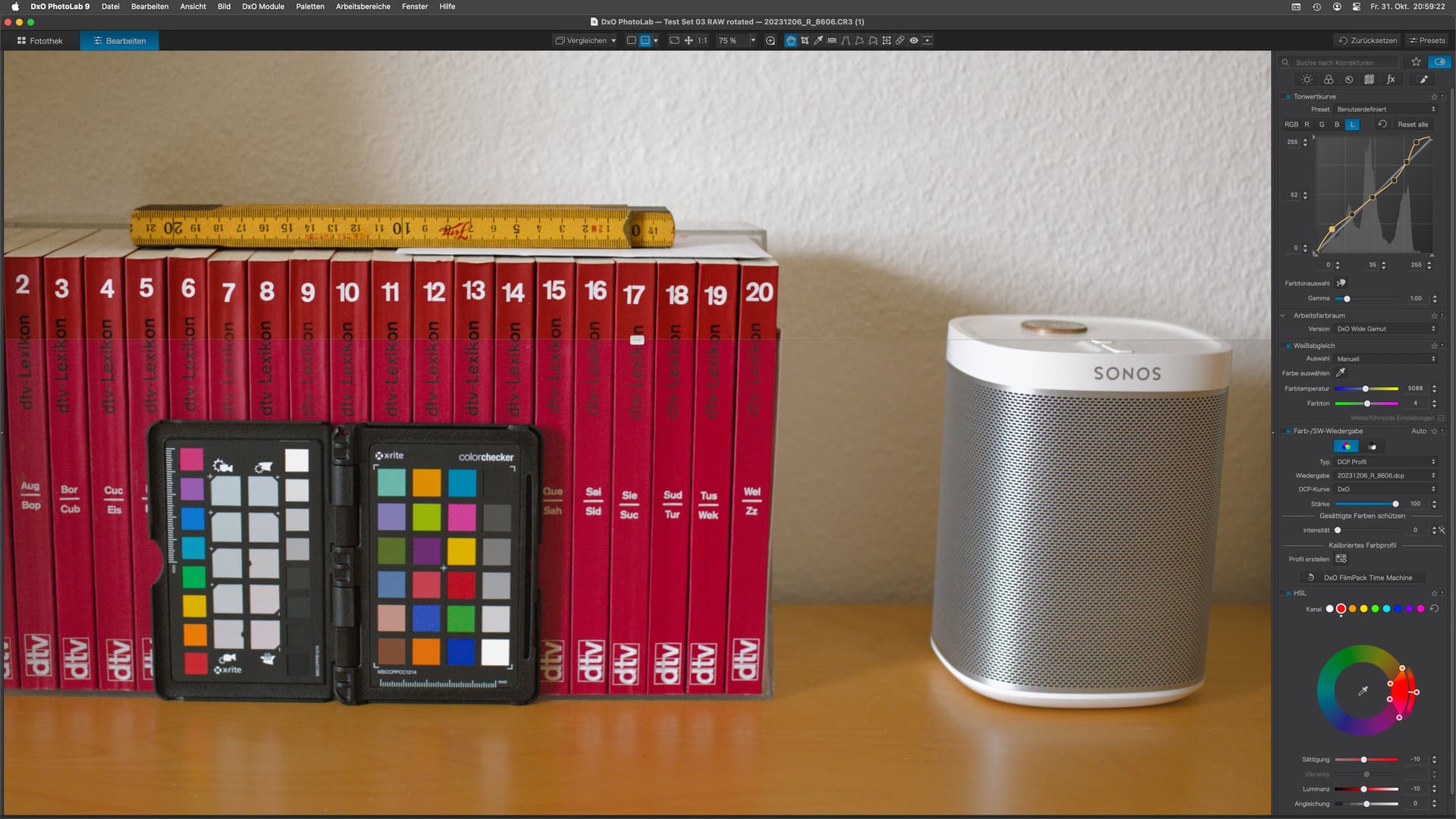
The screen shows an image with and without using the Trinity mentioned above.
Separating the “default” rendering from the “trinitized” rendering is done with a horizontal split view that is found easily on the top plate of the speaker at right.
DCP Profile
Calibrated from the color checker with WB adjusted at the same time
the orange tint of the book covers went away and showed a colour that matches actual colour of the books with almost no visual difference (the books are an arm’s length away from where I edit my photos)
Tone Curve
Selected the “L” curve and set points using the selection tool (Finger/Pipette)
Adjusted output values of the points to 51/85/122/160/200/243, values I found in a document that X-Rite had made accessible a few years ago.
this adjustment lifted the shadows and lights while keeping mid-tones where they are, which is a sign of exposure being driven by mid-grey and DxO’s “old” default rendering.
HSL
Visual evaluation led me to reduce both saturation and luminosity of the red channel, modified by using the pick-up tool on one of the books.
The modifications led to a rendering that is much closer to “true to life” than even DxO’s old standard, neutral colours presets. Apparent contrast has been reduced and overall saturation is very close to what I see on these items during the day. Using these tools effectively helped to create a rendering that can best be used for reproductions.
Just for fun, I created a preset that you can try on your photos…but be aware that they might turn out to look terribly wrong - unless you test with images that were coincidentally captured in very similar (day) light to what I had when I released the shutter. Different cameras might struggle too.
The preset is for PL9 and will not be loaded by PL 8 or earlier…unless you edit the version numbers in the preset. Trinity.preset (11.7 KB)
However, it did not work well for me. The problem is the DCP. I do not have the one that you used and I get error messages about it being invalid. Others may also have this problem.
So, after applying your preset, I set the profile to Adobe Standard for my camera (Olympus EM5 MkII). This produces a dull, flat image compared to either my own custom preset or the OOC jpeg.
I think that DXO should sort the DCP issue and allow DCP profiles to be embedded in a preset. This, rather than the need to have the profile resident on your computer.
Decompiling the profile with DCP Tool, I also found that the profile states a Copyright with DxO, which feels wrong as the profile was not created by DxO but by me. I saw no mention of an author either. Looks like DxO is simply claiming our profiles as theirs.
I created a ticket. Let’s see what DxO will do. I’ll let you know
Completely agree. At lease, it should (imo) be possible to store profiles in a standardised location.
DxO mentions that profiles created with PL are not meant to be camera profiles, but are intended to correct off-colours due to shooting conditions/lighting. Under this premise, the location next to the source image can be understood/and even makes sense.
For cam profiles, we’d need dual-illuminant profiles that also contain other characteristics. This has been discussed elsewhere in the forum, so I’m not going to re-iterate.
I installed the DCP and your preset is now working. However, the colours are not a match for my Olympus cameras. I could tweak them but I already spent a lot of time fine tuning my current “default” preset. It depends on the scene - the woodland shots are close and good whereas the blues are over saturated in the lake shots.
Other than the blues, your preset is in between my “default” and my “modified generic Ektachrome” presets. Here is a screen grab showing this.
My “default”; Trinity is the middle; modified generic Ektachrome.
Also, in the Programs Files folder under PL9, I created a new folder called My DCP and copied my DCP files to it. I then modified my “Default” preset to look there. I also have a My LUTs folder.
A smart move, one that DxO could have done a few years ago.
PhotoLab on macOS does not provide means to change the locations of app-related folders. “We” have to organise ourselves with locations and PL will remember the places. Editing locations in preferences files is possible, but will often only last until the next update.
…as mentioned above, profiling an image helps for that one image. Colours greatly depend on lighting conditions and on how an app interprets RGGB raw data. When I apply the preset to my test images, results are best with images taken under similar conditions and the same camera. Everything else adopts a style that is not mine - what a way to say .
My point with this thread is to remind folks to also use the not-so-hip manual features for full control … while AI gets the spotlight as the new powerpoint in photographic capture and post.
Yes, I do understand - I was just giving you my experience with it.
I spent many hours fine tuning my “default” preset to cover most lighting conditions but there are still instances where it does not work and I have to make further adjustments. Then again, there are times where it works very well and I still make changes. I have also made many, many presets for different B&W looks.

 .
.