I have just downloaded and started my trial of DxO PL9 Elite. The advert claims 30 days, but the popup upon install states 29 days. Which is it – 30 or 29 days? Screenshot attached.
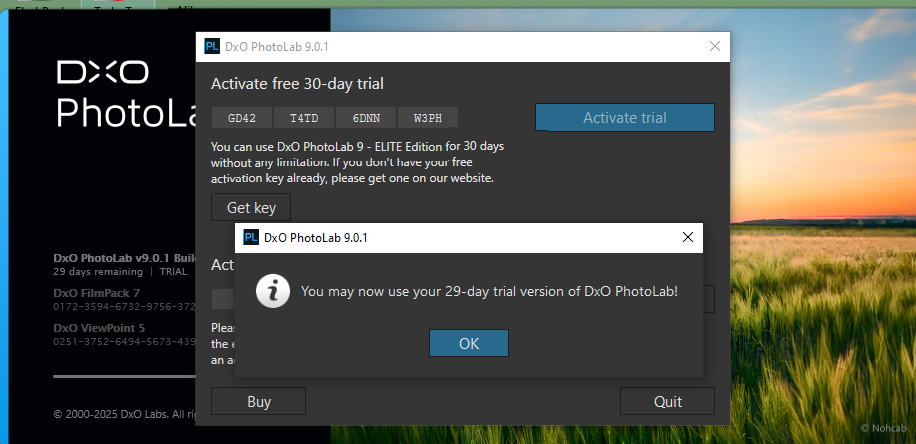
It’s 30 days, but from the first installation.
I installed it yesterday and despite an update in v9.0.1, I have 29 days left.
This was my first installation – no updates. I downloaded the installer file about an hour ago, installed, and I displayed a screenshot of the actual installation details. I am using the same machine as I used for PL8 Elite complete and neither the installer nor the actual PL9 instance “complained”; thus I assume the machine is satisfactory for PL9 Elite.
/heh DxO always does that with trials, but it’s really a full 30-day trial.
They’re not showing you a countdown clock, but there’s a virtual one attached to the software that starts running as soon as you activate your trial and open the DxO app. 30 days minus one second would be make the countdown clock 29 days, 23 hours, 59 minutes 59 seconds, but they display that to you on a splash screen when you first open the app as “29 days” remaining, and that displayed number counts down one day 24 hours later.
BUT… you do get the full 30th day. In other words they don’t shut you off until 24 hours after day 0 starts.
At least that’s how I remember it.
Thank you for the clarification. DxO PL trial thus should show a day/hour/minute timer counting down – say 29/23:59 when the trial starts (and 0/0:0 at the end of 30 days) to avoid the confusion and contradiction between the two displays at the same time (30 days in one, 29 days in the other). Another peculiarity (that perhaps needs to be a separate post): I had to activate FilmPack in the trial PL9 Elite, but ViewPoint seems to be active. Is ViewPoint now a standard feature of PL9 Elite? In any event, I now have PL9 Elite complete and am testing it.
One test: taking a raw image that after my PL8 Elite complete post was accepted by a client, re-doing it with DeepPrime XD/XD2s but otherwise my same custom preset and modifications held in the .dop file for the same raw image file. I then processed to the same JPEG output settings, and compared the JPEG. Not very much difference. However, I shall compare the masking for sharpening detail on several other images. I note the various software defects (“bugs”) mentioned for PL9 production release in posts to this list and thus certainly wait a bit before I use PL9 for my workflow. If there is no Black Friday discount, I will consider when to license PL9 for fee.
ViewPoint is included and active in PhotoLab Elite for basic perspective correction. There is a more full-featured version with much more nuanced control of perspective correction and some extra features in the standalone ViewPoint 5 app. I think the ViewPoint add-on can be worth buying in addition to PL if you do a lot architectural or cityscape photography or otherwise need a lot of perspective correction. For a bird, sports, family photographer, or for those who rarely would do perspective correction anyway, the basic VP included in PhotoLab Elite may be enough. Check for YouTube videos reviewing or demonstrating ViewPoint 5 if you’re on the fence, or just do a 30-day trial of the separate app. Do expect to spend some time with the ViewPoint 5 user guide; some features have a learning curve. But it is very powerful.
ViewPoint was NOT included with PL8 Elite – I was required to enter the license activation code for “stand along” ViewPoint into PL8Elite, and then the perspective control features “activated”. These seem to be “built-in” to PL9 Elite. Thus, I have a license for VP current. HOWEVER, it is my understanding that VP standalone will not integrate with PL workflow – there is no “pipeline” between the two different stand alone applications and thus VP does not allow itself to be used and then additional corrections applied to the raw image. Hence, as with the NIK plugins that do NOT work with PL as internal plugins but require export into a non-raw format, all of the famed DxO body/lens corrections cannot be applied AFTER an external NIK or VP use as the result from NIK or VP is non-raw. Am I missing something? I have FilmPack licensed to activate ALL of the contrast, etc., sliders in PL Elite for manual correction. Presumably, these sliders can be applied in masked areas of an image (including areas “found” by the PL9 “AI” technology) more easily than with PL8.
Just curious – have you already worked with VP standalone?
When I first licensed (for fee) VP, I tried it on JPEG images exported by PL then current. I compared the result with using intelrnal VP – and the same .dop file – on the original raw image file (save that the .dop would have been modified by using the VP internal to PL then current). I compared the resulting JPEG to the one with VP used external to PL. The comparison was done with a JPEG viewer with a “loupe”. The internal one was better in the some areas that evidently had been “most modified” by VP – not much better, but visibly better. I repeated the experiment on another raw image similarly processed by PL – same result. Presumably, whatever “magic” DxO does upon JPEG export from a PL corrected raw is done on the entire image including areas modified by the internal VP. Hence, until such time as DxO figures out how to establish a raw pipeline from PL to other “stand along” DxO workflow applications, I shall use PL and not the others. Others on this forum have written that it is impossible for DxO to establish such a pipeline due to the architecture of PL, including exporting a modified raw file and adding raw processing to stand alone applications such as VP (note: a TIFF is NOT a raw file, although in some ways it is quite close – but a TIFF file is much larger than the raw file from which the TIFF was exported).