So I am using PL9 more and more now and weaning myself away from LRC especially when masking complex images. When I used LRC and sent a file to photoshop I would generally save the photoshop file as a tiff file which would then be sent back to lightroom. I tried a similar workflow with PL9 but a tif file appears in photolab even before I have done any editing in photoshop. I find this really confusing as I would not expect a tif file to appear in PL9 until I had edited and saved a file in PS. For example - if I go into PS and then decide against my edit and I come out without saving the file (effectively discarding my idea or edit) I have to go back into PL9 to delete the tif file that wasn’t wanted. Am I doing something wrong or is this just a quirk of the export to application workflow?
There are two ways to have PL deal with images from Lightroom.
- customise in PL the original (RAW) file(s) by using Lr’s “module” option
→ Lr → File menu → Plug-In-Extras …
→ launches PL with its focus on a new project with the original file(s) - customise in PL the image with Lr edits by using Lr’s “edit” option
→ Context menu → Process in …
→ The file format used for edited file(s) can be set in Lr’s settings
I don’t think you understand my workflow - I am working in PL9 not Lightroom - I was just describing what I used to do in Lightroom. I edit my raw file in PL9 but if I need to do something in photoshop I send it out to photoshop by exporting to application. a tif file appears in PL9 before I have done anything in photoshop. I would not expect this to happen until I had saved the file in photoshop.
This is the normal behaviour … and the (visible) TIFF file gets automatically updated as soon you save your edits in PS. ( → Make sure to save a compatible file. )
For example - if I go into PS and then decide against my edit and I come out without saving the file (effectively discarding my idea or edit) I have to go back into PL9 to delete the tif file that wasn’t wanted.
PL mirrors the image folder … and so the TIFF file (no catalogue import). If you don’t need the TIFF file anymore, simply delete it.
Ok - thanks - I just didn’t understand why it would do that - creates the file before it gets saved in PS seems a little odd - but at least I know that it’s not something I am doing just a PIA if I am using PS for batch web sharpening etc etc. If I use PS for regenerative remove then of course I want the file - would have preferred not to have to delete a file that I hadn’t created (as I said where I have changed my mind or don’t actually need the file).
Just figured out I am better exporting to disk and then opening in photoshop from the disk for batch processing of sharpening - this then means I can save the PS file however I want.
Yes - it’s been a while since I checked in detail what PL can read after the image is processed in PS ( … had to be saved in some compatibility mode ).
BTW, if you haven’t you can configure PL to export to the desired application.
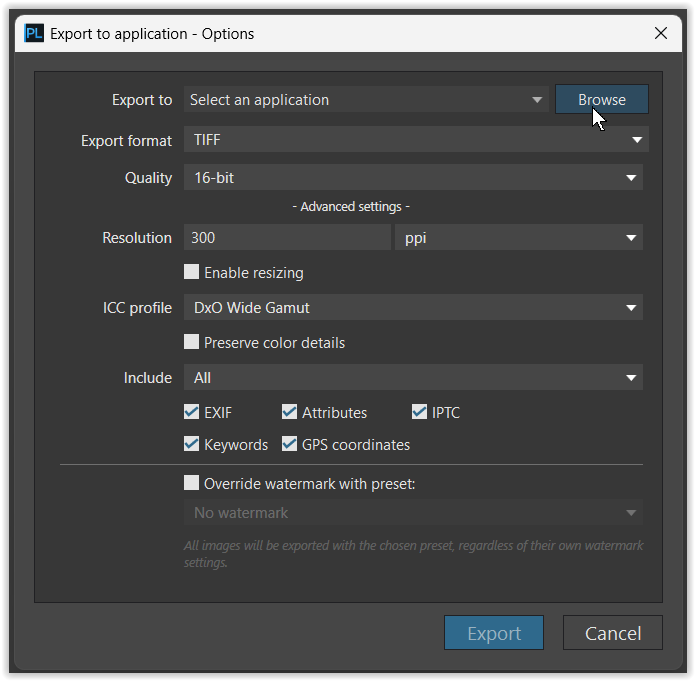
The reason for this is that PhotoLab has no way to get data to Photoshop without creating a file first. LrC may be able to just “send data” to Photoshop to inject into a new document file, without saving anything, (since both those apps are Adobe’s and can therefore probably “speak” to each other more seamlessly), but generally speaking, the only “transportation” method of image data from one app to another is to save the file first and then open it in the other app.
Of course, PL could probably command Photoshop to open the original RAW file, but then you would not see any of your Photolab corrections when in Photoshop.
Thank you - that makes sense. Just tested it and I just have to make sure the file format that PS saves is the same - then I get a replace request and all is good - thanks or the explanation - I hadn’t thought of that - thanks for your help.
Yes – or, theoretically I imagine if you open a TIFF in PS, then if you just simply do a Save operation (cmd + S or ctrl + S), then it should just overwrite the TIFF with your edits?
I no longer use Photoshop so I can’t speak with any authority how it handles a file once received from PhotoLab. I use Affinity now (previously Affinity Photo). But I can talk about how files are sent from PL to another app.
In the “Export to Applications - Options” dialog there is an dropdown box called “Export format”. One of the options is “Original file(s) - no processing”. When this is the option selected the file(s) currently selected in PL are passed, without any changes that have been made in PL, directly to the outside app… no tif or any other file are created.
Personally I prefer PL’s handling of Fuji camera images so I stick with PL for RAW conversion. If I plan on working with the image more I always create a tif. But that’s just me… 
export to AFF.pdf (30.4 KB)
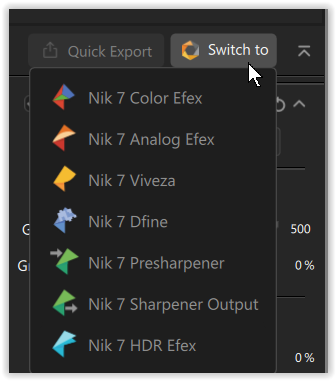
Yes, in earlier versions of the Nik Collection, this was helpful to avoid re-exporting a TIFF file. Since Nik 7, you can switch directly to another module.
.
When “exporting” to Affinity or Photoshop using the option “Original file(s) - no processing”, the raw file is opened by the respective raw data processor … effectively bypassing PL.