mwsilvers
(Mark - New Jersey, USA, Win10, RTX 4060, PL9, FP8, VP5, Nikon Zf )
21
I am not a landscape photographer and I use high zoom levels quite often for more accurate masking and retouching. The original zoom level for the Windows version was 400% which was way too low to do detail masking. While I rarely use 1600%, I often use 1200%.
There’s a number of different forum topics all somehow related to this issue, the most general one probably being here, so it’s hard to choose which one to continue with, but…
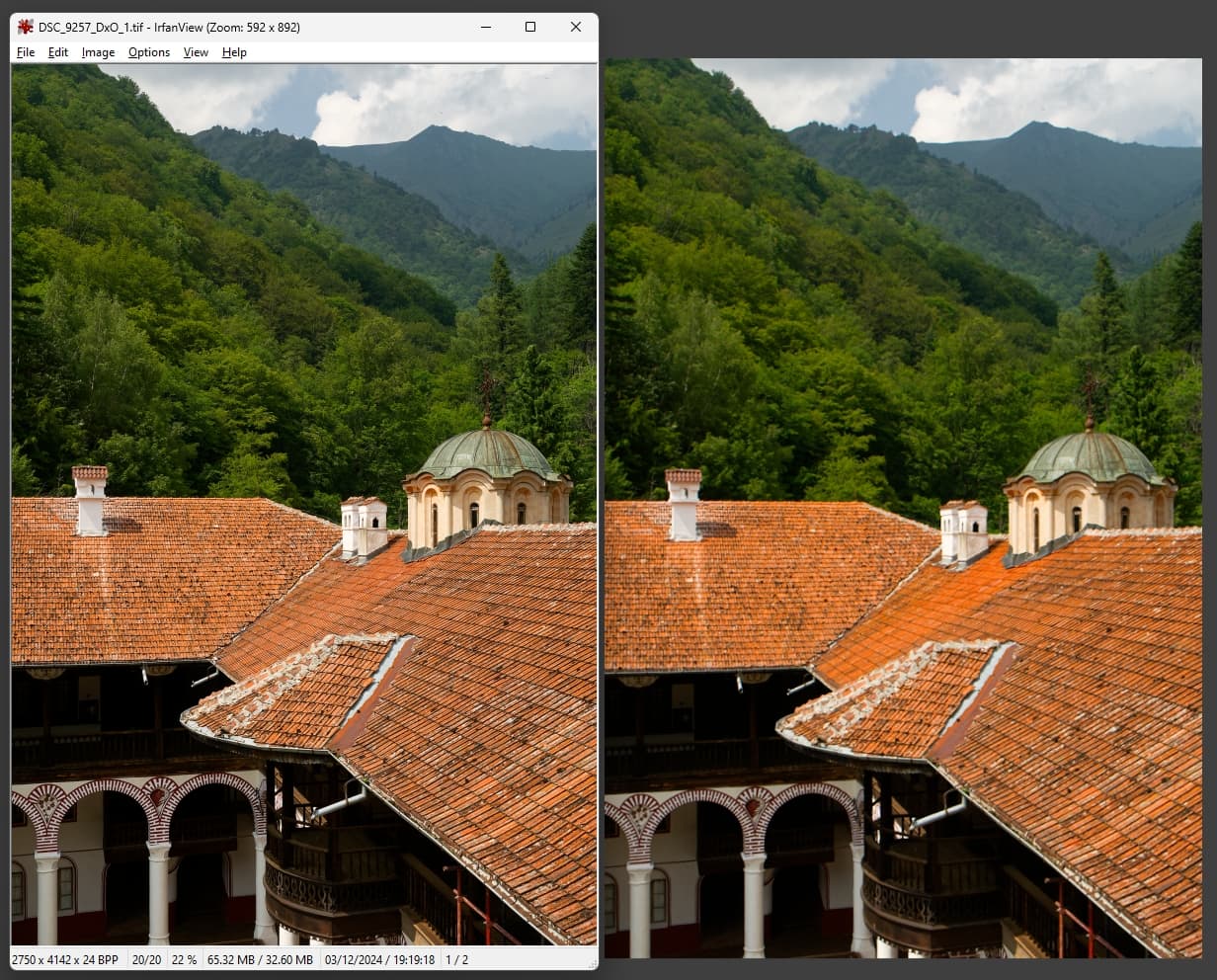
I have just come across the most egregious example of this issue causing colour inaccuracies I have seen in my own photos to date. On the right: PhotoLab 8.1’s preview. On the left: the same PhotoLab’s exported image.
I have submitted a support ticket (in the “I have a software issue” category, as I did not find a bug report option) along with the raw file. I hope this helps them address the problem.
Your image absolutely confirms my 5 years experience with Photolab.
I have opened several tickets in these last 3 years for this issue… and never got one single reply.
mwsilvers
(Mark - New Jersey, USA, Win10, RTX 4060, PL9, FP8, VP5, Nikon Zf )
24
Actually @Lucabeer there had been a number of discussions with DxO staff on this topic when they had more of a presence on this site. Years ago we were promised a replacement editing window was in the works which supposedly would resolve at least some of the issues users are seeing, There has been no update on that effort for a few years now.
The 1600% is there to sell the new denoise algorithms. At 100% I would never notice any difference between the different algorithms on low iso images. At 1600% you can see how impressive the algorithms are, albeit far away from most practical use cases ;-).
mwsilvers
(Mark - New Jersey, USA, Win10, RTX 4060, PL9, FP8, VP5, Nikon Zf )
27
I don’t think so because it is basically just an enhanced version of the previous small non-moveable DeepPRlME loupe and is not an editing window.
Mark
mwsilvers
(Mark - New Jersey, USA, Win10, RTX 4060, PL9, FP8, VP5, Nikon Zf )
28
I don’t think that is the reason for a 1600% zoom. The ability to zoom up to 1600% makes it easy to apply very precise masking especially with the Retouch tool. This zoom level existed on the Mac version for years before DeepPRIME was added. It was a latecomer to the Windows version which finally gave us parity with the Mac version. I had been asking for it on the Windows version since PL 1.
Anyway, returning to this very illustrative example…
we spend hundreds of Euros/Dollars to buy monitors that show the widest possible gamut and most precise accuracy when editing our photos
we calibrate these expensive monitors, for even better accuracy
we welcomed the arrival of the Wide Gamut workflow in PL, to increase editing accuracy
… and then, we still have to live with a bug in the viewer that causes MORE inaccuracy in the reproduction of colours during editing, than all causes above.
I submitted my support ticket early December, and, after additionally uploading this video upon their request to more clearly show the issue’s relation with this known 75% zoom threshold, I have just now received the below response.
The discrepancy in color rendering at zoom levels below 75% is a known limitation in the current design of DxO PhotoLab. This behavior stems from an optimization process designed to balance performance and responsiveness: at 75% zoom or higher, DxO PhotoLab renders images in full resolution, while at lower zoom levels, a lighter preview mode is used. In some cases, such as yours, this can result in visible discrepancies.
Our development team has thoroughly reviewed your case and recognizes the importance of addressing this issue. While improvements to enhance the accuracy of previews are being actively explored, these changes require significant development work and will be implemented as part of future updates to DxO PhotoLab.
In the meantime, I recommend a workaround to help maintain consistency:
Open your RAW image in DxO PhotoLab.
Apply your preferred noise reduction method.
Export the image in DNG (Denoise & Optical Corrections only) format.
Continue editing the exported DNG file as you would a RAW file—this approach avoids the aliasing issue you’ve experienced.
The most important point seems to be that “improvements to enhance the accuracy of previews (…) will be implemented as part of future updates”, while the suggested workaround seems to imply that denoising and optical corrections (including CA) are known or suspected to be the main culprits.
mwsilvers
(Mark - New Jersey, USA, Win10, RTX 4060, PL9, FP8, VP5, Nikon Zf )
31
That is incorrect. Optical corrections have nothing to do with the issue which has always been due to the need for a replacement editing window due to design limitations.
The more complete work around suggested by DxO is to use the Export as DNG (Denoising & Optical Corrections Only) export option. The only features you can use with that option include one of the DeepPRIME variations, Lens distortion corrections, Lens Softness Corrections, Chromatic aberration corrections, Vignetting corrections, and if you have ViewPoint, Volume Deformation corrections. After the export is complete perform all your other edits to the DNG file.
The Unsharp mask is not included in exports to the DNG file using that specific export option. While you can use the Unsharp mask on the output DNG fille, you will still have to zoom to 75% or higher to see the results of it. However if you have a profile for the lens used to create the image, you should not need to use the unsharp mask. Instead just use the lens softness corrections before the export. The lens softness corrections are only available if you have a profile for that lens used.
Hopefully you also own a license to FilmPack so you can use one or more of the four fine contrast sliders which are added to PhotoLab and can be very useful with augmenting the impression of greater sharpness. Fine contrast can be applied to the DNG file and does not require zooming to 75% or above to see the results. The main Fine contrast slider affects the entire image, while the advanced Fine contrast sliders are divided into three specific ranges, one contrast slider each for highlights, midtones, and shadows.
Basically pissoff thats the mess we have created so lump it. As been pointed out by Mark this was promised year’s ago.
mwsilvers
(Mark - New Jersey, USA, Win10, RTX 4060, PL9, FP8, VP5, Nikon Zf )
33
Off and on over the years it has been suggested by DxO that a new editing window is in the works which would address many of the issues discussed in this and other threads. My guess is that this effort is far more significant then any of us realize and might require a major rewrite of PhotoLab’s codebase.
The problem is this doesn’t look a new feature its admitting we have had a poor display rendering that finally we have done something about. A good new feature is something new added to what there even if no one wanted it. Its like the long promised printing rewrite its there so not something new. Marketing drives what programming is done. Miner bugs can get fixed, sometimes but major cor problems never
@mwsilvers I agree that the so called workaround is problematic, at least for me because I use DP XD(2s) to clean up my clumsy sky editing via a graduated filter.
Mark
How can it be difficult to implement when it is essentially the ‘Loupe’ but scaled up, which was really the NR preview window made larger and more easy to use and able to look at image detail to a much finer level of granularity.
So the technology has been there for a long so why are we getting excuses and half-baked workarounds instead of the product upgrade, sorry fix, which is so long overdue, incidentally failing to implement the Loupe in the F11 full screen preview was just plain dumb.
In the following video I have applied some edits to one of my infamous images where DxPL insists on adding even more CA, purple fringing or whatever it is called to the preview which only vanishes below 25% or at 75% or above.
I then opened the Loupe and traversed the entire image and then checked to make sure what I expected actually did happen, opened the screen recorder and repeated traversing the image 1 Loupe frame at a time.
Is there any hesitation in rendering?
Could it be that DxPL is smart enough to store the rendered image elements in memory?
Could DxPL make that rendered image available to the user now, in place of the excuses we get about how complicated it would be to implement this and it might be available at some time in the future etc.
I must make sure not to take my blood pressure for a few hours!!
PS: sorry about the fan control screen at the end of the video I missed the screen recorder icon and couldn’t be bothered to edit the video!
Interesting topic, and I fully support the better quality preview. Didn’t know about the 75, and the DNG files. That format seems to speed things up, but they are also twice the size of my raw files…
I don’t know if it is helpful, but I would like a full screen preview on a separate monitor. Maybe that could help the development?
There are so many areas which need to be factored in when deciding how to approach a matter in development.
What we might discuss as “how hard can it be” or “just add it to the backlog” is not that simple at the backend, at resource planning or as a business strategy level.
If there’s a lack of a full screen rendering we nag. If there’s a lag when scrolling we nag. If there’s a low quality output we nag.
DxO will probably find a way to fulfil our wishes sometime. We just need to be patient and accept the process.
Or continue to let it affect our lives and wellbeing.
@Required I agree with your points although why shouldn’t we “nag” based upon our experiences with the product and what those experiences do to our productivity on our machines, with our images and our edits.
Unlike DxO developers we have a very mixed user base with very different machines, so our experience versus the experience of the DxO engineers is potentially very different, arguably way more representative!
That lack of any sort of discussion with DxO about any topic makes the being “patient” issue a non starter being “patient” for what, for DxO to realise it actually has a user base that pays the bills and have (long-standing) issues that need resolution.
Users need to use the Support mechanism alongside the forum. Even if DxO monitor the forum “from afar” they can simply ignore whatever they want. They promise little or nothing even, in their responses to user Support issues.
That leaves the issue of how difficult it is to actually achieve what is being requested here and the assumption in the posts that this is somehow difficult for DxO to achieve (otherwise why wouldn’t any self-respecting developer have done it already, obviating the need for this topic)!
If there are difficulties it would be nice for DxO to address the forum and discuss the issue(s) with the users. This topic has so far attracted 3.3k views so there is some interest in the user base.
It would need to be possible to control whether Noise Reduction is applied to the full screen render or not, a feature currently not available with the Loupe which automatically includes NR but with no option to turn that feature off.
Having such a feature would make full screen resolution at any scaling available to a wider group of users because DP and DP XD(2s) require GPU resources for rendering in any situation, i.e. screen display as well as export.
The same should also apply to the F11 view, which should also have the Loupe added (why that was omitted I really don’t understand).
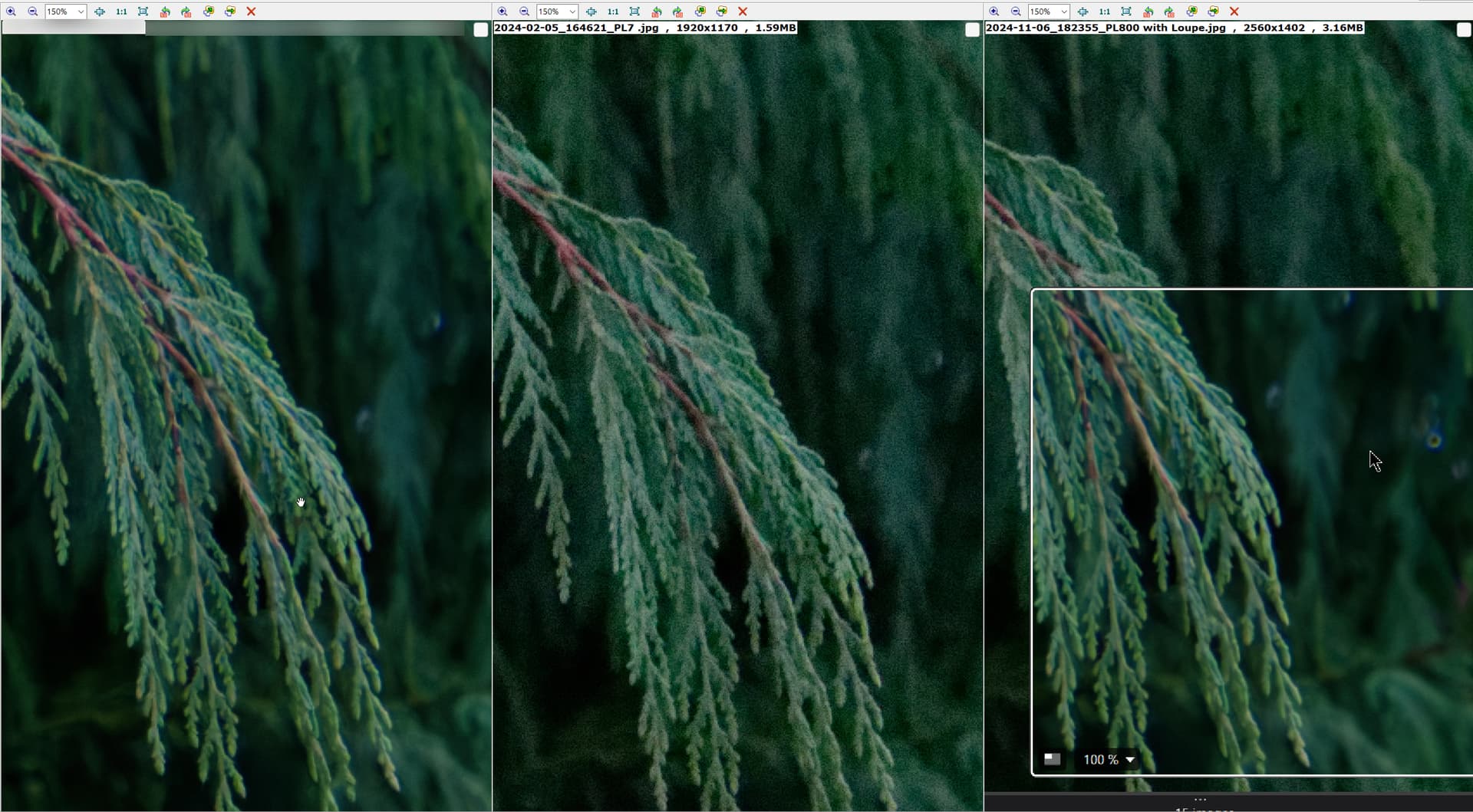
So on the left of the snapshot we have a full screen render with NR applied, PL7 in the middle, which doesn’t have any NR applied at any resolution and PL8 applies NR to all edits but in the restricted window of the Loupe.