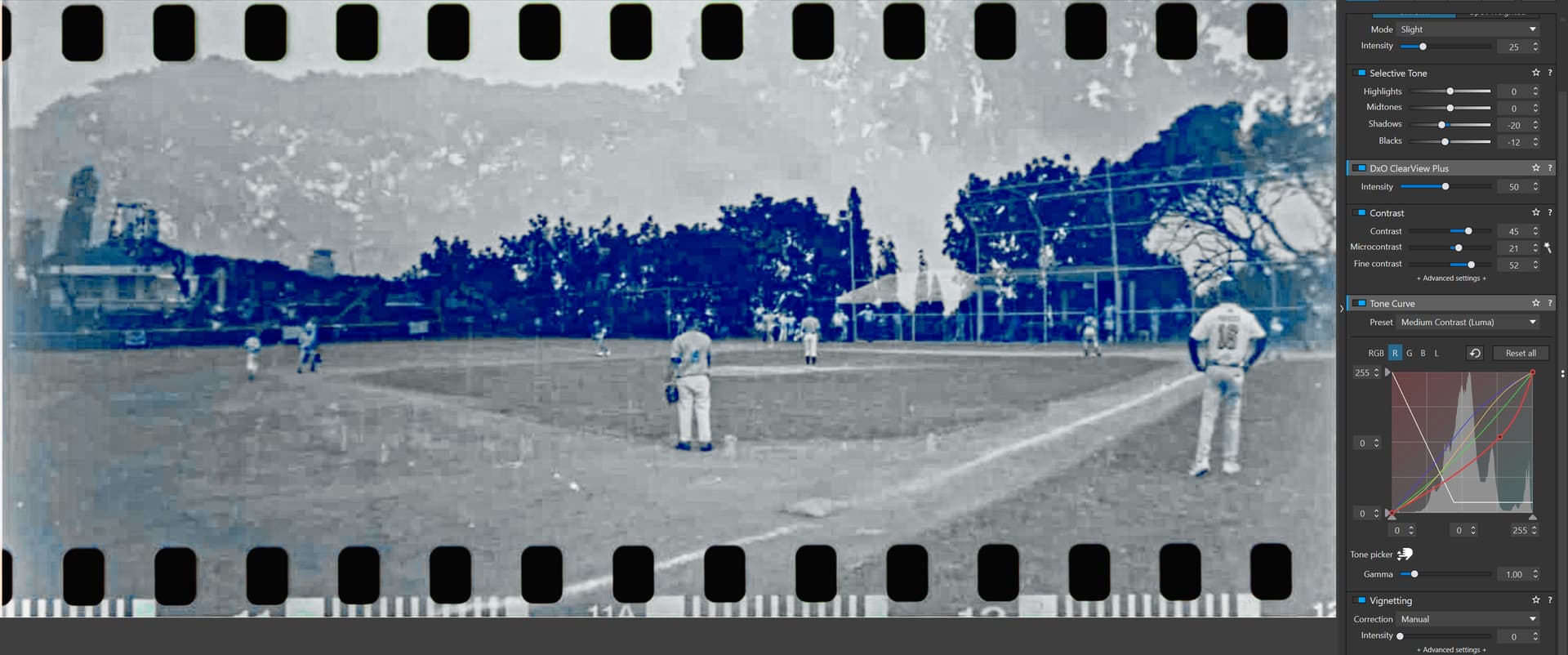
Hi Alec and other interested. After some communication problems with my bank and Hamrick Software I have managed to download the scanner software Vuescan and to test to “import” and “convert” your example file. I can say I can manage to get the conversion a bit better than with Photolab 9 as you can see if you compare with my initial try in Photolab.
The net pattern from Vuescan is just a mask from the crop tool in that software and is just to be ignored. As you can see my initial try in Photolab below is very much more “washed out”. I had real problems getting any further in Photolab 9 really and frankly: I´m not a real big fan of Filmpack either. At least for me Vuescan gives a far better starting point for further improvements than Photolab or Filmpack.
I have not scanned your original just opened it and tweaked it a bit in Vuescan. In a real world scenario there are a few new brandnew AI-powered features that I´m convinced might improve the image quality. You can read by yourselvers here:
Especially when scanning old 35mm film and not the least positive 35mm color slide film anyone will soon realize the poor technical quality these old films offer (poor resolution, a lot of often coarse blotchy grain and impurities often in skies and often lost colors because of long time storage in often too varm places (like a hot summer attic). I see lots of that in my own old color films that often have gotten severely detoriated over time. So scanning or repro-photographing them is often a challenge giving not very uplifting results right out of the scanner (so far) or camera.
BUT, we can do a lot with softwares like Vuescan and not the least Topaz Photo AI 4 as I use just for JPEG or TIFF. Vuescan can scan in RAW-format that is some kind of DNG but so far I have never been able to handle them with Photolab that lives in it’s own sort of DNG-bubble. Topaz is more forgiving even here.
BUT I reproduce in RAW with my camera you may say. Sorry! Despite that Photolab´s Deep Prime or Lens Correction sharpening might work fine for digitally born RAW as well as old Unsharp Mask, all those tools are completely useless on my Agfa CT 18 and CT 21 color slides. The only tool in Photolab that works for those pictures is Photolab Fine Contrast and that is better than nothing but not at all good enough - but there is a lovely trick in Photolab with cluttered blue skies or other bright surfaces - just push Microcontrast in the bottom (-) and it all goes away!
As @Stenis notes, dealing with old, poorly stored film scans (esp color negatives) is much more complicated and requires much more correction than dealing with new film (which I suspect may be DxO’s initial target audience). DxO has set up a foundation for more sophisticated scanned file handling (incl taking advantage of the FilmPack renderings?), but there’s a long way between where they are now and what’s needed for problem scans (via scanner or camera). Negative Lab Pro’s promised stand-alone version sounds interesting. Unfortunately, in the meantime, I need to do some repairs on my Konica Minolta DiMAGE Scan Elite II scanner to deal with a backlog of unscanned negatives & slides…
1 Like
Stenis
(Sten-Åke Sändh (Sony, Win 11, PL 6, CO 16, PM Plus 6, XnView))
23
Konica Minolta DiMAGE Scan Elite II, wow! That wasn’t yesterday.
Well I have been testing my scanner with Vuescan and see that there is no way I will sit and wait for that solution to deliver. It is really slow ands super inefficient. When I worked with building the Digital City Museum of Stockholm between 2009 and 2016 all the photo antiquarians very using scanners. I suggested using repro photo instead but never got an ear for that. It was a pretty conservative department but their photographers used the new efficient workflows fully out.
We had an old photographer that had worked his whole career at this museum and when I started the museum had managed to publish just about 200 of his pictures in their old webb. The same year when he retired (around 2013) when the Digital City Museum of Stockholm was finally released a new photographer was hired and just the first year at the museum he managed to published around 5000 new pictures on the Digital City Museum site with our new very efficient DAM-systems new photo workflows. Then the antiquarians got upset since they felt the old historical pictures were “drowning” in all new stuff. So then we had to make a filter for the old ones.
It is great to scan photo copies on paper but not so much for film. I will continue to do like Alec and use my camera in my case an A7 IV with a Sony G 90mm/2,8 Macro for repro photo. It is just so much more efficient but I will convert my negative films with using Vuescan. Vuescan is also a very useful OCR-software and I love it for photo copies BUT for film? No way! Can anyone really defend the approach to scan negative color filmstips or color slide film anymore?
I will see if I totally leave Capture One now when Photolab 9 is as good as it really is with it’s new AI-masking system. Sonys Imaging Edge is really better than most people believe as a tethering and repro photo software. I have used it before and found by surprise that it do have some advantages too. For example it reads the metadata from the camera that both Capture One, Lightroom, Camera Raw and even Photolab ignores. Sometimes proprietary tools are more efficient than general ones.
I’m a bit late to the discussion but I am able to use the Scanned Film Optimization on my Intel iMac running MacOS Sequoia. Are you running Intel or Apple Silicon?
That is a big improvement. After playing around for a couple of weeks with the tools available to me (PhotoLab 9, FilmPack 8, Luminar Neo, C1), the clear winner is C1. C1 handles colour so much better than any other photo application, including PhotoLab (no slouch itself). I didn’t end up as a C1 photographer as 1. the interface makes less sense to me 2. high ISO chroma noise was my pain point with night photography on Canon cameras (since switched to Nikon which theoretically makes DeepPrime less essential).
C1’s curves and levels can really convert almost anything. There’s a gentleman who has created a detailed workflow along with a helper tool, Analogue Toolbox. The basics of inversion just work in C1 (even back in 2016), the exact recipe is up to us.
For a photographer who uses Adobe, Lightroom Classicwith Negative Lab Pro looks like the value/convenience winner at $99 which plugins into software s/he already uses with a very sensible interface. Since I won’t put Adobe spyware on my computer and won’t support their business practices in principle, NLP is not an option for me.
Still to be tested is Negadoctor in DarkTable and the negative inversion in RAWtherapee. Both of those should be tested before we come to a consensus on the best and most cost-effective way to scan negatives. For file preparation the solution is already clear: RAW files shot DSLR via a Nikon ES-2 or other adapter with backlight seems to be the winner in terms of resolution, quality, cost and speed. DSLR/ILC scanning wins on cost as everyone here already has a high resolution full frame or APS-C camera.
What is clear is that the negative scanning tool in FilmPack 8 and PhotoLab 9 has a long way to go before it’s competitive with other negative scanning solutions.
Side note: since after these tests, I don’t plan to buy FilmPack 8 I must make sure not to use any of its colour presets. I just used Cinestill 800 Tungsten in a set today.
Stenis
(Sten-Åke Sändh (Sony, Win 11, PL 6, CO 16, PM Plus 6, XnView))
26
If you mean me, I am running Windows 11 on Intel.
Stenis
(Sten-Åke Sändh (Sony, Win 11, PL 6, CO 16, PM Plus 6, XnView))
27
Agree, Curves and Levels in C1 is fantastic. … and yes the denoise is very weak and hasn´t of some reasons been improved at all for ages. That is a mystery since so much of the other tools are so good.
I will see what I will do in february when my subscription runs out. Maybe I will convert it to a perpetual licence with a 40% discount. Ithink I will do that because the tethering in C1 is just the best there is and so are their AI-batch workflows.
There is also always the option to add Topaz in the workflow with C1. It works really nicely and seamlessly. I nowadays prefer to process my digitized colort slide pictures with Topaz scaling , denoising and sharpening. Photolab is truely useless for them.
You’ll get C1 Pro 40% discount for perpetual license only after two years of paying subscription license, and if you move from subscription to perpetual, you’ll get updates for at most 6 months (+critical bugs), that is until new version arrives (e.g. 16.8 will be a NEW version, if you have 16.7.x now). It’s different than up to two year “post-divorce” period you get updates from DxO. Did I get it wrong?
Bonjour,
Peut-être que je suis bizarre mais vous êtes sur un forum DXO et non C1.
Les promos de C1 ne concernent pas DXO sauf erreur. de ma part.
Il y a également des forums sur C1 que vous pouvez consulter ou participer.
Hello, perhaps I’m being strange, but you are on a DXO forum, not a C1 forum. Unless I am mistaken, C1 promotions do not concern DXO.
There are also forums on C1 that you can visit or participate in.
I have numerated argentic photos with my camera, as you will see details on my website.
I have also Vuescan the drives my Epson ET4700 but its ergonomic is not very good. I could use a very old scanner for argentic films but global ergonomic is a disaster…
Stenis
(Sten-Åke Sändh (Sony, Win 11, PL 6, CO 16, PM Plus 6, XnView))
33
Vuescan is very competent but the interface wouldn´t have pleased the users even in the nineties and it hasn´t improved since than but still it seems like the industry standard despite that because it just works.
2 Likes
Stenis
(Sten-Åke Sändh (Sony, Win 11, PL 6, CO 16, PM Plus 6, XnView))
34
@uncoy This is not a Capture One promotion but a comparision. This function that we got in Filmpack 8 that did not really work for converting negative film might have to get improved. I got a mail about how they have made ity in the new version of C1 that i might upgrade to if I get my discount on 40% that I´m entitled too after some years of subscribing. Look at it.
@Stenis I noticed the announcements for negative conversion. I’m curious about:
how well the dedicated negative conversion in C1 works
how I can get the 40% discount, as I’ve bought a couple of full Pro versions myself (nothing like you, I converted to DxO and have mostly stuck to it)
In the meantime, the colour tools in C1 are good enough to be able to convert negatives with the built-in tools on any version all the way back to v12 or even earlier (I tested with 12).
Stenis
(Sten-Åke Sändh (Sony, Win 11, PL 6, CO 16, PM Plus 6, XnView))
36
As I have understood it, it is a whole new predesigned “Workspace” also to make the process and workflow from repro photo to conversion as efficient as possible.
Compared to the rest it looks like C1 in many ways tries harder to provide efficient workflows for the professional photographers.


 )
)