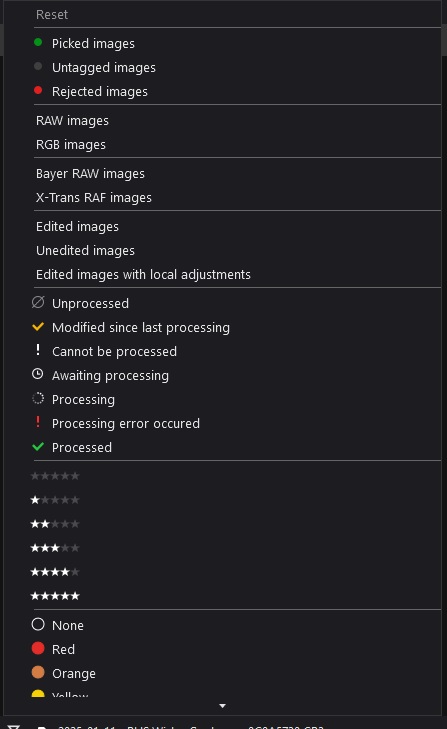
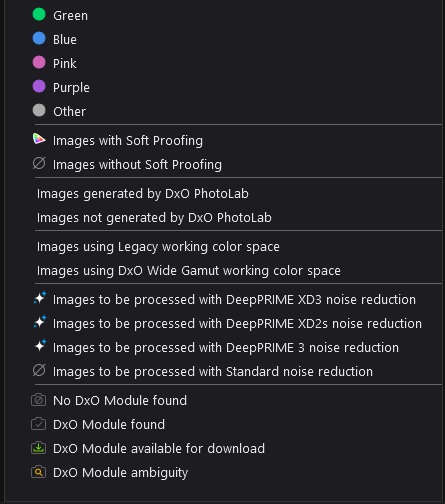
It’s so large that (I) need to scroll through it to get from the top to the bottom. Not all options can be shown at once.
My suggestion is to either:
Rework the design of the list so that some options are truncated into a sub-menu (Stars and Colour Label seem prime candidates for this).
Add a section to PhotoLab’s main options menu where the various filters can be toggled off/on to suit tastes.
For example, I will never need the Bayer RAW Images / X-Trans RAF Images filter. I will never need the DxO Module filters, I will never need the filters for different Noise Reduction settings. I will never need the Color Space filters. I will never need the Soft Proofing filter.
Allowing me to toggle all of these off - 16 filters in total - would help minimise this section very nicely. Others may use (or not use) other filters and they could set this up to suit them.
Ultimately there are 46 available filters. It’s great to have choice, but let me choose to hide half of that lot (or truncate it into sub-menus). Let’s make this section less busy.
Your request is just a tip of an iceberg. Hopefully DxO will follow the “Think generic” line and redesign the filtering tool. There are just too many options to satisfy everyone. Maybe DxO should change their (conjectured) motto “Keep it simple” to “Keep it simple to edit” and allow more UI customizations (causing support havoc as a side-effect ).
My typical use case would be an event, like concert with about 10+ performers, 1-3k photos, with some photos having two or more performers in focus. The problem: how to cull and how to export for individual requests. Seven colors is not enough for tagging in this case, so I have to use a combination of Colors+Stars, rather strange and not really intuitive solution (btw, I got used to tag double bass with Blue, vocal with Red, drums with Yellow, etc.). For a given “session”, I would also like to export automatically photos with a given tag to a specific directory. If you think about other use cases, you’ll see how complicated it is to keep it simple.
The filters I most often use:
RAW images / RGB images (mostly RAW only)
Modified since last processing (e.g. to choose images to export again)
Colors (classifying subjects, if shooting event portraits)
Stars, numerical ratings (rarely)
I don’t recall using any other filters, but some may use completely different set.
What I miss is ‘cropped images’ filter, but that again is a personal thing. Same for “Images that have White Balance settings changed”.
 ).
).