Renaming rawfiles after proccessing does what with dop file internal filename?

Hi guys and girls if bought a DMC G9 a wile back 04 2025 i suppose.

And this camera has a ockward handicap if found out to day. ( yes i am blind and didnt notice it earlier.)

it’s running folder for folder : folder 100 gets ABC**** so it does ABC0001 til ABC9999 and then it makes a new folder 101 and starts over with yep ABC0001 => ABC9999 => new folder => BUT the 100 nor the 101 gets infront of the 0001.

So ive multiple rw2’s who are named the same but has different shot date… and different image.

(my G80 does [folder number] shotnumber so P100 0001- p100 9999 and new foldernumber p101 0001 so i was in the assumption that this would be the same.

Assumptions killed the cat so to speak.

i am now renaming the rw2’s and most of them arnt processed, well because i was too bussy and most of them where car shots in burst mode so, but some of them has already a dopfile.

i can renaming in Bridge which takes alot fine tuning and preview. but i don’t think its renaming the dopfile’s internal filename. Am i right?

i am thinking of changing my hole system:

name tag rw of camera’s like LX100_[filename] G80_ [filename} G9_[Renamed filename]

That will take a wile so

1 G9 from start.

2 renaming G80 files rw2’s then the jpgs in archive.

Renaming the raw files in Bridge will definitely do nothing for the .dop files.
If you are going to rename any files that have any processing done on them, you’ll want to rename these within PhotoLab itself.

If I were you, I would go into the camera settings and change how your camera names your files. This is what I had to do with my two Fujifilm cameras, because otherwise I’d get files with the same name sometimes.

With your Panasonic, it looks like you can even have the filename include the 3 digit folder number, so this would prevent the camera itself from recycling the same names.

Thoroughly check out the documentation here: Panasonic - How to set the Folder and File names - LUMIX

Just use the smart renaming function in PhotoLab, design a format that will work and use it every time you first open your new files.

I copy all the files into a new folder for each event. Open the folder in PL then sort the images by date/time then rename them.

1 Like

Hi thanks, i read this and thought it just replace the abc for 114 but no automatic 115. I just made a new folder [114] and set use foldername as default. Well i suppose to make 1 foto before it sticks now i have _115_1234 .thats 10000shotcount in 1 sec :joy: Ow well its better then before :sweat_smile:. ( i could use reset nr if thats reset folder number. And create new folders until i am around my new renamed shotnumber..)

I have stil to rename all rw2’s i made already…:face_with_bags_under_eyes::downcast_face_with_sweat: i make G9_shotnumber.rw2 ( and skip a few shotnumbers each time its running towards 1000, 2000, 3000, ( normally you delete alot of shots. So i try to mimic total shotnumber a bit. Biggest problem are sorted files in folders on car number. ( renaming is counting up in sequense so i have to get all rw2 file as ducks in a row in one folder each time in order to get them counted up properly…)

I hope(d) that “lost dopfile” does something on renamed files.

Maybe with the rename sub function keep original filename inside xmp file . So dxo sees that too..

On plv8 i can batch rename something infront or something at the back as far as i see now. ( ive used and tested dxo pl from v1.2 til v7 and the keyword userinterface wassn’t that joyfull. So i used it for small corrections and adding gmaps gps coördinates, ( which Bridge doesn’t understand)

Plv8 i nearly didn’t use because of renovating a new bought 1980 house, i did shoot a lot of images on car races and shows my son wanted to visit and he too with my older g80. Thats why i didn’t notice this problem. I was storing them and let them be because of time i need 48 hours in a day i think…

( this weekend he (18) was driving with his friend (18) 400km to Nürnburg for 24u green hel zat 01:30 to see Max and the others came back safely sunday 22:30.

With again 1000plus images…:sweat_smile:

I hurt my knee so i cant stand on a ladder or do things like plaster a wall or ceiling. Started on my pc to plow through my things to do and :scream:.

My normal workflow is ingest in adobe Bridge.

Then delete all mishits. Use FRV If i need some checking. And use select/discart folders ( faster then dxopls red dot.) Give burstgroups colors so i know pick one or make gif, stack and such.

Add iptc by template, (dxo dont have that) add some info where who what , then tockle through keywording. Create xmp file wile doing.

After this dxopl comes in to play.

Maybe v9 has more userfriendly pre prep functions then v8.

Yes, it has a full set of batch renaming functions that should be very useful.

Hi again, Peter;

I’m not entirely clear about your requirement - but I can answer your basic question;

Assuming you satisfy two conditions;

  • You have a matching sidecar/.dop file for each image
    AND
  • When you rename image files you also rename their matching sidecar/.dop file in exactly the same way

Then it does not matter that the filename stored within the sidecar/.dop file is not changed - PhotoLab will update that for you - and it will create a new entry in its database for the “new” image.

John M

1 Like

Right small update:

I used Adobe Bridge to rename all my rawfiles from g9-000000 til g9-014728. ( this is what i found easiest: numbercounting up of all files and skip some numbers (rounding up) to simulate deleted files. ( clicks)

Did check my initial shutter count on my G9 which is 16000 isch. (So i am not far off)

According to the manual i can reset nr count including folder count if i format sd first.

so it would be _100 0000. after this. folder 100 and file number 0000

in order to get it back in “total count” it should be 101 5988 So after reset i make new folder twice: that would be 102.0000 ( assuming i have some electronic shuttercount and video counter to match a bit closer the 20k is this the closest i can get to “native total count of my Camera.

And it did so i am now on _1020002.

And as i am a bit autistic in details i gonna be renaming all G9 Rawfiles now again in order tp get the 100-101 count up. from now on i need to put “G9” in front so i doesn’t conflict with my G80 _101xxxx filesnumbers. This is easy to do.

other thing i found out Bridge renaming sees Dop files als rw2 because they are named as filenumber.rw2.dop so bridge renames them as filenumber(1).rw2.

Thus al my renaming for the G80-filing must be done inside DxOPL in order to keep already editted file information.

Yep alot of time to re- organise my photofile system but from every task you learn something so no wasted time. :wink:

@OXiDant Sorry to hear about your knee but I am hopelessly confused by your concern over Lumix image numbering!?

I have owned FZ5, FZ37, LX7, G7, G80, G90, FZ330, GX80, G9, GX9 and an Olympus E-M1 ii, cameras marked as bold are still in my possession and the G9 is a Mark1 not a Mark 2, i.e. the same as your G9.

I have to admit that I never work directly with the original folder numbering, I use ACDSee to upload the images to a directory that contains the date taken from the images, to which I then add a description of the “event” that is contained in the files,. If there are multiple events on the same day then I split them manually using the same date and adding a two digit suffix

But my problem is with you tale of woe about the G80 doing things differently to the G9!? I went from the G80 to the G90 and then to the G9 and I can’t say that I discovered that there was any difference!?

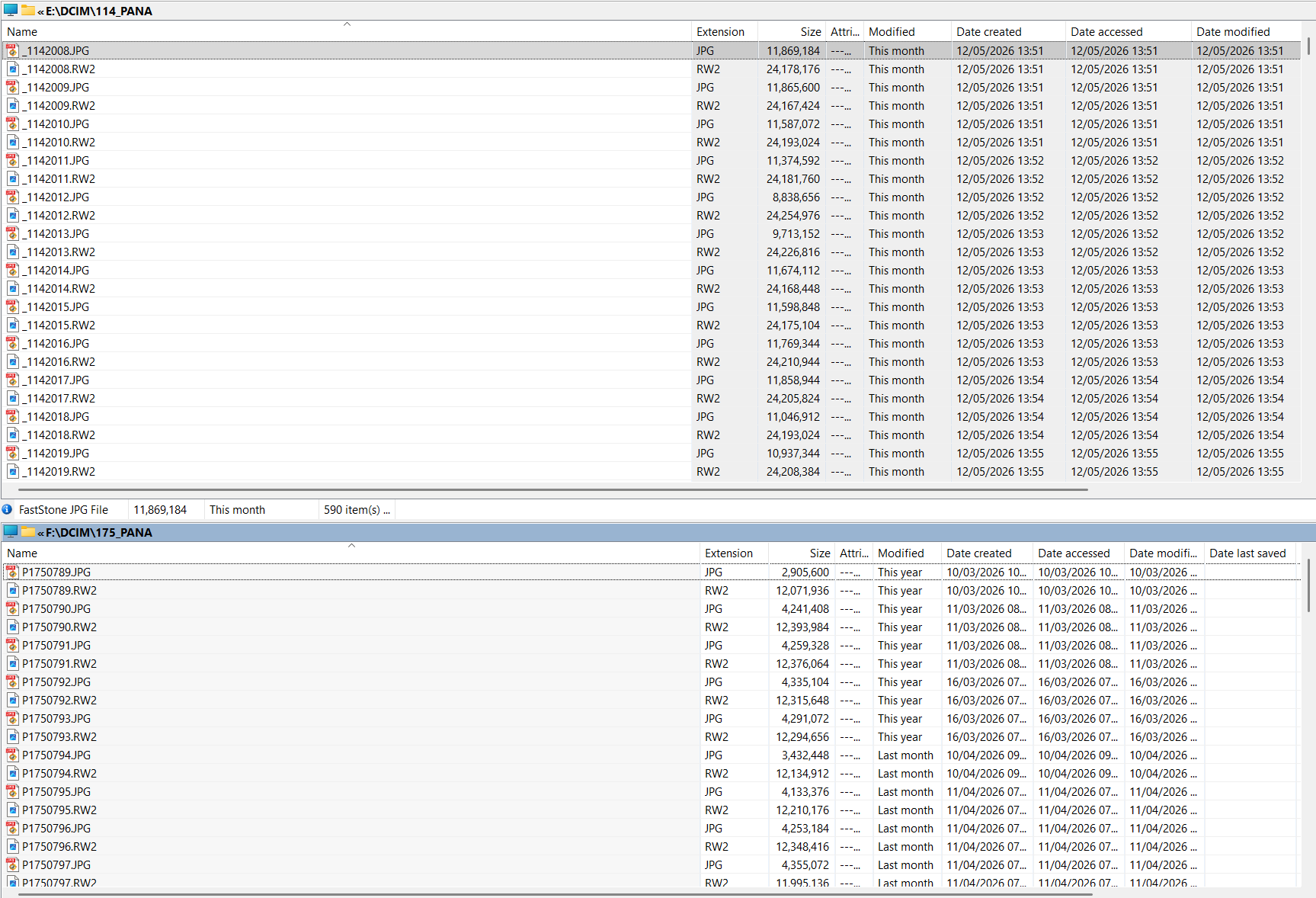
Currently this is a directory from the G9 compared to one from the LX7

and the major difference is caused by the fact the the G9 replaces the leading “P” of the image with an “" because I have set the camera Color (Colour) Space to use Adobe rather than sRgb, albeit that is only going to affect the JPGs, I take both RAW and JPG, and I can easily replace the "” with a “P” if I so wish with a basic renaming utility.

So I don’t understand how you have got into the state that you appear to be in!?

If you look at the snapshot you will see that the Directory number is also included as part of the image “name”, 114 for the G9 and 175 for the LX7. When the current directory is full a new one will be created and the numbering of the images will indeed return to 0000 (or 0001, I am not sure which) but the directory number will be increased by 1 so no risk of confusion or clash between images from one directory and the next!?

Wel when i bought on secondhandmarketplace the G9 it was less then 4500 clicks and it was set to “ANA 3985” And you can change the letters each time if you like to for projects.

As a real technical guy i “never read the manual hole” only the things i am interested in. And who is interested in file naming? :wink:

So i changed ANA to PAK and assumed that the counter added a 0 each time it needed to. As @unchdxoly rightfully posted If you read the manual you see that the “ANA” is the same as a folder name in which 1-9999 imagefiles can be placed (well if you shoot raw plus jpeg twice 9999 files but that is besides my problem.)

The G80 uses the same structure [folder] 0001 which is _/P (depending on sRGB/AdobeRGB ) [100] and rawfile number 1-9999 after 9999 it makes a new folder {101] and start over again with 0000 and when 9999 is shot it makes [102] so it looks like its P1000001-P1009999 => P1010000(or 0001) this sééms to be one row of digits but in fact its two rows sticking together when you import the images out of the SD card to your pc importfolder and then you could get PAK4500rw2 -PAK9999RW2 and a later shot date and time but named PAK0001RW2.

its a setting in menu. So i changed the PAK to folder numbering and in order to use the digit right i resetted the camera to default folder {100] and shotnumber 0000.

Then in order to get as close as possible towards the “real” amount of shutterclicks i made twice a new folder which is 100 => 101=> 102. together with the shotnumber 0000 ( which doesnt be written you must shoot 1 image in order to see a file number so 100 0001 is the lowest count and to see after 2 new folder actions if its working an other image shot so i begin with [102] 0002 which is _1020002 aka twentie thousand and two image count.

My G80 has around _1270788 files so that’s [127] 0788 So if i blend my G80 and G9 shots i could have issues of matching filenames and a 1 overlook could be destroying files due overwriting files with the same file name. (when i go to a event with my son he uses the g80 and i use the G9. We use what’s in my selection of lenses.

Thus i bought some extra overlapping the 12-200mm oly so he could use the 100-300mm lumix and my latest lens is a 100-400mm version 1 panaleica. when he goes without me he borrows my G9 and the lenses of his choosing. mostly 12-200 and 100-400mm because both are weathersealed. but sometimes also the lumix 14-140mm dual is And all images are ingested in one desktop, mine, because well organising and editing isn’t his strongsuite ;-P. So i have a system:

import folder and i ingest images in shotdate named folders first G9 so that folder i rename shotdate “event” G9 after that i ingest the g80 files which appear in yes also shotdate named folder.. . so i rename that one also to shotdate “event” G80

So both arn’t blended in one folder. those are culled , tagged, keyworded, icpt data as where what when who and moved towards a dxo edit ready folder. on exporting out dxo i have to place a suffic as G9 or G80 so they arn’t overwriting each other.

( in theory i can put all images in one folder and still be safe as in no overwriting due same filename issue.)

didn’t i say allready a dyslect ADHD person with some autistic property’s :rofl:

Sums up my problem : Don’t read more then absolute necessary to acomplisch the goal, start to soon and too fast to see the problems ahead, and is along the way changing route inorder to get it perfect…. => result chaos and blackholes…. but as you know out of every dying(imploding) star comes a blackhole which eventualy makes a new star! :innocent:

:slight_smile: