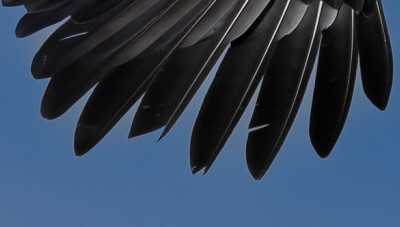
Hi, just some advice please.
How would you remove the subject mask from between the end wing feathers? When selecting subject the sky gets selected at the wing tips. Thank you, Russ.
Have you tried using a control line to select the sky and then inverting it? That might give a better initial result. Alternatively you could use something like control points in the negative to remove unwanted parts of the mask. There are many options; this is a strength of PL.
As already mentioned by @ColinG, and elsewhere in many other topics, using a control line to select sky is invariably far better than using the sky AI mask.
Thank you both will have to look at how this is done.
Russ.
I use DxO PrimeRaw5 only, but otherwise use Adobe tools. However, I’m writing this in the hope that my almost failsafe approach to resolving this problem in Photoshop might have a similar approach in Photolab. My technique in Photoshop is to use the Clone tool but to select “Darken” mode. I then take as a source sample the nearby surrounding background areas, typically sky or brush. With mode “Darken” the clone tool will only replace the pixels if the source is darker than the destination. Since the source is usually a lighter background color, then the only the pixels of the halo contour will be lighter and get replaced by the darker source pixels. It’s a matter of a few seconds or at most few minutes to brush out the entire halo area completely and with no artifacts. I hope Photolab has a similar mechanism.