I am evaluating DxO PhotoLab but the advert for FilmPack is using my vertical real estate.
How do I remove it?
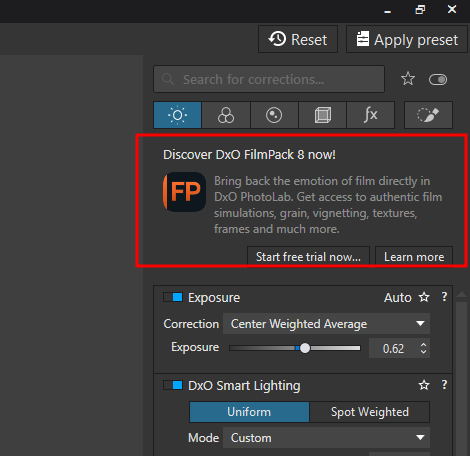
Thanks
-Alan
I am evaluating DxO PhotoLab but the advert for FilmPack is using my vertical real estate.
How do I remove it?
Thanks
-Alan
Start the free trial? It’s integrated into PhotoLab and you’ll be glad you did.
Check out the fine contrast sliders in the contrast tool and the luminosity mask in local adjustments. All the styles that are included are not everyone’s cup of tea though.
As others have said, start the free trial. If you ultimately decide to purchase PhotoLab and don’t want to also purchase FilmPack you won’t see advertising popping up over the interface..
Mark
“Just buy FilmPack” might not be the advice the OP is looking for. I don’t find it useful for my needs.
I’m pretty sure the advertisement goes away if you purchase PhotoLab. So you don’t have to purchase FilmPack but you will need to purchase PL.
I don’t believe anyone suggested that he should “Just buy FilmPack” but I do believe he should at least trial it for use from within PhotoLab before dismissing it. He doesn’t have to install the stand-alone version.
Mark
I’m using the full version of PL and still see this FilmPack nag on my interface, so I don’t think it’s limited to trial versions.
I am quite curious about FilmPack though, so might activate the trial anyway. I imagine the nag will go away once the trial has expired, but I guess we’ll see.
I didn’t start the trial yet, but have indeed been captured by curiosity so will tomorrow. I am very pleased so far with the results from Photolab. Not so happy that luminosity mask is a film pack feature, and slider sensitivity is a bit mwah. That said, I’ll probably purchase the bundle 
Thanks for the replies.
With PL (Mac), there is an “X” that allows to eliminate the panel…