Just installed PL9 (was using 7) and saw the recycle bin icon has disappeared from the thumbnail of each image in editing mode. That really pisses me off as I need now to click Shift+del instead of just clicking the bin. Any reason for that?
2 Likes
There was a parameter for this, did you look in the preferences/display “image brower section” ?
I also am missing the recycle bin icon and don’t see it in the image browser section of preferences.
1 Like
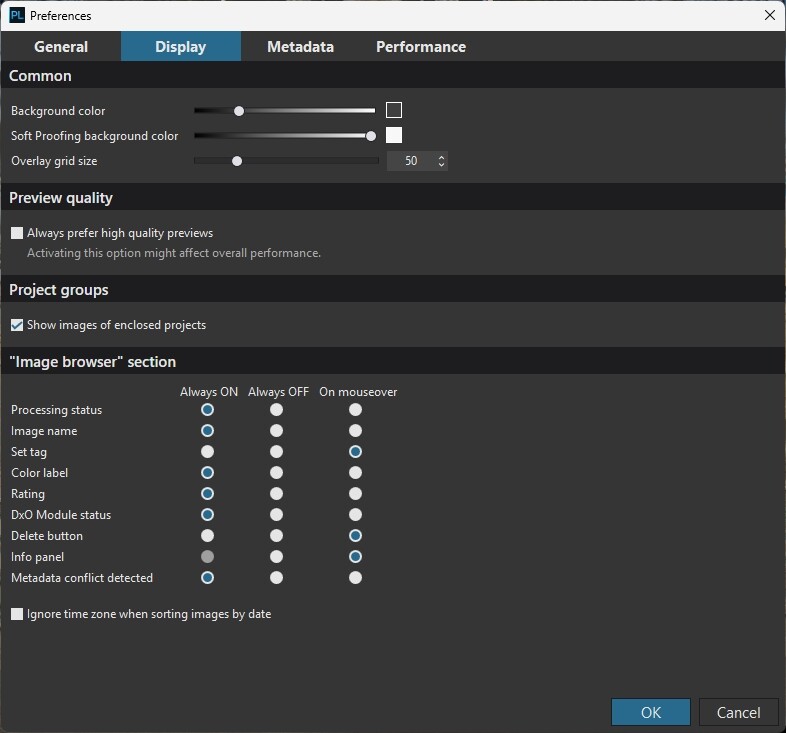
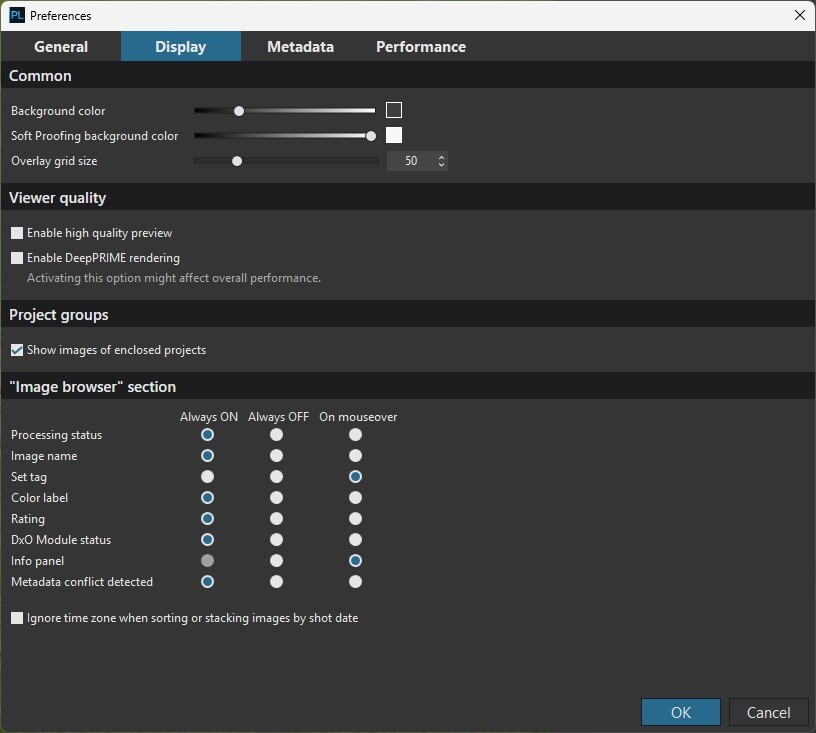
The “Delete button” was where Franky sugests in PL8, now it’s gone. There were all together nine choises, now there’s only eight left. At least for the windows version. I do hope we will get it back.
1 Like
According to the user guide for PL9:
### Delete image
To delete an image, press the Delete key (PC) or Cmd+Delete (Mac). A window asks you to confirm the deletion (or cancel). If you choose to Delete, the image will be put into the trash folder of your operating system and the associated virtual copies will be deleted from DxO PhotoLab.
However, as Franky said, the trash icon should still be available if it’s enabled in the appropriate Preferences tab. This, too, is documented in the User Guide:
Image browser section
Six different icons can be displayed on the thumbnails in the image browser. You can choose to have them systematically displayed, hidden, or shown only on mouseover.
Processing status: displays the processing status in the bottom-right corner of the thumbnail image.
Image name: shows if the image is a RAW or RGB-type (JPEG, TIFF) file.
Tag: red/green/grey dots indicate which images have been picked or rejected for processing.
Color label: displays the color label behind the file name.
Rating: lets you grade the quality of your images.
DxO Module status: shows whether a DxO Module is available.
Delete: lets you remove an image from the project or hard drive.
Info panel: floating information window on the image (always off or on mouseover).
Metadata conflict detected: displays an icon indicating a metadata conflict.
You can select the following display modes for each thumbnail icon:
Always: the icons are always displayed.
Never: the icons are never shown.
Flyover: Displayed only when the mouse hovers over the thumbnail.
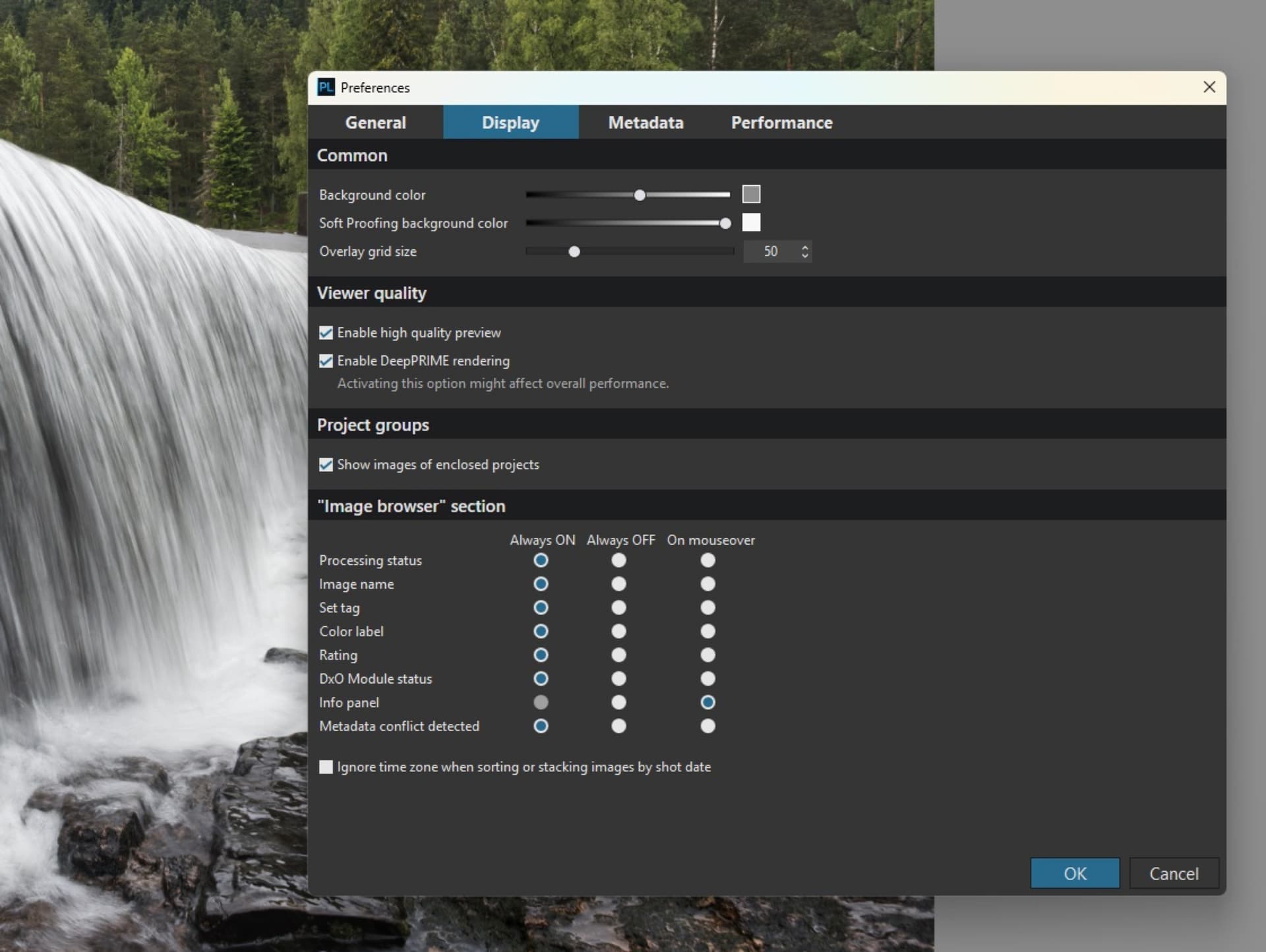
I see! Then the user guide is wrong and the feature was removed. Interesting. I’m supposing this was done in response to customer feedback of some kind.
Yes it’s definitely gone from PL9 but still present in the latest version of PL8 (8.8.0 installed just now).
1 Like
Thanks for the comparison. That’s odd, anyhow, I hope they bring it back. Sure they will when I am already used to the new way of deleting!!
1 Like
I never use this icon, I have a shortcut on my mouse for that.
Yes missing – I used it with mouseover.
1 Like
There have been quite a few changes to the thumbnails:
- The trash can icon has been removed.
- It’s replaced by the virtual copy information (M, 1, etc.). It’s much more readable than before.
- The DeepPRIME/XD processing status icon has been moved into the image. This makes it less readable, but it’s probably less important than in previous versions.
- The stars have moved from vertical to horizontal. This makes more sense to me.
In fact, for Mac, the recycle bin has been missing from PL5 onwards.
1 Like
Same here, I really miss it!
Dear DxO team,
please bring the trash tray icon (trash can/recycle bin) back:
- either one icon per pic (as before at PL8 et al)
- or one central icon to delete all selcted pics
Why?
Wildlife photographers often shoot in burst mode and get thousands of pics per day. From a burst series of 30 pics only e.g. two are worth to keep (plus jpg & RAW …). So we need a quick possibility to select and delete files without using the right mouse button pop up menue. Right mouse button is too slow and includes the danger of hitting the wrong menue item.
So please bring the trash trax icon back!
Best, Joerg
PS: I’m really asking myself why your beta testers accepted the removement of the tray icon without creating a shitstorm.
1 Like
The deletion icon was removed from the thumbnails In the image browser as a direct result of the introduction of the stacking feature. Can you imagine the havoc it could cause if that icon was still available on various types of stacked groups?
DxO needs to provide a useful replacement for that icon elsewhere, but that is the reason it is no longer visible on each thumbnail.
Mark
1 Like
What makes you think the issue didn’t come up in testing, or that the beta testers were okay with it? Please don’t jump to conclusions and make poor assumptions about things with which you have no personal knowledge.
Also, see my post just above yours which may help you understand DXO’s decision to remove the delete icon from the thumbnails. However I agree that it’s unfortunate that they did not implement a better way to delete individual files once the icon was removed.
Mark
So obviously you know more (maybe you are a beta tester?). If DxO didn’t listen to the beta testers, it’s even more incomprehensible. Very disappointing!
Yep, gone from PLv9 … (Edit: Reasons explained above, as I’ve just now noticed)
I’m sure there were a number of things that beta testers were not completely happy about - but, beta-testers are probably just “testers”; with their opinions not being sought !
2 Likes
That sound’s very much like whatvothers have said from former years. DXO just do not learn to listen. 9 is unusable for me due to my video card even after taking it back to an old driver
1 Like