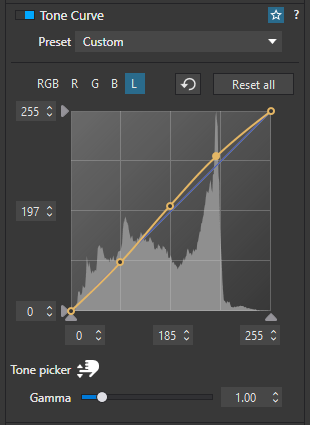
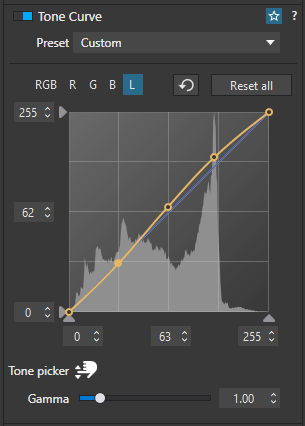
I’ve been using tone curves in PS since the late 80s so how to use one is not a dark mystery for me. But I’ve been wondering what the ‘middle’ numbers do (one in the middle at the bottom and the one in the middle on the left side). Changing them from 0 to 255 doesn’t do anything obvious. Mostly curiosity on my part - plus they might do something I find useful.
Also, there isn’t any way to see what the middle of the histogram. is there? I see LR tutorials that use that to put a pivot point right there as part of creating a S curve for contrast. Again. just wondering. If there’s a full tutorial for the curves tool in PL I haven’t found it. If you’ve got a pointer to one I’d be glad to wade through so I can answer my own questions.
These are coordinates of the currently selected (active) anchor point on the curve, meaningless if none is selected. Useful e.g. if you want to put many points in deepest blacks near each other – you just add a new anchor anywhere on the curve and then edit X and Y precise values, using keyboard or mouse.
You can just use the 4x4 grid. Isn’t one shown in your case (I’m on Windows too)?
Right. Here’s an example in case anyone comes across this in the future.
Example 1: The second “highest” point on the curve is selected. Note that it’s completely yellow, rather than with a black dot in the middle, showing it’s selected. Its coordinates are: 185 x, 197 y.
The middle dot between these two curves will return a number roughly in the middle of the two examples above (in my case: 126 x, 134 y).
The lowest dot is set to 0 x, 0 y and the highest 255 x, 255 y.
(As a bit of an aside: here I’m showing a basic S-curve which are popular in photography, but the dots could appear anywhere you like on this graph and their impact would hopefully be obvious. For example, if I moved the dot from example 1 (second highest) up to the top of the graph space (255 y) you’d see the whites (most likely) horribly crushed up towards pure-white, over exposing and losing a lot of detail.
PS provides the median value of the tonal range and this number can be used to anchor the tone curve precisely. In Lr and PL one has to eyeball the luminosity histogram to estimate same.