Recent user here, a few months only. Sorry if it has been raised before.
Am I the only one using multiple screens and looking for a way to spread the interface on multiple screens, like having the PhotoLibrary and the Customize UIs on the lower resolution screens while having the picture on the hig res monitor?
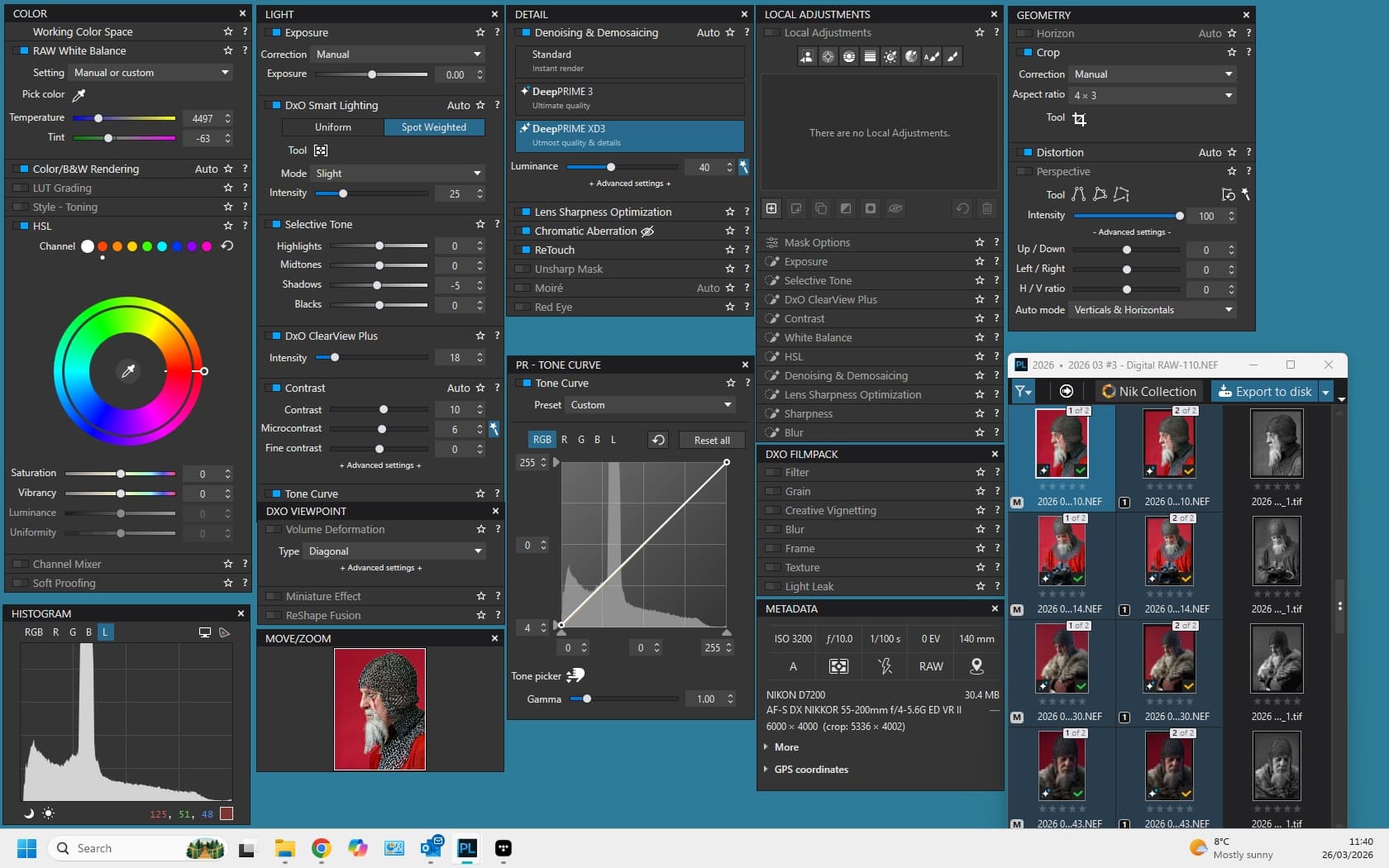
I do exactly that with my double monitor setup. In Customise mode, select the “DxO Advanced” workspace in the Workspace menu drop down. This will open up all of the editing controls and information displays on the left and right sides of the image. Then just select each Palette in turn that you want to be visible in your customised workspace (e.g. Color, Light, Histogram) and the Filmstrip and drag them to where you want on your second monitor. When you’ve got things arranged as you want save the workspace via the “Save workspace…” option in the Workspace menu and this will now become your default workspace going forward. A step further is to create your own Palettes and populate them with a selection of individual controls.
Depending upon your monitor resolution, you may not have enough screen estate to position all of the Palettes and/or you may not have enough to have all of the controls in all of the Palettes expanded, so how you handle this will depend upon your personal preferences. Note you can resize the Filmstrip to display fewer or more thumbnails.
As an example, the image shows my default workspace that’s on my second monitor, with just the image and main menu window on the primary monitor.