Why is the AI masking still so bad in Photolab? No options for masking skin etc and the hair masking is poor too - still not a patch on Adobe - OR am I doing something wrong?
I find the people masking Ok to fine. If you do something wrong is hard to say. Do you have a sample you have a problem with?
1 Like
I presume it’s because DxO is a small company, nothing the size of Adobe and its seemingly bottomless funds.
Adobe recently quadrupled subscription pricing and is milking customer’s images for AI training. Quadrupled? Yes: two products on two computers, now one product on one computer. Plus more cloud space so that customers provide more training material.
We might need to manage our expectations for some time still.
What do you want to achieve with this statement? It just sounds like primitive trolling, sorry if I’m wrong.
If you have a REAL problem, please present it. Note that skin masking without any boundary diffusion usually leads to artificial results, as seen e.g. in Capture One, best seen on the face/hair boundary. But if you add diffusion, you’ll get artifacts elsewhere…
@platypus I doubt this is just a question of company size and money. There have been quite a few one man or small companies that have made far better programs than the giants. Look at Emrick Software and Vuescan and compare that to the scanner manufacturers often surprisingly poor software. Look at Photools and iMatch DAM and compare that to what is in the RAW-converters - and even Adobe Lightroom.
It all boils down to skills and commitment and that is things no money in the world can be sure to buy because it is genuin human qualities that happens to be pretty rare and very hard to scale. If a company lack these skills it doesn´t get better how many half mediocre developers you throw on the same developing task. Sometimes the results even get worse with that approach.
How many at Adobe is really developing anything these days. I guess they are fully ockupied counting all that money instead and with a subscription model there is not really any need at all to rush any R&D at all and from time to time that has really been obvious at Adobe when looking at Lightroom. With all that money it opught to have been absolutely outstanding right? But it is not!
1 Like
You may add “programmers/designers who can think generic”.
No not trolling - more frustration - there is no way of easily selecting just the skin when adjusting skin tones. I have tried doing it with local adjustments using HSL and hue adjuster but HSL doesn’t have eye dropper locally and hue tool isn’t sensitive enough. I just find it curious that this seemingly basic tool cannot be done by a company that produces such a clever AI based noise reduction tool.
As recently as just prior to the PL9 release, I was just as frustrated with Lightroom’s AI masks. It could not select objects to save itself. Easy ones, too, with clearly defined edges.
Every product has its strengths and weaknesses.
…and a five-year old kid will probably never beat the world record in running marathon distances.
@Wellsyboy Things take time and commitment and no matter how seriously people are committed, time just flows. AI masking is new to PL, others have started earlier. And that is where resources come into play.
It can be frustrating to see that others don’t meet our expectations. Nothing new though. One way to happiness is through expectation management…and DxO sales are good in raising those. But every time, reality wins.
1 Like
That’s a fair point. While DxO’s DeepPRIME is definitely industry-leading, it feels like the local adjustment AI is still catching up. For now, I’ve found that using a Control Point with a very narrow chroma/luma selection can sometimes grab skin tones better than the auto-mask, but a dedicated ‘Skin’ or ‘Body’ AI mask like the competition has would definitely save a lot of manual cleanup.
1 Like
I find the “click to select” Ai masking fairly usable and it’s also quicker to select an area.
1 Like
I’m finding it a little hit-and-miss when it comes to bodies and hair too. Sometimes you’ll get more (or less) than you bargained for. Then it takes time fixing it.
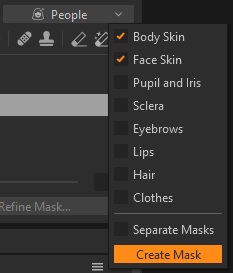
Capture One has a lot of development both in masking:
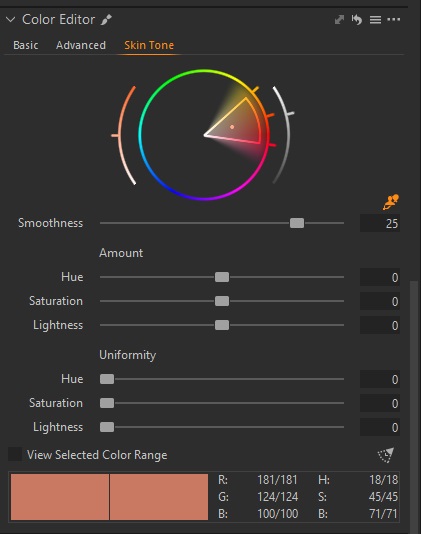
Skin tone correction (and there’s a picker to select the tone you want to address here):
And there’s also a ReTouch panel which can do some interesting stuff if you work with people a lot:
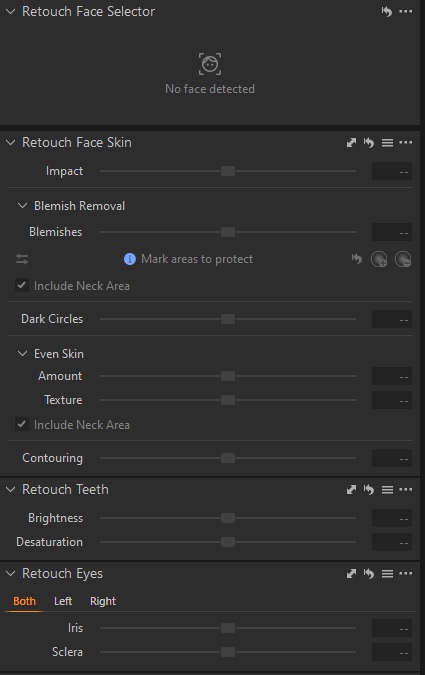
It might be possible to emulate some of this with e.g. PhotoLab but it’s not as “neat”, yet.