I am looking to buy a new Mini PC and I’d like to know if I can get away with integrated graphics (780M or Intel Arc, etc.) and still be ok with performance on PL9 for AI Masking and noise reduction.
Any suggestions or recommendations would be appreciated.
@adamh128 If you had asked that question before PL9 and AI I would have said definitely not if you are exporting more than a handful of images at a time.
With the coming of PL9 and AI you can imagine my response and that is coming from someone with a 3060(12GB) and a 5060Ti(16GB) and who happens to own a very cheap mini PC and values its presence for cheap (with respect to electricity power usage) computing, so much so that we bought another for my wife so that she move to Win 11.
Possibly better than I expected and you can get add-on GPUs for some of the “baby” desktops.
For actual PL9 use the 780M might not be too painful but for exporting the images it is going to take at least 2.78 times longer than my 3060(12GB).
That may not be so bad providing the gaming benchmarks hold true for the 780M, they have been pretty accurate when I compared my old 2060(6GB) with the 3060(12GB) but that was before the coming of AI.
Plus it might not even be supported by PL9!?
The MAC users would suggest moving to a Mac mini or whatever it is called and they may well be right in this context, but again not all models will be suitable or the most suitable.
Thanks, I am only a casual user of PL (I have PL5 elite and haven’t had a reason to upgrade until I saw the AI masking), so my usage wouldn’t be enough to justify buying a discrete GPU just for this, and I think I can live with slow-ish exports (I would rarely do more than 5-10 at a time), but I’m more concerned with the UI responsiveness.
I’ve been using PL5 on my 4-year old laptop (i7-9850H, Quadro T1000, 64GB RAM) without issue, but my PL9.2 trial UI is painfully slow on this.
So I ran tests with the rather more buggy earlier PL9 releases on my i7-4790K, a little less powerful than your i7-9850H, with a 2060(6GB) and it worked until it hit an AI bug!?
Sadly the trial licence on that machine has expired.
The problem you have is whether to spend money upgrading the existing machine with a better GPU or buying a new machine but I am afraid I do not believe that the 780M or similar will be of much use.
My 5060Ti(16GB) replaced my 3060(12GB) in a 5900X which in turn replaced a 2060(6GB) in a 5600G. The 5600G and 3060 work perfectly well together, the 5900X with 5060TI even better, the processor is twice as fast as the 5600G and the 5060TI is about 1.7 times as fast as the 3060.
Personally I would consider buying a more powerful GPU with at least 8GB (preferably more) either new or second-hand, both my 2060(6GB) GPUs were bought second hand for about £115 a year or so ago and were perfectly serviceable until PL9 AI, and some of that might have been bugs in releases before PL9.2.1?
If you are in the UK I would offer to sell you a cheap 2060(6GB) except I am still concerned about whether 6GB is actually enough VRAM!!??
The 3060 is fine but then it has 12GB and there are still problems with PL9.2.1 exporting, even without AI!!
Thanks, I appreciate you taking the time to do some comparisons
I was planning on buying a new Mini PC anyway to replace a [very] old desktop, so perhaps I’ll look for one that can house a discrete GPU (or via eGPU) and upgrade once the PL AI/GPU bugs have been resolved.
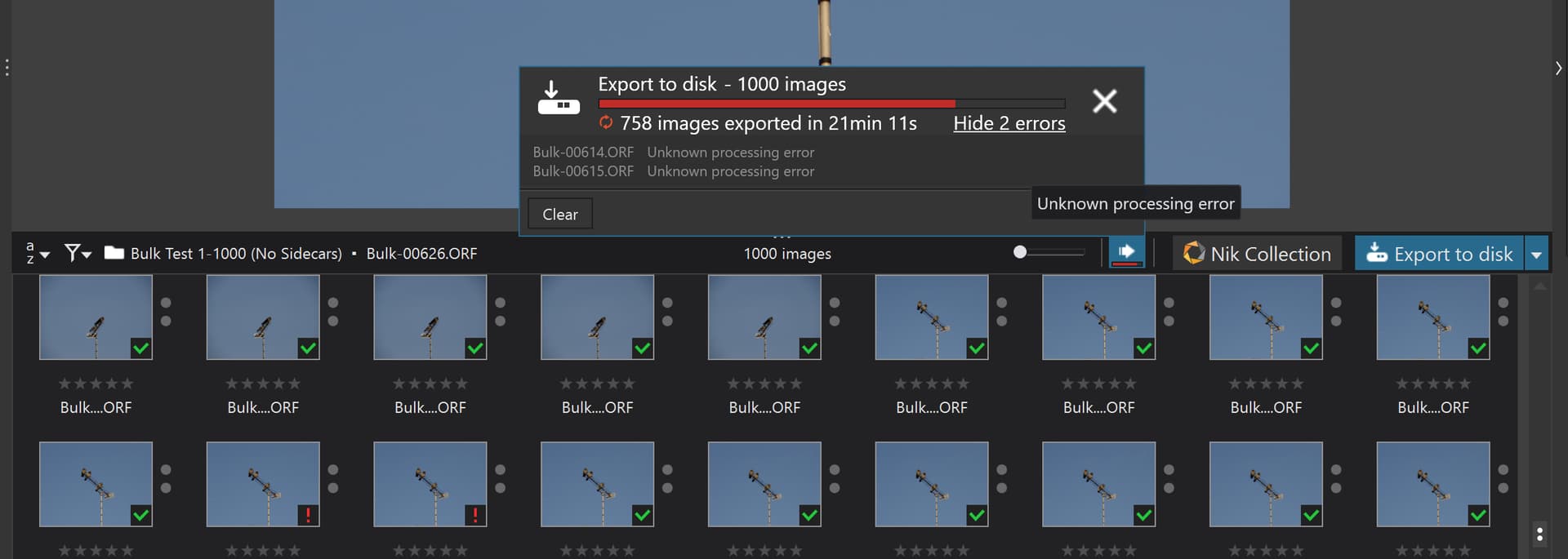
@stuck Except me and one of my tests with images with NO edit, NO NR and NO AI got PL9.2.1 to Dump, admittedly after 615 export of a 1,000 export test run but failed it did.
They have changed the way the export process works and I think they may have made an error in the design or coding of the new process.
@adamh128 I believe I am right in stating that the Mac mini with an M chip-set doesn’t require any other form of GPU but you will need a Mac user on the forum to advise about that and the best model to choose, e.g. @platypus, @Joanna , @zkarj to name but a few.
I personally use a MacBook Pro M4 with an Apple Studio Display but, if cost is an issue and you don’t need a laptop, my recommendation would be this Mac mini - Apple (NL) but with a 1TB hard drive.
Of course you will also need a monitor, keyboard and mouse but the choice for that is up to you.
I just bought a new Laptop with an Intel Ultra 9 processor and the RTX 5080 ti graphics card (Make sure it’s a newer dedicated graphics card!) and tested it with a few Ai layers in a batch of about 15 RAW photos. Copy and pasting settings to each one. It went through all of them and had errors on 2, which I retried and it went through fine. However, there was a new update released by our friends at DXO and I’m sure this will continue to improve.
What I would say is get 32 gig of Ram for sure. 16 is not an option IMO for Ai. And make sure at all costs you end up with 8gig of V-Ram! I found a steal with 12gig on mine at $1,500. There are a lot of deals to be had. I spent 2 days geeking out to find the perfect one for me. Micro Centers in Baltimore had some really good builds in their Predator line via Acer.
I haven’t tried any bulk exports yet, but version 9.2 exports reliably enough for me (so far) with around a 30-35 second export time per-photo using my usual setup.
The latest version - 9.2.1. - tanked that performance to over 2 minutes and 30 seconds exporting the same photos under the same conditions.
Whatever they’ve done, it’s not good. I’ve downgraded to 9.2. and will be keeping at that level for the time being.
@Fineus Oops, mine was that image 615 failed to export successfully and PL9.2.1 Dumped. The images had NO Dops, No edits, No NR and NO AI. i.e. just turn a RAW into a JPG and, because I was sending the output back to the same USB 3 attached SATA SSD they were 35% JPGs at that so I didn’t run out of space!!
I was just playing around with PL9.2.1 on my old laptop and managed to do a few AI Mask edits (using the AI rectangle selection). There are delays to get the preview but not as bad as I was expecting. I then did a DeepPRIME XD export of one image in 2m43s.
All in all, as long as DxO keep improving performance (and don’t go backwards), it should be usable on a basic (integrated) GPU, and as long as I get a Mini PC that can expand (eGPU) later then I think I’ll be ok with that.
Mac is off the table - I’m not a fan
Actually I’m not really a fan of MS either, but as there’s no Linux version of PL, that’s what I’m stuck with!
@adamh128 Sorry I tried to send you down that particular road! As for the mini-PC then check which can have an (externa) EGPU added (in the future) and which offer the best inbuilt IGPU experience for the budget available.
I think that’s what I’m trying to tell you - though your experiences may vary from mine (and for your sake I hope they do).
I’ve found overall Photolab performance to get progressively worse since around version 7. That’s the point where I started finding “Huh, this isn’t as slick as I remember it”.
(And that’s with general edits and no other big changes to my process or system - it gets oh so much worse when AI masking is introduced. I used to be able to export a Photolab shot in around 12 seconds. Now it’s usually ~30 seconds).
That’s honestly astonishing. So PL can’t even convert files from one format to another without crashing out? I could understand if (like me) you’re trying to introduce at least some masking/AI masking…
I’ll stick with v9.1 for now, as that seems stable and to not take 2.5 minutes per shot. At that kind of performance, I might as well go back to Lightroom.
That’s a shame because the new M series chips are mind-blowingly powerful and the VRAM is integrated.
You can always buy a Mac and run Windows in a virtual machine, using something like Parallels, for those apps you prefer in Windows. You even get both Windows and Mac apps on the same screen and can copy/paste/etc between the two.
@Fineus Yes, or at least in my test, which was not exactly complicated in any way, but was deliberately designed to flush out what I had come to expect, i.e. after a while PL9 gets “bored” and the export fails, i.e. memory gets full, an array overflows, a resource DxPL expected to be available wasn’t etc. etc…
I do believe that the more work it has to do the sooner the failure, so AI would/should result in that failure sooner than my giant batch, which are all physical images rather than VCs, albeit a copy of a limited number of original EM1 Mkii images but with absolutely “nothing” for PL9.2.1 to do and “fortunately” it fulfilled its promise and substantiated my belief and failed, albeit I expected that sooner than image 614.
Hopefully the Dump will be useful to DxO engineering!
The change in export worker architecture may also be responsible for the changes in performance between PL8 and PL9 (just guessing).
I’d certainly be interested, but even between PL 9.2 and the new and latest 9.2 I’ve observed that massive export time difference after just a little bit of usage (not even 10 exports… but even 2!) where it goes from a consistent 30-35 seconds per photo to export, to 2.5+ minutes.
I was moaning about PL performance before this latest release. Somehow they’ve managed to make it even worse.
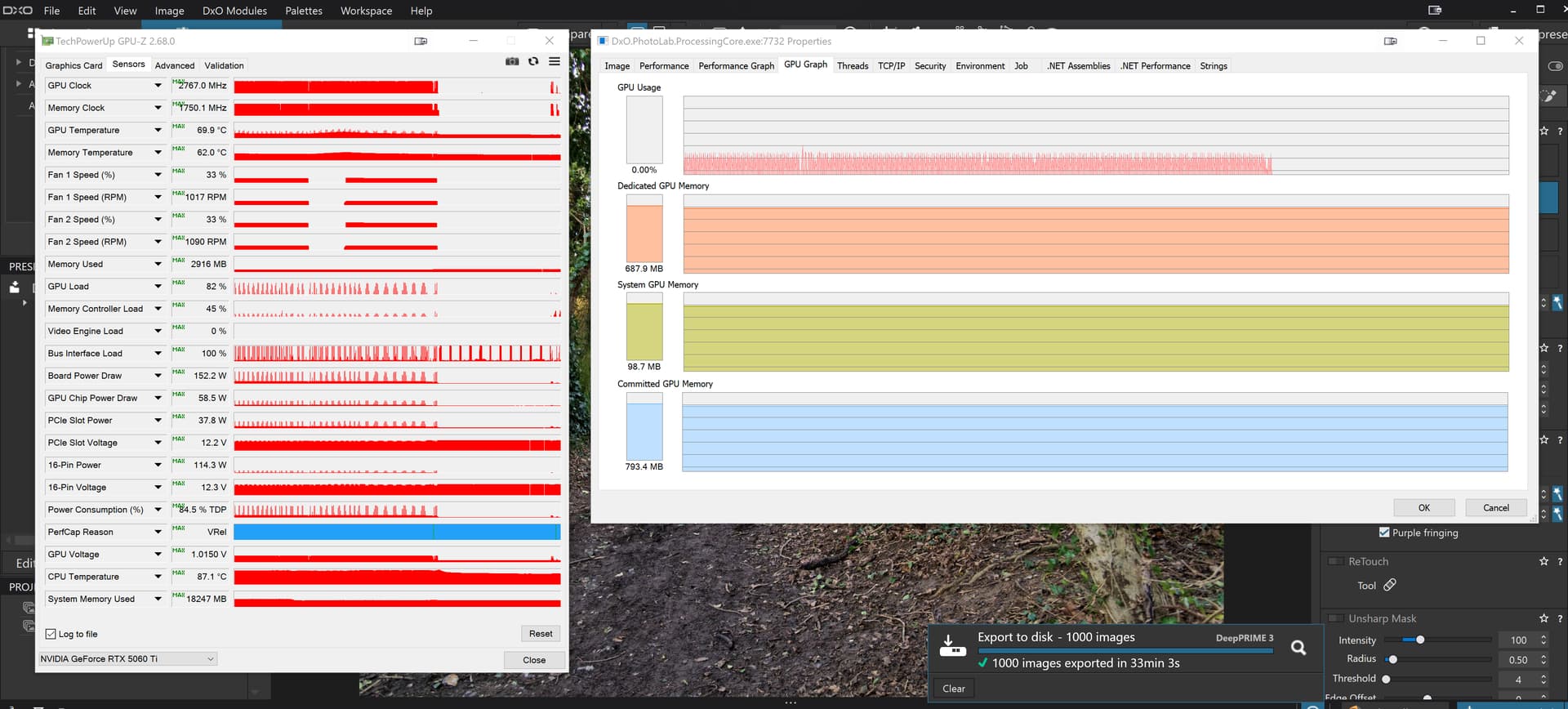
@Fineus So much for my theory. Used my 1,000 image directory which has DOPs, opened, applied a new preset to it and changed the NR to ‘DP3’ and this was the result
(I have to get a rant in: You shouldn’t be doing their beta testing for them) BUT it’s still very strange that this somehow worked where your no-edit export didn’t.