I can affirm, sleep purge GPU VRAM usage.
1 Like
@Allan if you still have PL9(02) installed could you do me a favour. I read the bit about the fact that one of your machines continued to work with PL902 where both had worked with PL901.
This is a DOP that goes with one of your images (the second you kindly posted in the forum) but it contains the [M]aster and 39VCs, in fact there are two DOPs one has DP3 set for all 40 and the other XD2s set for all 40.
It would be interesting to see what happens when you try to export on your machine where PL902 has worked for you, if you still have PL902 installed that is and are inside the trial period and have the time to do the test.
Thanks
Bryan
Both DOPs in a zip file , each with an additional extension that needs to be removed before the DOP is added to the image for testing.
If you can run the tests please supply some GPU-Z data so that I can compare it to mine!?
Alan’s image - VCs.zip (75.8 KB)
Both DOPs worked although the XD2 version was quite a bit slower as expected.
Neither set presented any problems, no crashes.
Allan

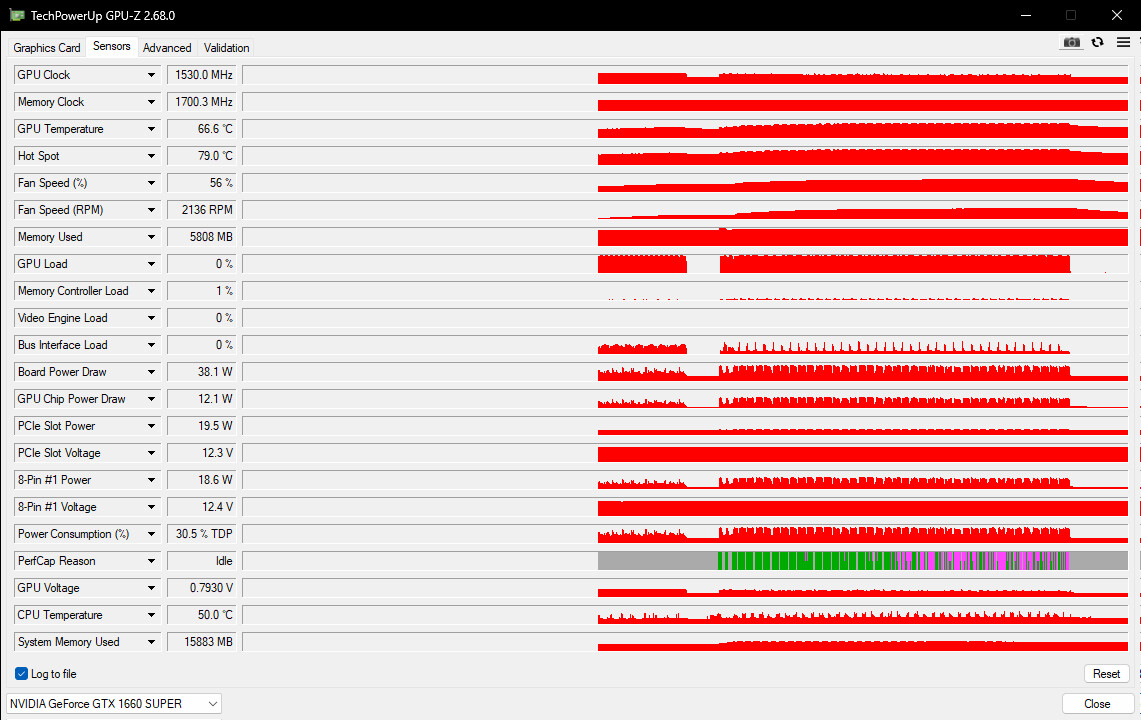
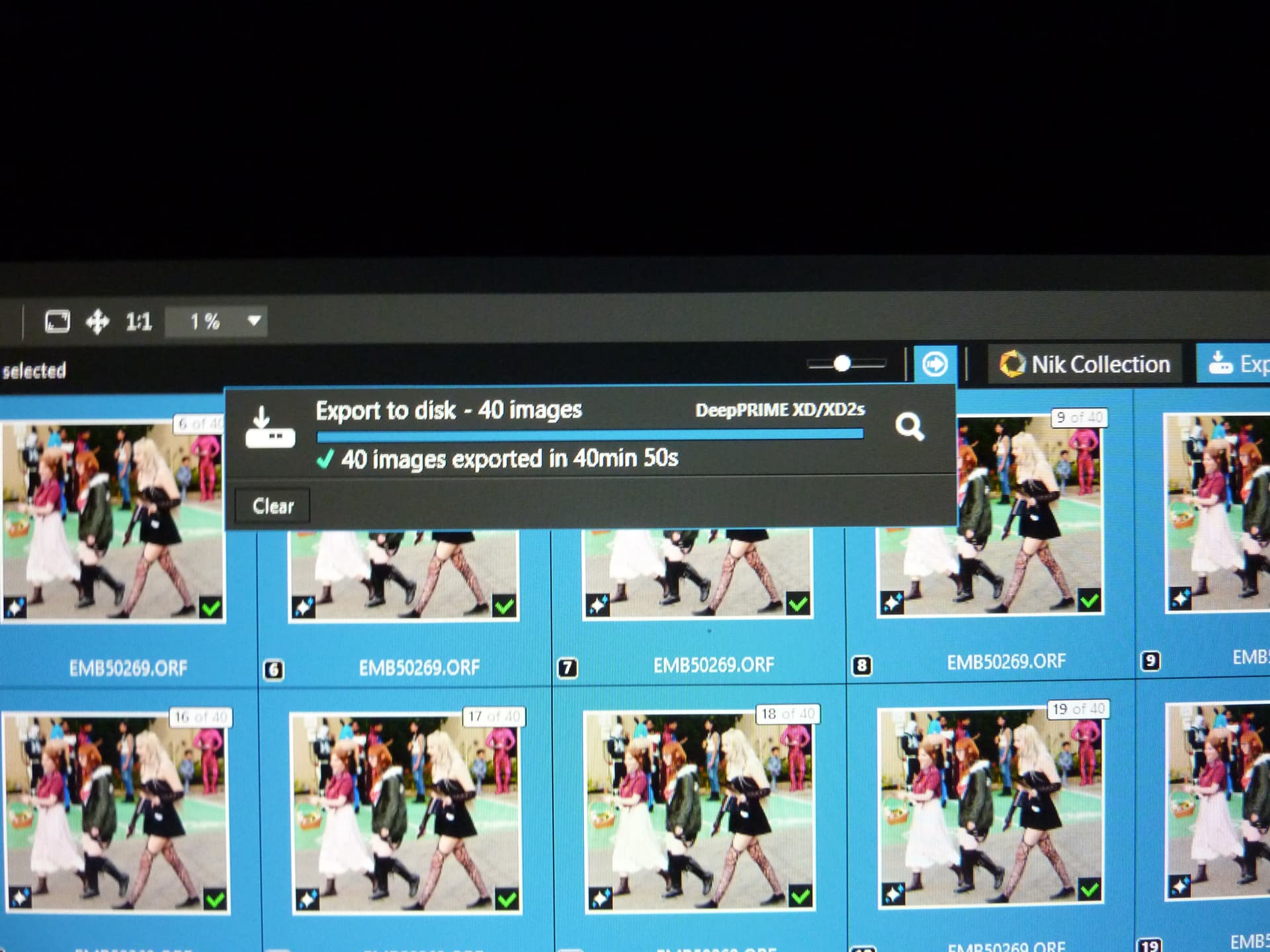

@Allan Thank you for that now for the Inquisition and I will then explain the reason for it.
So please tell me what you did to load and perform these tests, I understand that you will have unpacked the zip file and put the DOPs with one or two copies of the image etc.
But I presume that you then had to select all the images and export?
The reason I ask is because I having discovered that putting the PC to sleep clears the GPU VRAM of the PL902 models, AI and de-noising.
The tests were done this way to see if I could detect any “strange” patterns to VRAM usage.
There certainly are because the results go like this, I’m showing the 5600G 3060(12GB) figures first. Please note that the G in 5600G means that the CPU has an IGPU onboard which has two connections and I have the machine attached to 3 monitors.
So providing PL902 holds together while selecting AI masks, in fact the 3060(12GB) failed with “Sky” masks on the latest release but subsequently worked after I reverted to NVidia 572.83 drivers.
So for a test I make all the adjustments to all the images to be exported, select all the images and, in particular, the Noise Reduction to be used and then put the PC to sleep.
After I wake the PC I immediately do an export, even a simple change or selection of an image will cause the memory usage to increase dramatically and this is what I get
5600G 3060(12GB):-

Step                                Drivers    De-Noising      Memory usage       Time for export
Export straight after Sleep          581.29       XD2s           2892MB               2min 7s
Export after any adjustment          581.29       DP3            6894MB               1 min 42s
In the above example I changed the choice of de-noising as the operation and it immediately caused the increase in memory used. In other tests I have changed the selection from all to a single image and the usage jumps immediately.
I apologise for creating a batch so big that it took over 40 minutes to process on your one machine that can still handle PL902 and there is quite a difference between XD2s at over 40 minutes and DP3 at 5 minutes and 50 seconds on your machine.
In fact, I have become tired with the time that some tests take when I am repeating one after another and have reduced the batch size to 20 images in some cases.
The timings for my runs on the 5600G and 3060(12GB) are as shown above, i.e. 2minutes 7 seconds and 1 minute 42 seconds.
The 5900X and 5060TI(16GB) managed it even faster although not so much faster that occasional users might prefer to save some money and buy the 3060(12GB) card for about £250 new or £175, it cost me £339 at the start of 2023.
I had problems with adding “Sky” with the latest drivers on the 3060(12GB) but installing 572.83 seems to have made that problem “go way”.
The 5060Ti(16GB) cost me £369 when after deciding I was going to have to pay £399 or thereabouts I suddenly discovered a deal for one at £369 which I snapped up (that particular card has jumped to over £400 pounds)!?
However in looking for the timings of your images on on the 5060Ti(16GB) I came across this table I had created

and it was definitely on one of your images

This shows DP3 times exceeding XD2s times when using earlier drivers, 576.02 to be exact
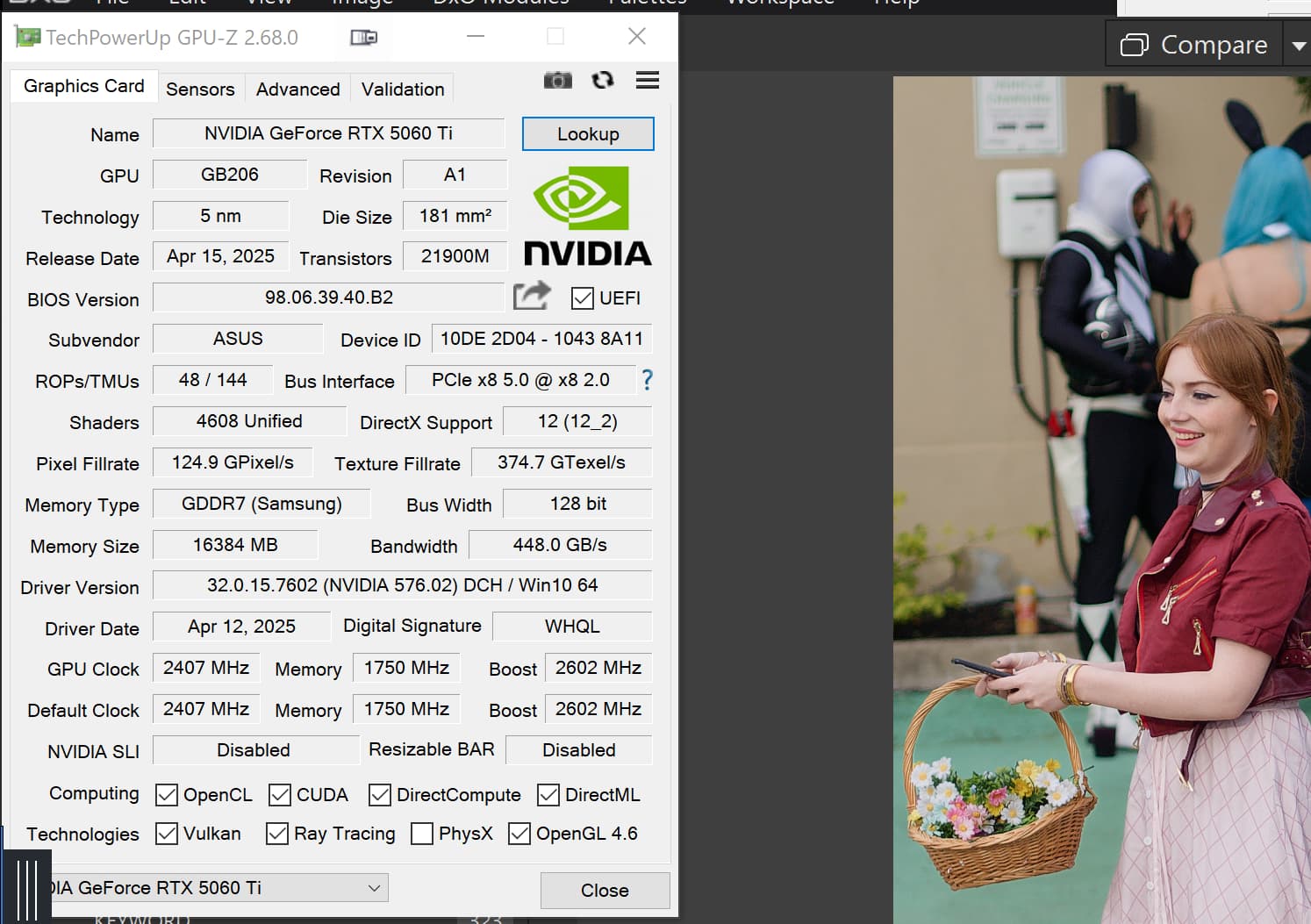
I was so focussed on VRAM usage that I completely missed this, oops!!
Once again I am sorry to make you “suffer” the wait for the test to complete and thank you for your forbearance and for providing the image in the first place.
Regards
Bryan
2 Likes
It’s interesting that on your computer, DP3 export is a bit slower.
So, with the images you sent to me, what I did was - I created two folders one for each noise reduction and copied the relevant forty images into each.
In PL, I selected the first folder and waited for PL to find all forty. Then, while in PhotoLibrary, I selected all forty and exported them as I normally would do.
Same for the second folder.
I guess that, since I did not make any changes to the photos, the computer was in a state similar to Sleep Mode. However, I’m not sure that this makes a huge difference as I have just processed a group of 77 images, some with multiple AI masks and various other edits for lighting (night scenes). Processed with DP3.
I exported all 77 of them immediately with no issues. The average time for that group was just under 10 seconds. I did not use Sleep Mode.
I find that the average processing time, without AI masks, is about the same as PL7. However, with the AI masking, I tend to spend more time adjusting scene elements.
On this Graphics computer, I don’t see much difference between 9.01 and 9.02 as some others have but 9.02 did not work on my Office computer as I mentioned above. Perhaps I should give it another try.
I am reluctant to buy a new computer or a new GPU as all my other photo editing and graphics software is working well. Even Topaz Sharpen AI works well with AI masking.
1 Like
For unscientific reference, I just exported the same shot using DP-XD/XD2s and DP3.
The XD/XD2s took 18 seconds, DP3 took 12.
1 Like
Thanks for all that testing all of you. It also confirms my own experiences.
1 Like
Sorry this response got parked and not posted.
@Fineus So has every other test I have done except the one shown, and I missed the occurrence at the time, but I was taking snapshots at each stage of the test and the “issue” was definitely there in those snapshots!?
@Allan In your case that seems to be the case but in many of my tests PL902 is “breaking” 8GB let alone 6GB. It is possible with both the 12 GB 3060 and the 16GB 5060Ti that DxPL is simply using any memory that is available rather than managing the models in and out of memory but … I don’t think so!?
@Allan So you be should reluctant, the sums of money I showed are not trivial and prices can vary wildly, on Amazon in particular. Throughout the day I was looking the lowest I found elsewhere was £389 and £399 on Amazon until up popped a price of £369 which I decided to go for, “only”(!?) £30 more than I had paid for the 3060 (back in January 2023), at least that was how I justified it to myself!!
The 5060Ti(16GB) gives me 33% more memory and about 70% more GPU -processing power but a 3060(12GB) would currently cost about the £240 - £250 mark in the UK new and cheaper second-hand.
If you do decide to go for an upgrade to one of you machines please seriously consider more than an 8GB card, either 12GB or better 16GB.
@Allan What are your settings for

for all my tests I have reported up to this point both settings had been ‘ON’ and I believe that has been causing part of the the problem where an export from “Sleep” has taken a certain amount from VRAM but this jumps considerably when almost any editing operation is undertaken!?
With the options set as shown in the above snapshot, i.e. not set at all, there is no such immediate jump in VRAM usage! But that happens soon enough when any real editing is done.
With my Graphics computer, “high quality preview” (HQP) is enabled while “DeepPrime rendering” is not enabled.
I do not see any difference in performance whether HQP is enabled or not.
Also, under Performance, OpenCL is not enabled.
On my Office computer, all of these were Not enabled.
1 Like
Regarding older / under specifications GPU computer my experience is the followings:
IF GPU enabled: seems with 4GB GPU (VRAM) Manual AI masking works quite stable with PL9.1 (at least today i try, very few crash, seems better then with 9.0.x). AI pre-defined mask (keyword like Sky) crash (as previously). Export crash (as previously).
Now i do GPU enabled most of the editing.
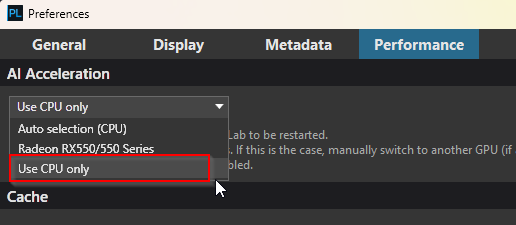
And switch to ‘CPU only’, restart PL9.1 and export (with CPU only).
Note: ‘Enable High quality preview’ and ‘Enable DeepPrime rendering’ is not enabled. max number of simultaneously process: 1
System: Win11, CPU: AMD Ryzen 5 3600 6-Core 3.6GHz, Memory: 32GB, GPU: AMD Radeon RX550 4GB VRAM. Photos: 20Mpixel Olympus RAW (ORF)
CPU only export time:
- Corrections, Lensharp, etc + AI masks (4 different AI mask with some Inverse/invert), NR: DP3. → 1 photo: approx/around 01:08.
- Same photo without AI masks → 1 photo: approx/around 01:08. 01:00. Seems with CPU AI masks for export not touch too much.
- With XD2s export times like double (2min)
That’s how i live with PL9.1 now.
Can be nice a split option like: ‘AI acceleration for Editing (mask)’ and separated ‘AI acceleration for export’
Note: with CPU only everything works, what is nice! Of course as CPU speed.
p.s.: i think with 9.1 its important to select manually to ‘Use CPU only’, the ‘Auto selection (CPU)’ seems still use GPU… (may a bug)
The following combination runs smoothly for me:
- Thinkstation P520, 32GB RAM, Intel XEON W-2223@3.6GHz
- Geforce RTX 2060 (6 GB VRAM)
- NVIDIA Driver 572.83-desktop-win10-win11-64bit-international-nsd-dch-whql
- Windows 11
- Photolab 9.1.0 Build 488 Trial
- Filmpack 8 Trial
High Quality Preview and Deep Prime Rendering are enabled.
Cache size is configured to 10GB.
OpenCL is enabled.
Maximum of 2 simultaneously processed images enabled.
All local AI functions work with a “search time” of 2-10 seconds, depending on complexity.
It is possible to combine multiple AI masks and standard masks.
Of the Filmpack functions, I have tested Negative Conversion extensively so far. Here, too, AI masks can be used without any problems.
The export of images (up to 5 exported together so far) is possible without restriction. On average, it takes just under 2 minutes per image to export.
Currently, I can concentrate on testing the new functions.
Edit:
Several AI masks in parallel applied to 84 images (Sky, Object, Person).
Then exporting the 84 images in 170 minutes.
1 Like
@gserim I read your post and others seem to succeed with machines with lower powered GPUs in particular.
So I “bit the bullet”, got a trial licence for another copy of PL9 and installed it on my i7-4790K which has much the same hardware profile as your system, including a 2060(6GB) with a single fan.
I already had my test image backed up on the disk of that machine so I ran a single export test and this is what happened
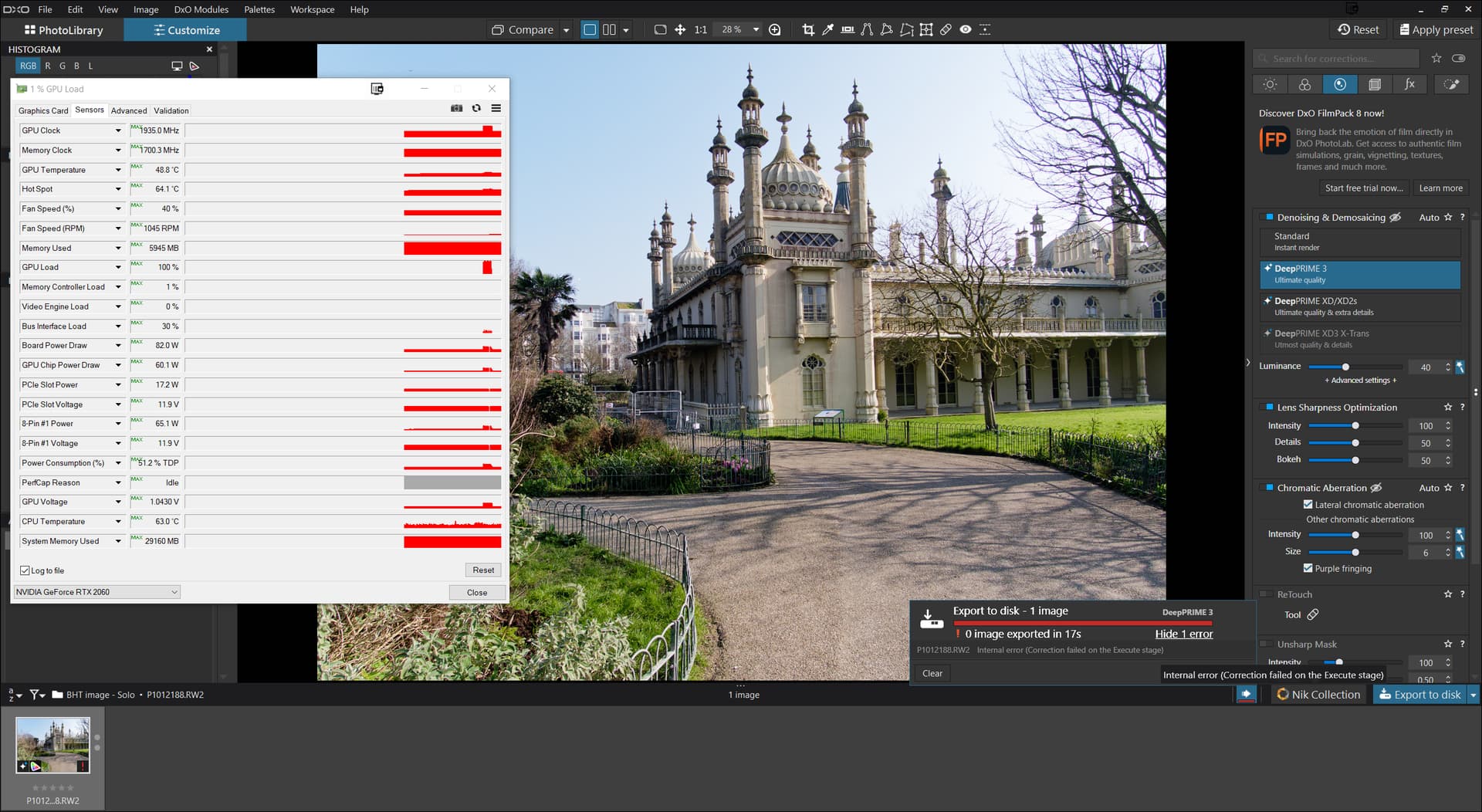
So some seem to be able to edit and export on “slim” machines and others don’t even on much more powerful machines.
I suspect that the hardware implementation also plays a role. As a server machine, the Thinkstation P520 has certainly been thoroughly tested for hardware compatibility and stability and cannot afford any minor design flaws. The NVIDIA card used is the original card, which can certainly be described as a reference design. Other combinations of motherboards and graphics cards from other manufacturers may have minor deviations that can cause problems for the software drivers.
Another difference could be the sensor size: I work with APS-C formats. Do you perhaps use full-format images?
Why would sensor size matter?
@Required At a guess because the image has more pixels, ergo there is more work to do which occupies more space? But to be honest we are talking about GPUs with 6 or 8 or 12 or 16 GB versus fairly small images.
With 2 export workers the image isn’t really going to occupy much space.
@gserim No mine are Panasonic MFT so even smaller than APS-C.
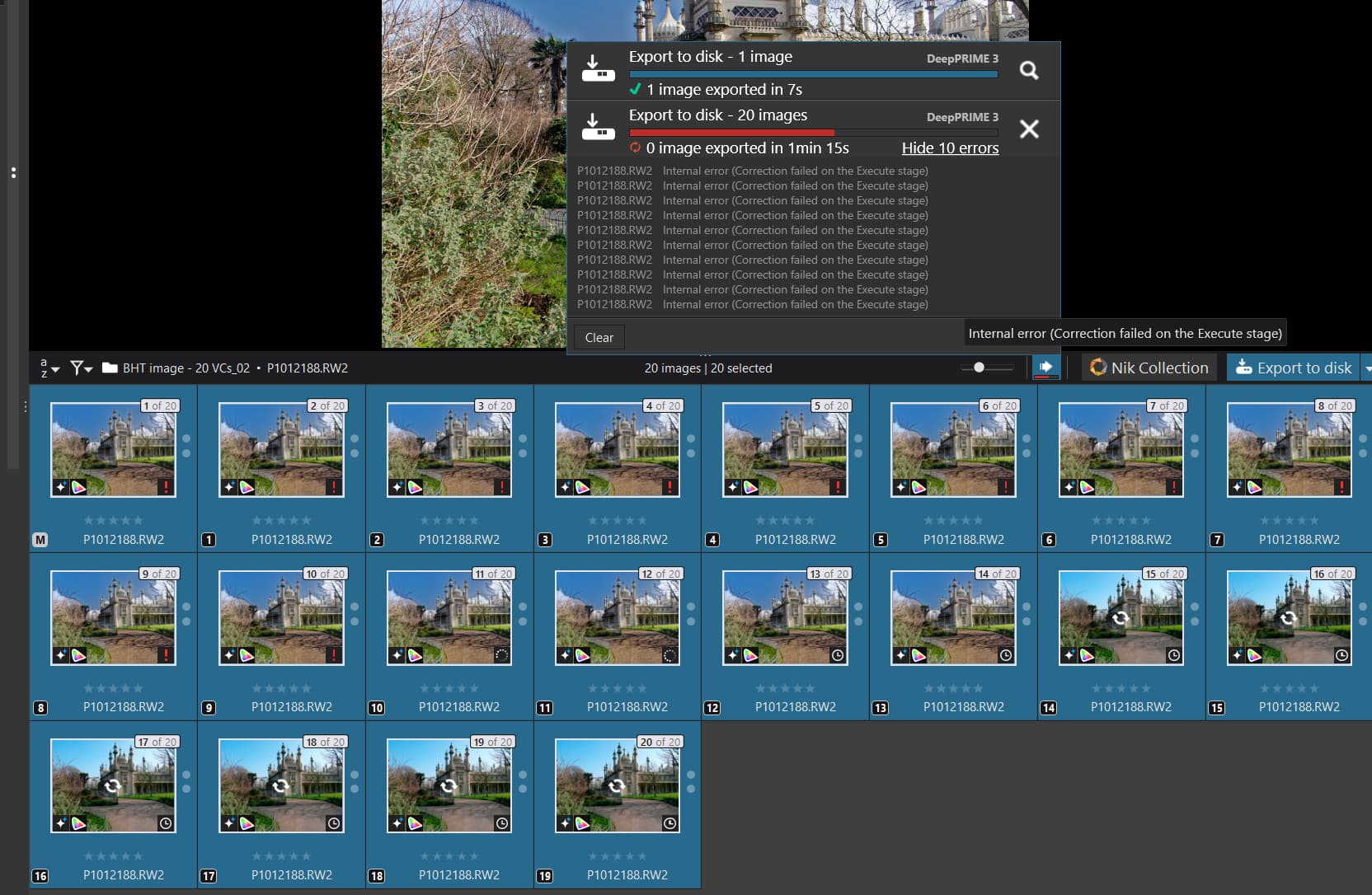
UPDATE:- I just loaded later drivers on my 2060(6GB) 572.83 and successfully did an export of the “problem” image after a PL910 restart. now for a 20 images batch.
OOPS:-
I updated my Graphics computer to PL9.1 and everything is running as before.
I took the batch of 40 that you sent to me and it processed them without error.
I processed and exported a new batch of 70+ photos, some with several AI masks, again without error.
All processes with DP3
Note: I have not updated windows staying with 11 22H2
@Allan I am pleased to hear that, from your point of view, I just don’t understand why it works for you and some others when my images don’t work on the 2060(6GB) and also take more memory on the 5060Yi(16GB) and the 3060(12GB) !?
Bryan
It looks like the older driver may be the reason. My driver is version 511.09.
I never saw the point of updating any of the drivers as the computer is working properly.
Some ancient NVIDIA drivers had known performance problems in OpenCL. The 511.09 was released on Jan 2022, and as far as I remember, these performance problems were fixed sometime in late 2023 (?). Maybe you may try 566.36 (Dec 2024), which has generally good opinion? To be sure, I take no responsibility for this advice 