Hi all,
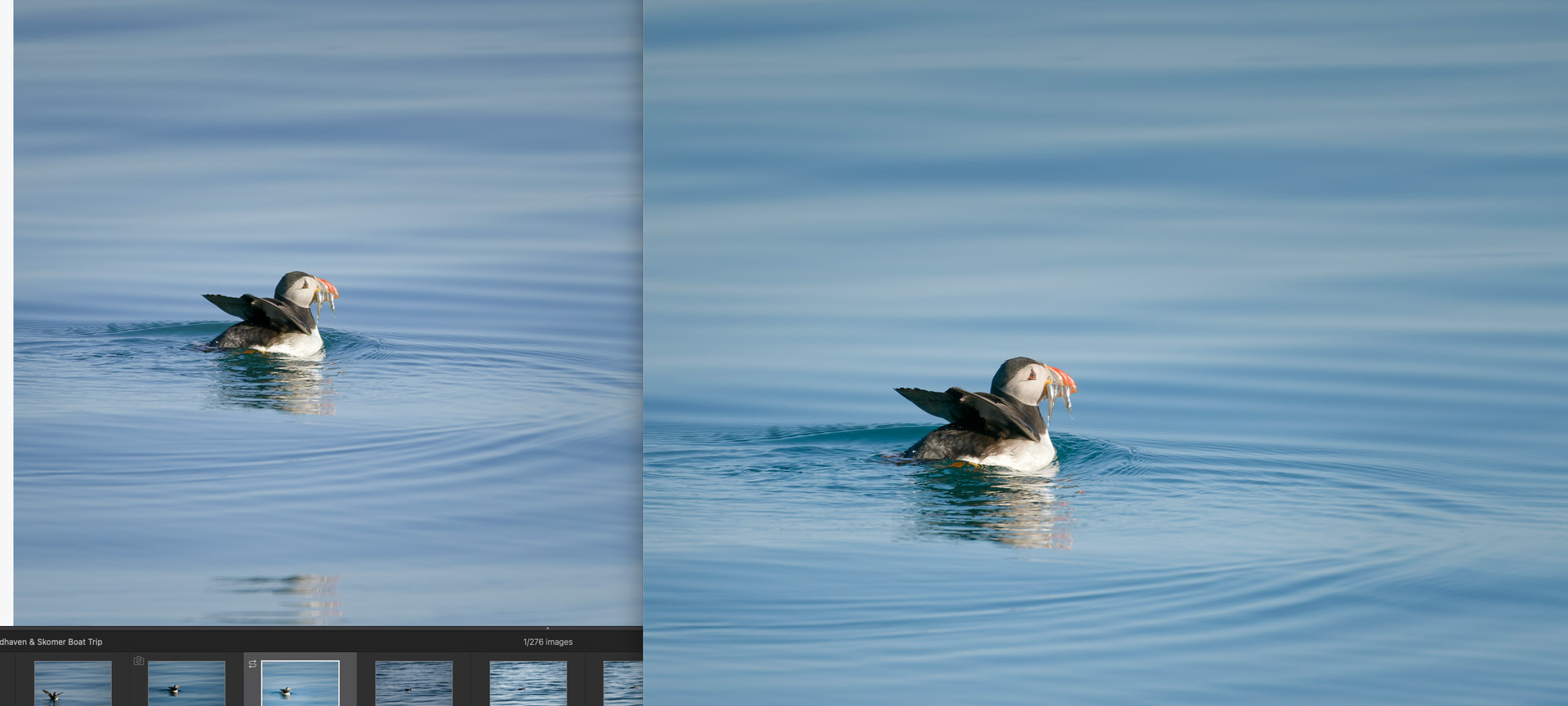
I’m seeing a strange issue in PhotoLab 9 where the main edit preview does not match the exported JPEG.
The exported JPEG, the filmstrip thumbnail, and the move/zoom navigator pane all match each other. However, the main image in the edit window looks noticeably different, flatter/less saturated and with different colour, especially in blues/cyans.
I’ve tested the following:
-
Exporting JPEG with sRGB IEC61966-2.1
-
Soft proofing enabled with sRGB IEC61966-2.1
-
Soft proofing makes no visible difference in the main edit window
-
Turning Preserve Colour Details off does not fix it
-
Changing DeepPRIME to Standard, or turning noise reduction off, does not fix it
-
The exported JPEG still matches the thumbnail/navigator rather than the main edit preview
So it seems like the export itself may be correct, but the main edit preview is showing a different render to the thumbnail/export making it hard to edit as you want to.
Has anyone else seen this? Is there a cache/GPU/display setting that can cause the main preview to render differently from the export and thumbnails?
I’ve attached a screenshot: left is the PhotoLab edit window, right is the exported JPEG.
PL9 version 9.8.0 version 46
Computer is a Mac mini M4 Pro