PL9 Auto Advance or Shortcut to Pick/Reject and advance to next photo

Does PL9 have a setting to “Auto Advance” after “P” for pick or “X” for reject?

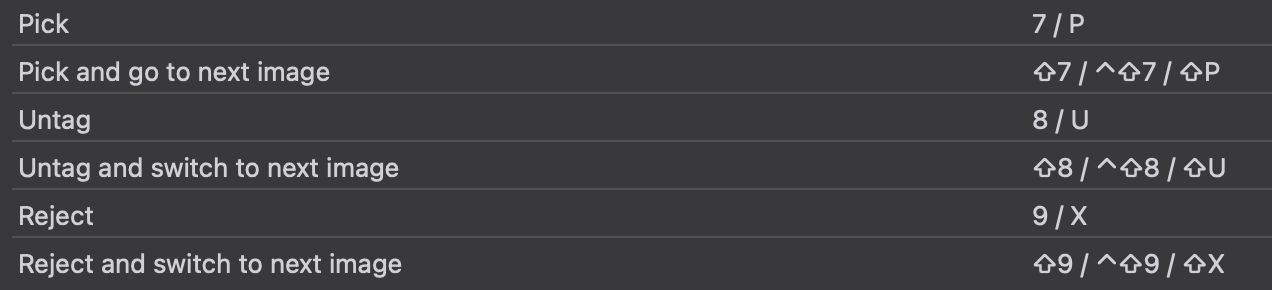
I thought I saw a video what showed a shortcut combination to Pick and Advance. I do not see that in the list of shortcuts.

Are either of these options available? If yes, what’s the trick?

I think it’s a keyboard shortcut, go to Help/Keyboard shortcuts

SHIFT P for Pick and Advance

SHIFT X for Reject and Advance

SHIFT U for Untag and Advance

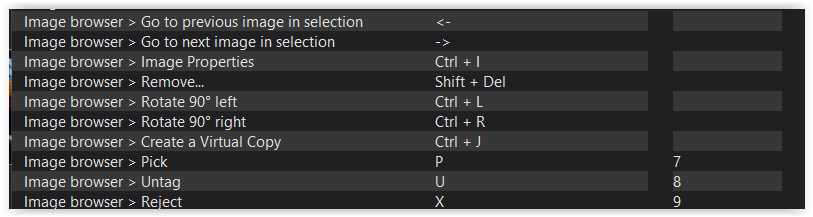
Thanks. That’s what I thought. However, those shortcuts are not shown in my shortcut list and they do not work.

PL9.7.0 and Windows 11

I can’t think of any reason why DXO would have different keyboard shortcuts. It may be worth opening a ticket.

I agree. I just contacted the support team.

Thanks!

I don’t know about Windows but on the Mac it is possible for apps to “steal” shortcuts from other apps. This is notoriously difficult to troubleshoot unless you can guess at what might be stealing.

What you can do …

P or 7 to pick
and
→ to advance …

but no “auto” advance

yep they don’t work for me either, maybe is mac only

A simple (somewhat silly) trick: if you set the filter to show only unpicked items, then once you pick a photo, it will automatically disappear and automatically move you to the next one.
4 Likes