In the nineteen nineties WordPerfect was the wordprocessor the worlds typists went for. The spreadsheet of that ere was Lotus 1-2-3. Each one of them had a market share of between 60-70%. That was before Excel and Word for Windows.
It was Excel that established Windows and not the other way around because it has always been the applications that have mattered and not the Operating systems.
In the day of WordPerfect these applications came with short cut templates to place over the keyboards function tables because they were so many that it was hard to remember them all. In the case of WP and Lotus there were so many that one sometimes had to press three keys simultaneously to activate a command BUT when you mastered that your productivity became far better compared to when the graphical interfaces in Windows-applications forced people to scroll up and down in menus to activate a command.
So, what I´m trying to say is that we will get far more productive if we start to use the short cuts there is even i Photolab. That also comes with NOT going for the menus and the premade AI-masking options in the menus and instead begin to use the freehand hoovering masking methods together with the boult in shortcuts.
I have also written about the fact that avoiding to use the premade AI-masks will put far less pressure on the system resources than the premade AI-masks do and it is way way faster to add masking too. Select a premade mask and wait three seconds or hoover with the mouse over an area and the masking is lightning fast instead. On topp of that using the premade AI-mask will probably make your PC to crash forcing a necessary restart of the whole computer to clear out caches etc.
There is nothing like graphical interfaces and long menus often even with submenus to slow you down and totally kill your workflows and your productivity.
So why the h_ll did they give us Mac- and Windows-style menu swamps? Well, probably because the functions got so many that few could master them and the graphical interfaces were self-instructive for inexperienced and new users and that opened a much wider market for the software companies. So many more users but much more inefficient than before. The good though is that Photolab now gives us a choice. Not all modern softwares does. It is up to us to use it - especially if we are irritated over how the graphical interfaces are designed.
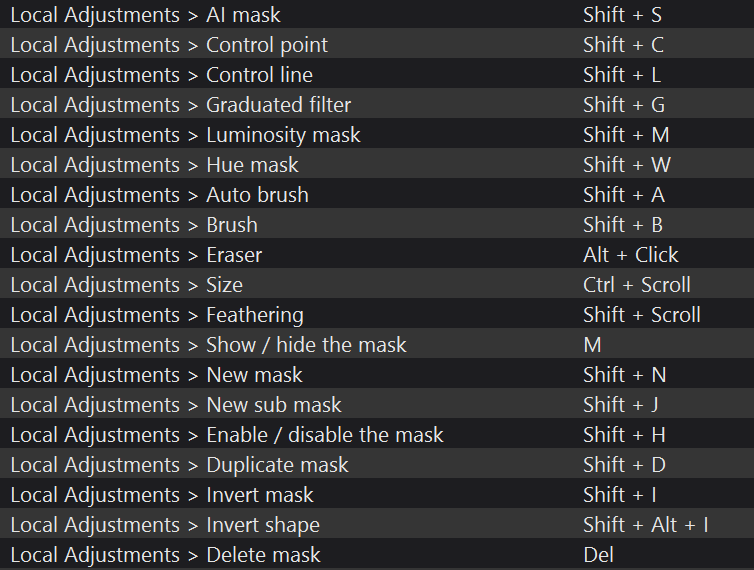
I have written about that here: