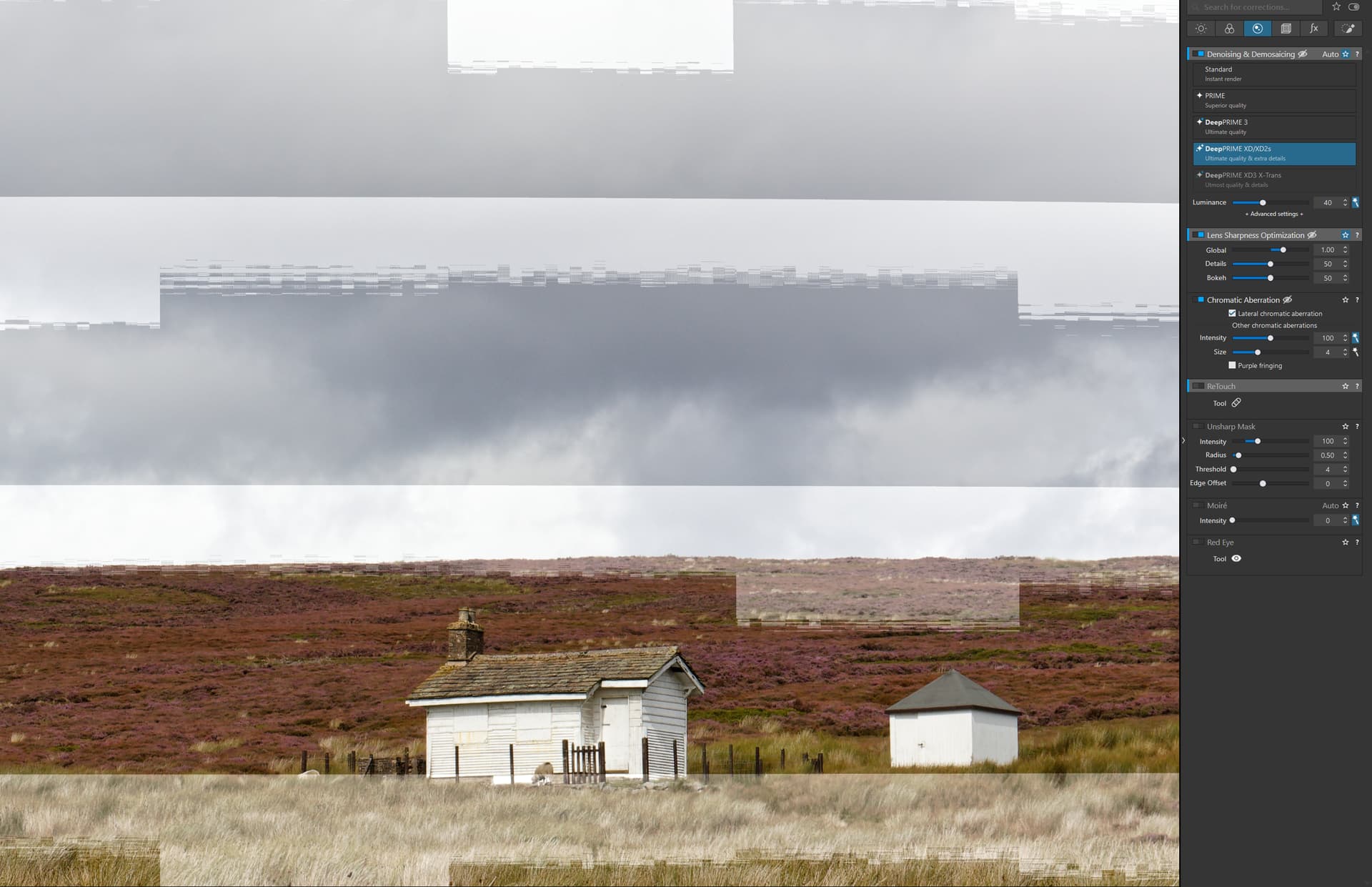
Upgraded from PL8.8 to 8.9 and now get artifacts across whole of any raw image when zoomed >=75% using DeepPrime XD/XD2s . The artifacts don’t show in the loupe or in JPG exports. The artifacts appear as broad uneven horizontal stripes that are maybe 0.5 stops lighter than the rest of image.
Downgraded back to PL8.8 and artifacts are gone.
Both versions using same hardware/drivers:
GPU RTX5060Ti 16Gb
Driver ver. 581.587
I can understand that will make editing problematic. I’d report this to DxO through their support system. The image is rendered with the “High quality” noise reduction in the preview, but, if I recall, when >=75% the lens sharpness processing becomes visible. Sounds like some kind of clash there that was introduced in 8.9.
The loupe is using the actual XD/XD2s so it’s good news that works still.
Hey, I have a very similiar problem!
I also upgraded from 8.8 to 8.9 and when the Standard Denoiser is enabled, these artifacts appear in the image while editing (>75 % Zoom).
I already got in contact with the support (13.October - 20.October) and shared all my information. As far as I can tell, they created a bug ticket.
Its not the XD/XD2s Denoiser but the Standard Denoiser.
When you have Denoissing enabled the standard denoiser is applied in Edite Mode, regardles of the selected mode.
Try it yourself, export a image with the Standard Denoiser and with XD/XD2s.
In the exported image these artfiacts appear in the standard denoiser image but not in the XD2s image.
And to be more specific: if you change the Luminance factor to 0 or 100 these artifacts also disappear!
My workaround is to work without denoising. I enable it when I finally export the image.
I have a RTX 5080 and tried differen Nvidia drivers (581.57, 577.00 and some more) with clean installations but with no success. Maybe this is a Nvidia/blackwell specific bug?
“DxO Photolab 9: Stability issues when using the AI masks [5475130]”
I asked the support multiple times for a installer for Version 8.8 but got no response. @IanM Can you help me out here to downgrade to version 8.8 as well? Do you have a working installation file for 8.8 which you can share?
I just find dubious sites to download 8.8 but no official download link.
I didn’t experience this problem neither with NVIDIA studio driver 581.57, nor with 576.80, PL8.9 or 9.1 (see config below). Maybe it’s some driver/hardware interoperability issue, overheating, or power supply problem (??). Some older driver versions caused similar artifacts but also not for all installations. It seems that PL8.9 has changed something in GPU handling and maybe it gets overloaded in some configs?
CONFIG: Desktop GeForce RTX 4070 used also for display, 4K/60Hz monitor, Win11 24H2, 32GB RAM, 850W Gold PSU, i7-14700KF, no HDR, G-Sync, or GPU overclocking.
Currently using PL8.9 for “production”, PL9.1 still in “beta” mode.
Two people have the same problem, which says it’s real, but some people don’t which says “it depends” on other factors.
The report to DxO is the only way forward and @nfg has done that. I would suggest to @IanM to report it as well, as the more people report it, the more attention it will likely get.
Sorry, I don’t have a working installation file. It’s pure luck that I have the PL8.8 installation intact on an SSD I have just swapped out for a higher capacity one. Even after mounting the old SSD as different drive I had to copy/fiddle with lots of things to get it to work, not sure it’s 100% robust even now.