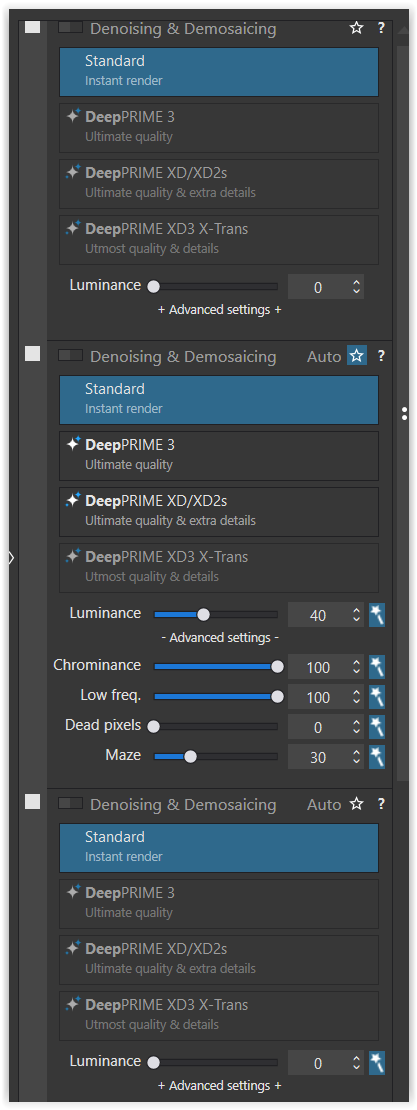
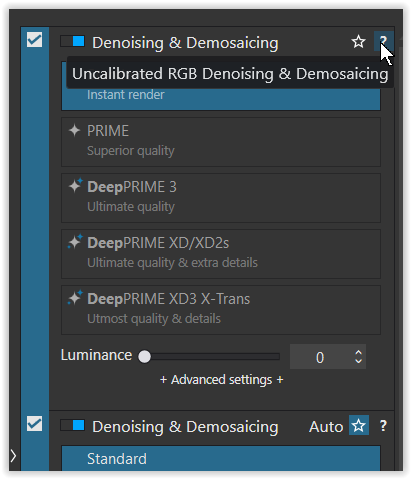
“The observed behavior is intentional. The first Denoising & Demosaicing section is for RAW images. the second is for RGB images and the third is for non calibrated RGB images.”
So there’s 3 different denoising engines potentially at work depending on your file type (I’m sure you knew that much) but… DxO can’t have the application intelligently show only the one most relevant to the file type you have loaded.
(They also apparently can’t amalgamate the different controls into one panel and grey out (or even better, not show) the options not suited to your file type)…
This would be the bare minimum. But there’s more to it. All sections are coupled for the Chominance and Luminance parameters (why ?) and the available settings obviously depend on the image currently selected when opening the editor. Nonsense.
What I don’t understand is that I had this problem of 3 identical palettes a few months ago but since then I have only the Denoising module once.
And I don’t know why that changed but I’m not complaining.
Well, I had opened a raw file and the second option was “active” (= showing settings), which doesn’t make sense (to me) … while referring to DxO’s explanation it should have been the first one.
However, I don’t care and honestly I’ve never noticed all this before, maybe as I rarely use custom presets.
Seems a bit of a re-occuring theme when it comes to the UI/UX.
Lack of parity between Mac and Windows editions
Unclear labelling
Inconsistent labelling
Icons in the place of text labels that are not immediately clear to the user (either in functionality or location).
Duplication of functionality
Forced display of irrelevant functionality (why… how… could I ever select X-Trans denoising with a non-X-Trans shot?)
While I don’t think any of this is show stopping when it comes to using DxO, I do think it makes the process needlessly complex and “busy” (two separate issues).
I’ve heard it said that Adobe purposefully dumbed down e.g. Lightroom but… it surely holds the dominant market share and is a favourite of both novices and professionals alike. I don’t think that’s all down to the UX/UI, but it works.
Nevermind some of the functionality LR possess that DxO really ought to - to the point it’s a no brainer - like numerical values for HSL sliders, mid-tone colour grading, and RGB primary calibration.
Agreed. And I think I know why. At this level of complexity, UIs have to be designed as Finite State Machines. This is the only way of keeping an UI consistent and stable. By observing the behavior of the Photolab UI, I’m pretty sure that it’s not the case for this software.
Just spent an interesting 10 minutes learning the very basics of Finite State Machines to try and understand that one but… yes, I couldn’t build one but I understand enough to say I agree!