I don’t think there’s any ambiguity in the individual sentences I’ve addressed, nor the meaning of your posts overall, which are summarised neatly here:
So… we’re back to the dubious value of telling people who are having problems that you’re not having problems (unless the intended audience is anyone else not having problems - but I can’t see any point in that).
To be clear: there are problems. For some they’re critical crashes or lack of functionality, for others they’re tedious performance issues, and some of us aren’t impressed with the level of service from the company. We expect better - that’s not entitlement - we paid for it. Improvement would benefit everyone.
The post of mine you just quoted is absolutely accurate for most of us. With regard to the rest of your comments, I have acknowledged quite often that a number of users are still having serious issues. I am wondering why you keep mentioning this. It suggests I don’t agree with you about that, which is not true.
Every time someone quotes your own words back to you. You claim firstly that they are not yours, then when it is proved that they are, you claim they are out of context. You sound very much like a well-known conman and dictator that we all know.
So let’s outline a few facts:
There are people in both Windows and MAC environs who used to run PL7 and 8 without problems but now have major problems with PL9.
Those problems are many and varied.
A few have been addressed by DxO. Most have not been.
DxO have not acknowledged most of the issues.
DxO are discounting their products out (including PL9) beyond the normal discount period regardless of these problems.
I suspect/fear they are discounting as they have problems due to 9. If so, that there are still many issues, that will be seen as irrelevant due to the need for cash to keep going.
We are at PL 9.3 and it has been at least 3 updates. So, of course they try to fix the problems. If I was in the market for a new RAW development software I would have used the one-month free test…
Ahh., Voodoo magic. The hardest.
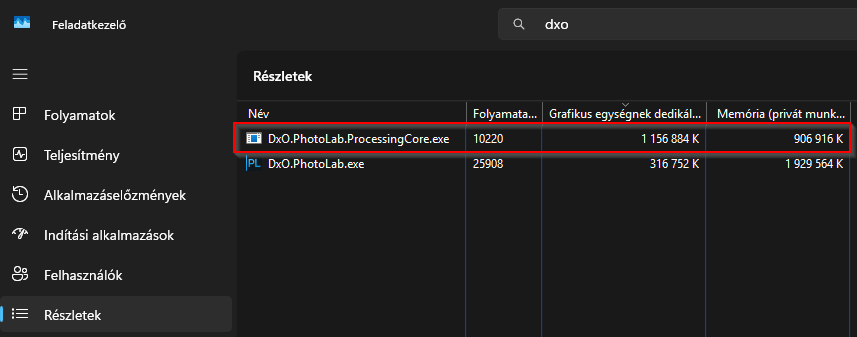
I like to note: : once ‘AI masking’ used → the ‘masking’ AI model stay in the GPU VRAM, once Export (with DP) done → the Export engine (DopCor - DxO.PhotoLab.ProcessingCore.exe) stay in the background.
May wort to try: kill the DopCor (or change the DopCor 'self-unload) time from 2hour to like a minute) and see.
Stupid thing: I ‘monitor’ when ‘internal error’ or similar come up with the following: some music from youtube plays in the web browser - when i hear the music goes to ‘zzzz’ / hiccup then issue come.
I’ve not heard of this one, can you tell me how to do it please?
I may have used AI masking in a previous edit within the same session, so that’s a possible. I don’t see many AI crashes anymore, just severe (yay!), just severe performance tanking (boo!).
@Stenis We are not alone in this AI Revolution as casualties!
First - Sep 29 2025 I bought a OWC USB 4.0 enclosure cost US$99.99. I also bought a WD 8TB BLACK 850X PCIe 4.0 SSD stick to populate it, cost US$679.99 to populate it. Total US$679.98 Plus tax.
Later I bought a USB4.2 OXC enclosure US$ 179.99. I cannibalize a 8TB stick from a USB 4.0 enclosure for the USB4.2.
On Dec 27, 2025 I ordered an 8 TB WD Black stick same as before for the empty 4.0 enclosure cost US$899.99 (Holiday Special). I also bought a WD 4 TB BLACK SN850X PCIe 4.0 SSD cost US$399.99 (Sale). On Dec 29, 2025 I checked the price from the On Line store where I ordered it on Dec 27 2025 Price on 29 Dec US$ 479.99.
I just checked the price at the On Line store (Jan 5 2026) and the 4TB stick was down to US$ 419.99. The 8TB stick price is US$1979.99 all plus tax. Needless to say, no more SSD stick purchases for me for a long time.
Second, last evening while surfing the internet I saw an article about AI making laptop computers and desk top computers impossibly high cost items and building your own desk tops cost prohibitive. There were more articles that showed up below that one.
Now for the “We are not alone!” part.
The following articles were aimed at the “gamers” and like you have stated they are not going to be able to game play on Laptops or Desktops without spending lots of money for new AI capable machines. They went on to say that the almost only way to continue will be at online AI play sites with a charge.
Other articles were hostile towards several GPU manufacturers who are are putting out new lines of GPU cards with minimal increases in capabilities and reduced VRAM at affordable prices. If you want high performance you will have to buy the top of the line for your desktop computer.
In this example: its use like 1.1GB GPU VRAM (still reserve) after one NR: DP3 export.
Right click on that → Kill task (or End task in English taskman)
DopCor restart automatically → but now not use much GPU VRAM, also System memory usage a bit lower.
Regarding ‘self-unload’ time:
Close PL.
Find PL config file (its a text file). Usually here:
c:\Program Files\DxO\DxO PhotoLab 9\DxO.PhotoLab.exe.config
7200 is sec → 2hour.
Change value like 120 (two minute)
Save the config file
Start PL.
DopCor after export is done → restart itself automatically after the value (like 120 sec).
Note: to edit (save) the config file you need ‘Run as Administrator’ the text editor.
Browsing in PhotoLibrary (and not click one-by-one) itself (for me) is okay (on old not so fast SATA SSD ). With few 1000’s photos IF the folder was never opened than takes a time, but runs well (as i test, usually i have like 20-50-100, 500 is rare)
Just browsing (and not click one-by-one) + edit applied, is can be fine - once the folder indexed, you already goes thru the photos, etc.
Yes.
Somewhere i write in some details what happen like A ->B → A “back and forth case” -in editing - but i not find it yet.
I the nutshell as i remember: Click on A → PL read up first the already generated ‘cache’ folder ‘Preview’ jpg and display it - its not a full 1:1 jpg, some like 1000 pixel wide (that’s the reason you see immediately something) - i think all Phot app do more-or less the same way (like C1 also use some mid resolution, mid quality jpg). And its start to create the ‘full preview in progress’. If no editing, or just some base → its fast. If AI masks → it’s takes time → But time as the hardware as-it-is! Dont forget, its create (to memory) multiple versions: without geometry, w/ geometry, w/ editing w/local adjustments. And its create 1:1 full quality for editing. Now click to other one (A ->B). First its re-create the ‘Cache’ folder preview and thumbnail jpg. I think the main reason for that at this point the ‘whole 1:1 edit quality’ is in the memory , and that’s the best time to update this jpg’s. And do with B the previous.
Some ‘culling’ mode may can help on that (when no ‘full preview in progress’ happen, just use the ‘cache’ preview jpg). However, if you do some ‘multi edit’ or manually apply preset for a lot of photos, or zoom to 1:1, etc → its not helps.
PL creates a new preview with every image navigation.
See previously.
Note: A → B → C case - if you wait until the ‘generating’ small circle finished, than may can save some time for ‘full preview in progress’. A ->B wait until A small circle finish, and than go to B → C.
May ‘if no change’ than not re-generate ‘cahce’ folder preview+thumbnail. However the ‘nothing change’ can be true if really nothing change → But like change Exposure with +1 and after change Exposure with -1 also give a ‘nothing change’, can be an issue, etc.
Well if it doesn’t I’ll have to rely on CPU mode. I’m only a light (amateur) user anyway. I’ll also be using the PC for software development so it won’t be a complete waste.