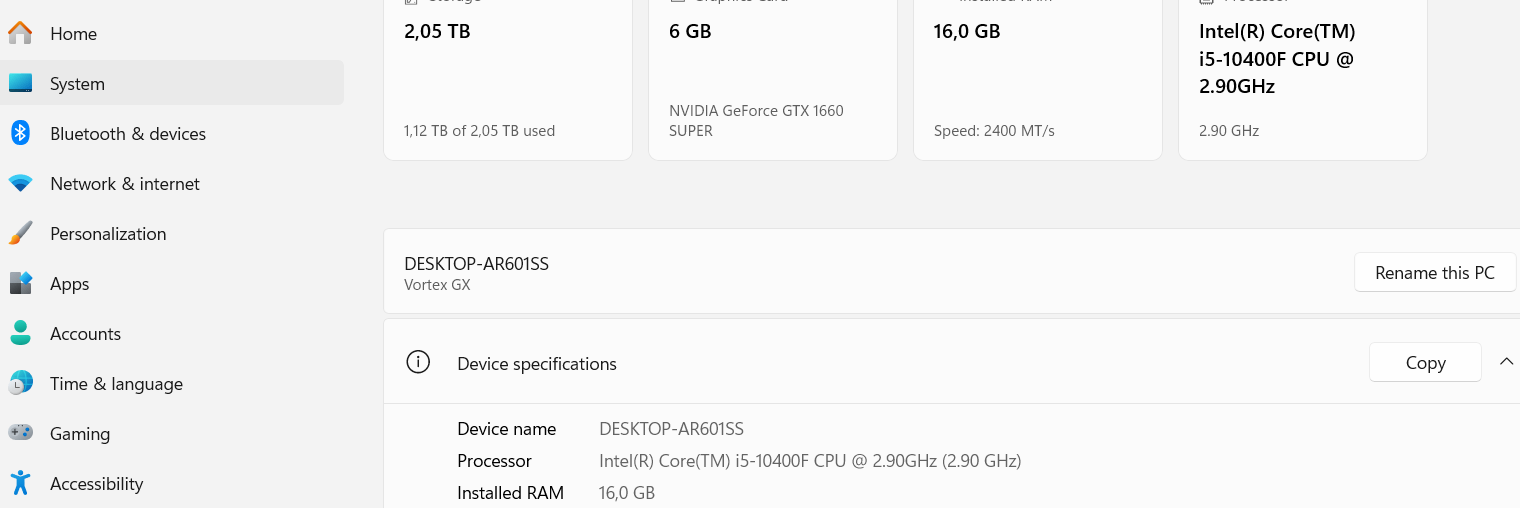
As far as I can tell, your GTX 1660 6GB is not able to run PL 9. You need an RTX card with 8GB, preferably more GPU RAM, if you have a Nvidia GPU. Another option is one of the cards from AMD. You can see here: PL9_release-note_win_EN.pdf
First of all thanks to all of you with your great contributions.
As suggested, I have downgraded my driver to an older one(the one that was mentioned) and the result is as such:
The tool is able to detect the subject (in this case a bird) and I could enhance it, but when tried to zoom in, the the tool crashed again, I got this error message again:
As Allan said, this is an ongoing issue. I see the same thing (with 32GB system RAM and a 1080TI with 11GB GPU RAM).
My best advice at this stage would be either a system upgrade (which I appreciate is not something many people just “do”) or:
Make masking your image the last type of image you make.
If you plan to make further global adjustments or crop the image, turn masking off first, and toggle it back on before you’re ready to export.
Treat PhotoLab like a delicate glass vase once you have masking enabled. Don’t crop. Don’t zoom more than you have to - or turn off masking while you’re doing it. Don’t expect it to be super responsive or stable.
It’s frustrating as hell to have to treat any program this way, but it’s the only way I’ve found (short of that system upgrade) to ensure use without crashes of some sort or another.
I was about to order some additional RAMs to my PC when I got your message then a new reply popped up from Fineus.
As it is very annoying to go that road which Fineus is suggesting, I think it might be only practical option for me right now, before spend lots of money to upgrade my Graphic card, add more RAM or just buy a new PC-
Or, at the worst case, go back to my 7,X version of PL.
Note for NVIDIA RTX x60 models (2060 / 3060 / 4060 / 5060)
These models are affected by a known WinML issue. Until NVIDIA releases a fix, you can:
Use CPU processing for these operations, or
Avoid AI Mask keywords temporarily.
As @Allan already note driver version, so i suggest to try that. You have a high chance that driver version helps you out.
Additional points / suggestions:
Close another applications (like Web browsers, etc) - lot of them ‘eat up’ some GPU VRAM.
If you enabled in preferences the “Deeprime Rendering”, than turn it off.
In Noise Reduction, try DP3 (and not DP XD2s - DP3 use less GPU VRAM)
Try avoid 'Pre-defined" AI masks, and use more the ‘Manual’ AI masks (selection, area). They works pretty fine, for example: just drag an ‘area rectangle’ on birds, and results can be the same than the ‘subject’ AI mask. Note: ‘manual’ AI masks use less GPU VRAM than ‘pre-defined’ AI masks.
I use PL 9.5 with a 5060 TI 16GB and had absolutely no issues. It works as it should. And by the way, the new AI masks make it a lot easier to get the results you want and gives me options that I had to go to my bitmap editor befor PL9.
Rolling back the driver and turning of the OpenCL didn’t have the effect I was looking for.
What helped me was, setting up the virtual memory.
At least on my PC, Windows 11 didn’t make enough of vitual memory available.
I chaned the setup and made 16GB to 32GB of Virtual memory available.
Since than, I don’ have any problem at all.
Both the AI Mask and zoom in/out and everything seem to be functioning fine.
Unless this is turns back in another form, I am happy with the setup I currently have and don’t see any reason to spend more money right now to improve the PC setup.
I hope my finding can be of some help to anybody experiencing the same issue.
This will work to some degree until you can install more ram. The downside is that it will result in a slower operation.
One thing I forgot to mention - although it is in the link that I gave you.
Referring to the Photolab Preferences, Performance screen, I said…
“One observation that I made was with the “Maximum cache size”. On both computers, the default is 5000Mb.
I read that this should be half of the ram size, so I set it to 16000Mb. While there were no crashes, the computer seemed to run “rough” like a car with a rough idle. The “Full preview in progress” was slower.
Returning it back to 5000Mb fixed this.
Any ideas on this?
(The number of simultaneous processed images is 2)”
Why this is the case, I don’t know but 5000Mb seems to be the magic number for both my systems.