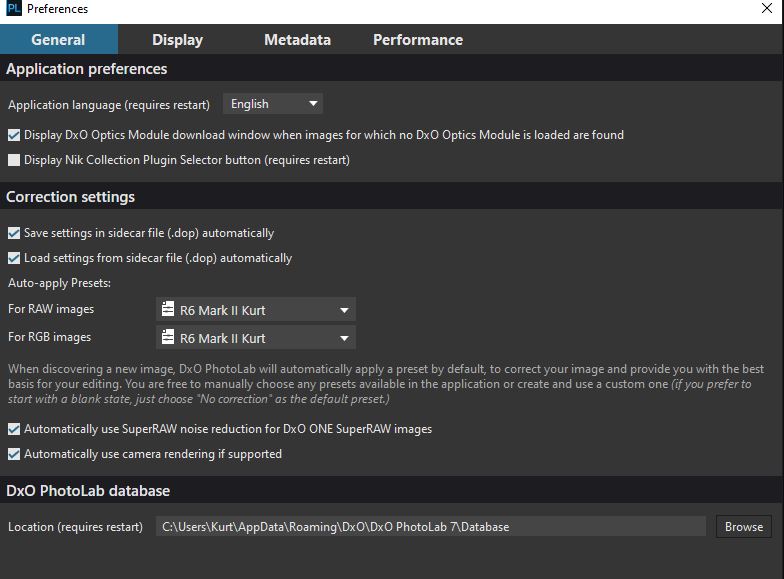
As stated in the subject, PL 7.8 is refusing to apply my custom preset via Preferences/General/Corrections/Auto-apply Presets. It is now applying the DXO Optical Corrections Only preset no matter how I try to change it to get it to display my custom preset. It doesn’t matter what I set as the default, it always chooses the DXO Optical Corrections Only. Supremely frustrating.
I believe that this issue started after the 7.8 update. It had been a about a month since I had edited any pictures. I really like the results I am getting with PL, but I HATE buggy
software.
Any help with this issue would be most gratefully received. Thank you!
Edit: I am able to use the Apply Preset button and apply my custom preset but it will not apply my chosen preset in Preferences.
Edit_2: And now it won’t let me apply a preset via the Apply Preset button either.
I am not having that problem with version 7.8 for Windows. You may have a corruption. If you have not already done so, try reinstalling 7.8 over the existing installation and select the Repair option. Repair will often fix corruption issues. Does the Advanced History indicate that the DXO Optical Corrections Only preset is being used?
As a side note, I am curious why you would use the same start up preset for unprocessed raw files as you would for RGB images processed in-camera. As a starting point for RGB files, I use the No corrections preset.
I’ll try your reinstall suggestion tomorrow, and yes the Advanced History palette indicates that the DXO Optical Corrections Only preset is being used
The RGB setting was from when I first set up PL, and I wasn’t quite sure exactly what it meant at the time. I only shoot raw, never jpg, so it doesn’t really apply anyway.
Thank you for your help, I appreciate the effort and time.
I also do the following to check a few fundamentals.
Does DPL apply the default preset?
empty trash (not strictly necessary) → delete images in DPL → quit DPL → move images from trash to original folder → restart DPL
Are presets okay?
check version numbers of presets. Edit version number if necessary e.g. if the preset is from a newer version of DPL, older DPLs will not apply that preset.