Bug fixes
• Fixed an issue that caused DxO PhotoLab to crash when using DeepPRIME or DeepPRIME XD preview with DJI Mini 5 Pro images. Previews now function as expected.
• Minor bug fixes and improvements
@andras.csore They didn’t advertise that it fixes very much and it certainly doesn’t fix my attempts to export the St Pancras station images with AI Preset Masks applied, except the ‘People’ mask continues to work as it did on PL9.3.0!
1 Like
Now begins the next guinea pig period…I’m still holding at 9.2.something.
1 Like
I’ve used 9.3.1 a bit.
For me, at least, it doesn’t seem unstable as the earlier versions of v9 have been. That’s a good thing. No actual crashes so far.
It’s still not exactly fast when masking is used in an image, but they never promised an optimisation pass in this version.
They also don’t say what the “minor bug fixes and improvements” actually are. This of course is useless information and means there could even be no bug fixes or improvements at all. It could be placeholder text to imply they did more than fix how PL9 works with DJI Mini 5 Pro images.
It is generally helpful to have a proper change log that details exactly what has been fixed. A shame we so often just get “minor bug fixes” which is pretty much useless info!
1 Like
Yes, and even support staff don’t seem to know what the “minor” fixes are. They often urge that users try updates to see for themselves if the problems go away. Granted, there is often uncertainty that a customer’s problem is identical to a known issue. But documentation of known bugs and fixes helps everyone.
2 Likes
This why paid support bi passes support as they never know what is going on and nearly always use us to see if somthing is fixed
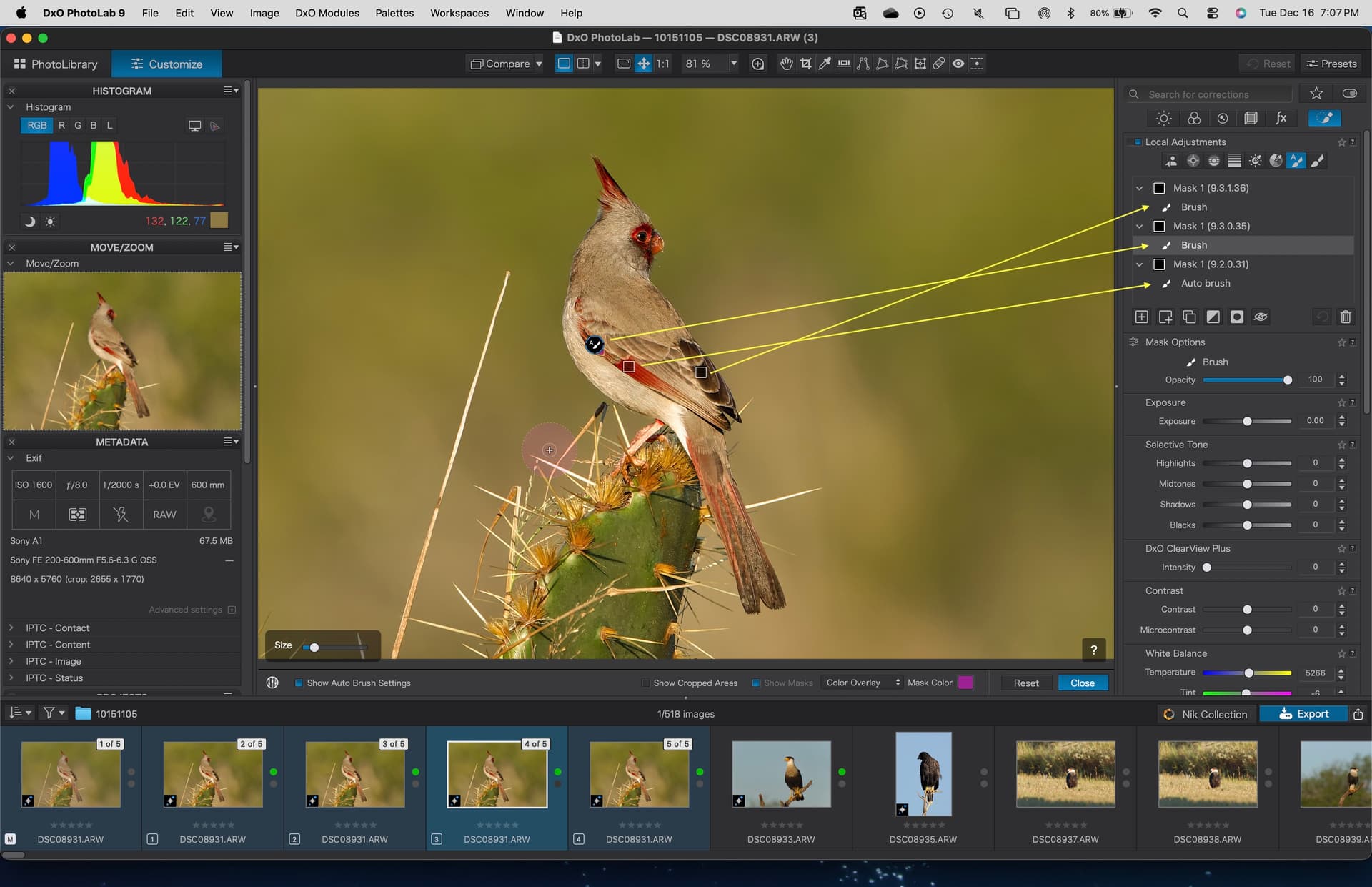
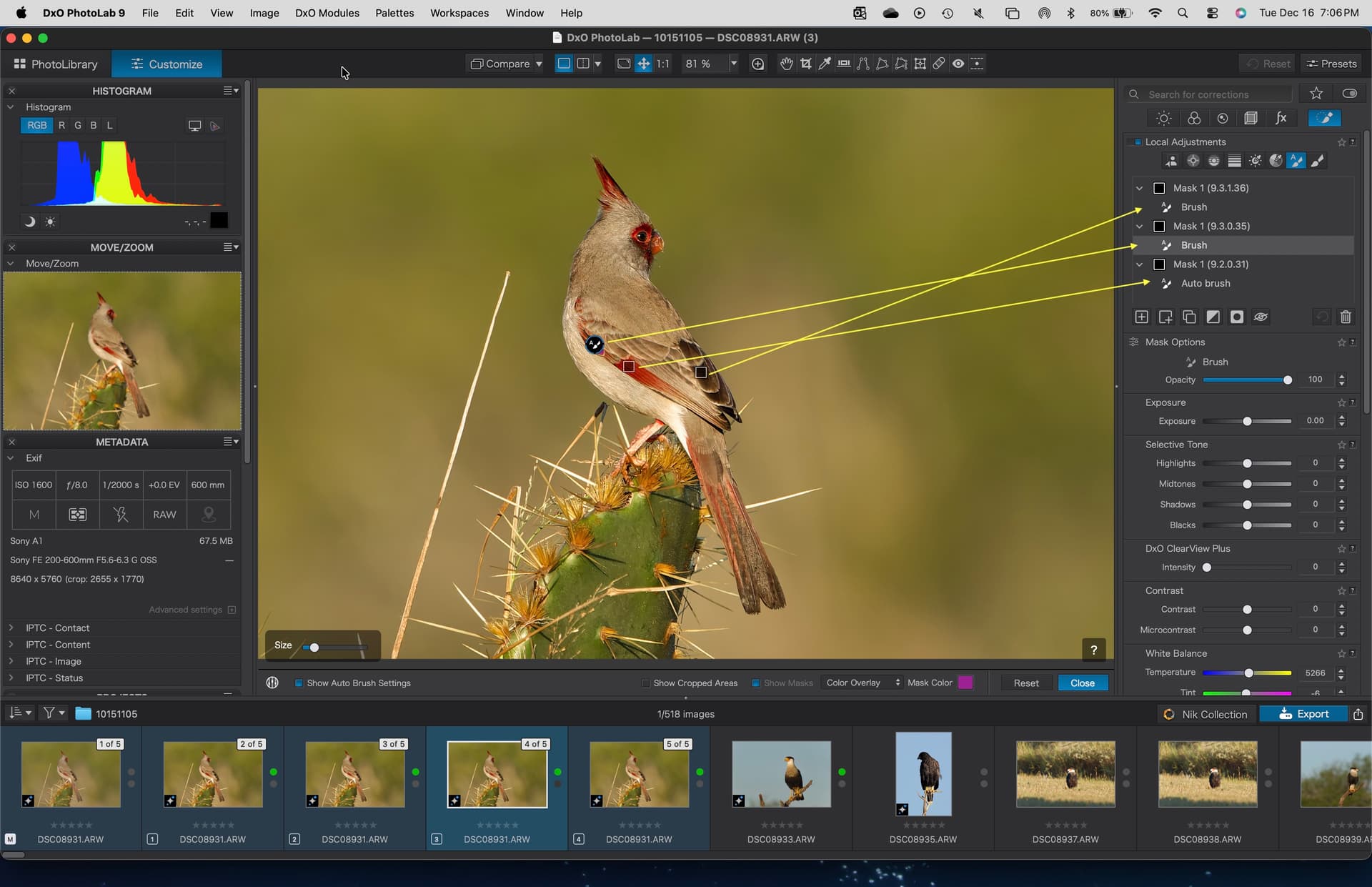
The Auto brush tool’s behavior seems a little different between versions of 9.x when trying to clean up an edge with a messy background, so was attempting to study. Then noticed the labels and icons in the local adjustments palette for “Auto Brush” reverted back to “Brush” in versions 9.3.0.35 and 9.3.1.36 as compared to 9.2.0.31. IIRC this was an issue in the initial release of PL9.
Running on a Mac/Tahoe 26.2 with all of three versions of PL9.x installed. Perhaps there is an issue in common files when attempting to compare multiple versions on the same machine?
Have others noticed this labeling change? Submitted a support request.
I’m struggling to visualise what you are seeing. Can you post a screen shot?
I’m on Windows and run the latest version of PL9.3.1_567, where that tool is called “Auto brush”.
And the separate Eraser from PL8, which was a negative Brush, is replaced by ALT + Auto brush, again a negative Brush.
There are no addditional entries in the LA layer stack when directly (= w/o submask) correcting an Auto brush selection with a positive Brush or a negative one (ALT + …).
And the same thing for correcting a Brush selection with Auto Brush … …
.
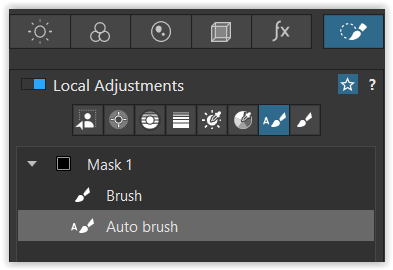
( Auto brush and Brush as submasks )
.
No idea, if that’s clearer now.
And it’s a pity that we didn’t get a true negative “Auto brush”.
(ed)
Its a true negative auto-brush.
I think after the PL9 layering → multiple edit in one layer + invert / invert shape for each edit + Order of editing / re-order in the layer → the PL8 style of ‘negative brush’ (eraser) is incomprehensible.
Like: ‘invert shape’ also can be a kind of ‘negatíve’, with multiple editing each ‘invert’ also can be the ‘negatíve’ and so on.
All three masks/sub masks were created using the “Auto Mask” tool, each in a separate version of PL9.
The mask label shows the specific version of PL9 used to create the mask (Auto brush submask).
Each screenshot shows the LA palette for the respective version of PL9.
All masks correctly show this in the “gizmo” on in the image viewers, however the two newer versions of PL9 switched the label and icon to “Brush”, rather than “Auto brush”.
If an “Auto brush” mask is created in 9.2.0.31 then the label and icon are the expected “Auto brush”.
If an “Auto brush” mask is created in 9.3.0.35 or 9.3.1.36 then the label and icon are “brush”.
This behavior occurred in the initial release of PL9, was corrected, and is now back.
This may be a Mac-specific issue, and perhaps a result of having three versions of PL9 (and two of PL8) installed. These various versions are all to facilitate comparisons and to easily go back if needed.

While I’m trying to understand this… what you’re showing looks like a “composition” to me (I don’t recall ever seeing anything else). On Windows, installing the same major version in the same folder/destination is done by default, not “in parallel”.
But as you said, maybe it’s due to the Mac version.

I get what you are saying, and it works on a sublayer,
-
when you use a normal (positiv) “Auto brush” on the area you intend to subtract from the main selection
-
to then use “invert shape”.
Instead, I would have preferred a simpler functionality using < ALT + Auto brush >.
I think after the PL9 layering …
→ the PL8 style of ‘negative brush’ (eraser) is incomprehensible.
The “Auto mask” in PL8 works different, not comparable with PL9.
1 Like
I took the same image, edited it in build 31 by adding an Auto brush. The mask shows up as Mask 1 and the submask as “Auto brush”. The label is called “Auto brush” and the little icon shows a brush with the “A” to the upper left.
I close PL9.2.0.31, then open PL9.3.0.35 and add another “Auto brush” in a different area of the bird. This time, PL9.3.0.35 calls this a “Brush” mask instead of an “Auto brush” and show the little icon as a brush without the “A”.
I close PL9.3.0.35, then open PL9.3.1.36 and add a third “Auto brush” in yet a different area of the bird. Again, the submask is labeled as a “Brush”.
So three “Auto brush” masks, but with two showing a different label as a different tool types.
But all three show the gizmos in the image as “Auto brush” since they all have the little “A” next the brush icon.
Next, opened the image to see if any compatibility issues showed up between versions. None found, and PL9.2.0.31 brought the other two mask from the newer versions as “brush” masks even though it shows them as Auto brush masks in the gizmo and in behavior.
If you are not seeing any issues in your Windows version, perhaps it is isolated to Mac versions. Thank you.
Using a Mac, so the tool implementation might be different.
When setting the tool to Autobrush the only modifier is the size.
If applying the Alt/Opt key to invert the tool jumps to the standard Brush too and the “-” image shows up to show a negative brush. The tool then offers size, opacity and flow modifiers. The tool effectively becomes an “eraser” with no edge detection.
If I add a “positive” Auto brush, then invert shape, the tool keeps the edge detection of the Auto brush" but subtracts the area from the selection.
So these different techniques with different results. Useful options.
2 Likes
Actually, I just downloaded 9.3.2 for Windows. Minor bug fixes and improvements is the only info on what’s new.
At least we know they are working to fix it up…. (9.3.1 has only given me one error so far.)
2 Likes