I have some old RAW files which show up as bigger in FastRawViewer than in PhotoLab.
For instance, a NEF file from a D300S that is:
4320x2868 according to FastRawViewer
4288x2848 according to PhotoLab
That’s a loss of around 0.2MP (12.4MP → 12.2MP) and can be visible in some instances very tight compositions.
This small crop also applies when exporting as JPEG, TIFF or DNG. It always applies even when all corrections are turned off: no optical corrections, no distortion correction, no noise reduction of any kind.
My wild guess slash tinfoil hat theory is that DxO’s denoising algorithms need to work with neighboring pixels to produce any result, which means that technically they don’t work or don’t work well at the very edges of the image… and the solution is to hide the problem by clipping said edges.
I also know that some cameras produce JPEGs which are a bit smaller than the corresponding RAW, possibly for similar reasons, and their RAW files contain EXIF metadata instructing RAW processing software to crop at a specific size and offset. I have some Fuji RAF files like that. But in the example above the NEF file had no such metadata.
Anyone knows what the real reason is, and if by chance there is a way to avoid this forced crop in PhotoLab (I suspect not)?
Good to know. The NEF files actually have more pixels than this, according to FastRawViewer and RawDigger. So PhotoLab is cropping to the “official” image size, based on some information (metadata in the NEF that I missed, or its own internal database).
It’s to make demosaicking simpler and maybe to ignore pixels on the edges due to possible light reflections from the sensor construction (?). Demosaicking interpolates values from some pixels around, so having these “extras” keeps the code simpler.
My Z8 records 8280x5520 pixels of raw data with only 8256x5504 being used by PhotoLab, NX Studio, and other editing software. Crop information for Z8 is recorded in NEF Nikon MakerNotes using tag 0x0045, called in exiftool CropArea. These are four integers, 12,8,8256,5504, meaning 12 pixels both on the left and right and 8 pixels both on the top and bottom are to be ignored by readers. Some cameras (Canon?) may use “edge pixels” to transfer black level info. FastRawViewer is more for “technical” view.
EDIT: Removed false info about D700 and D4, which as it turns out also carry crop info in makernotes, but under two other tags.
I actually did that before starting this thread. It made no difference. Exporting an image with zero corrections (no noise reduction, no distortion correction, nothing) or with some corrections (e.g. noise reduction and vignetting) outputs the same image size in both JPEG and DNG.
Though I only tried a few NEF files from the same camera, and it’s possible PhotoLab behaves differently with RAWs from other cameras.
No, it’s lens subject distance and focal length specific. However I did find differences between different camera’s too.
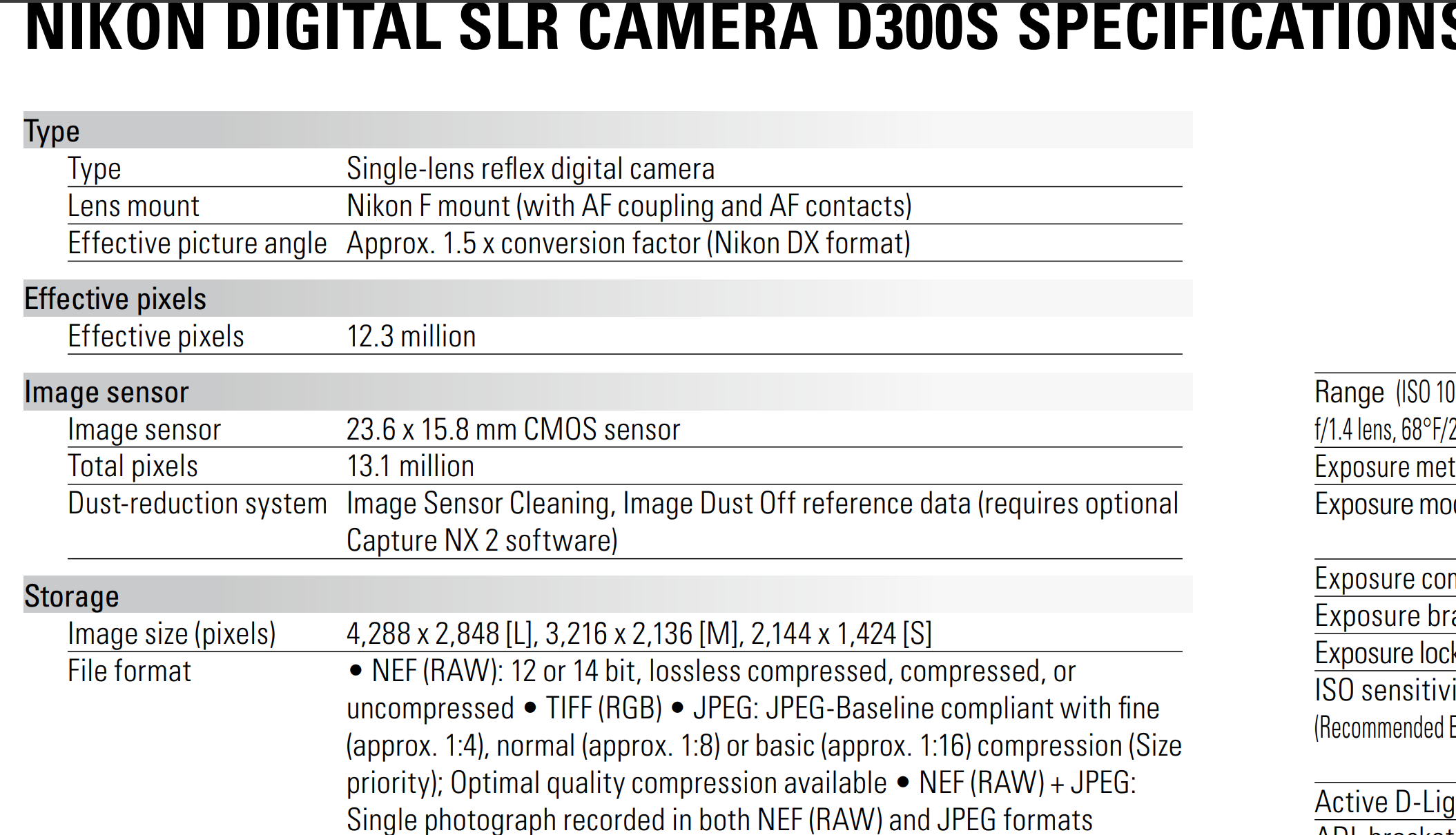
I checked the specs of the D300s. The sensor is 4280x2848, the same size of what PL shows.
It’s not a loss of 0.2MP but an addition of 0.2MP by FastRawViewer.
To see the different image sizes available in DxO:
Open an image with the following settings: Crop: Auto, Aspect Ratio: Original, and Distortion Correction disabled. This corresponds to the image size specified in the image specifications.
Apply distortion correction: Crop: Manual, Aspect Ratio: Unconstained. The image size may have changed depending on lens corrections.
In Crop, Advanced Settings, enable and disable Constrain to Image and Keep Aspect Ratio.
During these steps, keep the crop function enabled to see the displayed image sizes.
But @fvsch is comparing the raw data without editing, I presume. The only unintentional editing I’m aware of is the preset, mainly the optical corrections.
These are the advertised specs, and it’s the size of JPEG files the D300S produces. But the corresponding NEF files actually contain a bit more pixels than that. Some RAW editing software chooses to display all of it, and other crop the image to the specified specs (losing roughly 10 pixels on each side vertically and 16 pixels on each size horizontally, in this specific case).
I think @Wlodek‘s answer is a good explanation of why those extra pixels get cropped by the camera’s firmware and by most RAW editing software.
FastRawViewer (and RawDigger from the same publisher) will try to show all the pixels from the sensor data. It has a “Raw Image crop mode” preference with the following options (taken from their user manual):
Raw Image crop mode:
Max. visible area (exactly what you think it is)
Std. vendor crop: uses the crop that is recommended by the camera manufacturer
User crop: even deeper crop, for example
DNG: set through the DefaultUserCrop tag (this is how camera crop works in Leica cameras)
Fujifilm: set an aspect ratio that differs from the standard. In this case, RAW is recorded for the whole sensor, the “recommended crop” is unchanged, but there is an additional tag with the Aspect Ratio
I’ve already tried with zero corrections, and with no corrections except for Crop set to unconstrained and as big as possible. Both produce the same size, which corresponds to the vendor’s recommended crop.
It doesn’t look like PhotoLab has a way to use all the pixels in the raw data. Probably because its demosaicing and denoising algorithms (and perhaps other corrections) need those extra edge pixels to produce a clean image.
Well, use the output size specified by your image editing software.
An interesting question (and artistic decision) is whether and when to retain the visible distortion.
I’ve made it a habit to activate distortion correction in the camera. Depending on the subject, I decide later in post-processing whether to allow a certain amount of distortion (or vignetting) in the image.
What do you get when exporting a nef as jpg or tiff in FastRawViewer? The larger size?
Looking at the given data the sensor is 20 rows larger on each long side and 10 rows larger at each short side. At least 1 row on each side has to be used for demosaicing. The sensel on the outside of the image doesn’t have a neighbouring sensel on one side. Then there might be other reasons for not using the other rows and columns, other info(I don’t know which one) or quality. Think by example as the image created by the lens is a round image while the sensor is square.
FastRawViewer doesn’t have an export function, it’s designed for culling only.
But ApolloOne (on macOS) also reports the larger 4320x2868 size, and it did export successfully to a 4320x2868 JPEG.
Affinity 3 also reports the larger size.
Still on macOS, Acorn and Nitro both report the smaller 4288x2848 size.
So it kinda depends on the software. And for those which report the larger size, I’m not seeing anything strange going on in those edge pixels. Maybe the color accuracy of the ~2 pixels on each edge is not ideal, but it’s not really noticeable in my tests.
It is super relevant. If your examples uses the larger sensor size than the jpg should be in the larger size. And that’s what I doubt.
In the exif there’re 2 different image sizes. One is the sensor size,hardware, and one is the image size. Nikon implemented that for a reason. And that difference is camera dependent.
Think about it.