I’ve been through various platforms over the years including Aperture, Light Room, Capture One and for the last few years I’ve been in limbo using Apple Photos as my catalog and light weight editor and using the Nik Collection and sometimes an old version of Capture One for more serious editing. My cataloging needs are fairly simple.
I’m new to PhotoLab and have been playing with the trial version of 9 for a few days and I really like it.
My issue is that the PhotoLab library cannot access my images in Apple Photos. (There is a way but the file structure is cryptic making it fairly useless). I would love to use PhotoLab as catalog and editor all in one but I am really attached to how Apple Photos integrates with iCloud across all my devices and for backup.
Does anyone know of an easy way to integrate my current images in PhotoLab 9 with iCloud and Apple Photos (without creating duplicates)?
It is certainly possible for developers to offer access to your Photos library in at least two different ways:
An actual selector in-app, such as with Photomator/Pixelmator.
Via the standard Open dialogue, which has a “Photos” entry at the bottom of the sidebar.
However, PhotoLab has neither of these, preferring its own interface and no explicit support.
Looking at it from DxO’s point of view, their primary strength is in demosaicking camera RAW files — an area Photos can deal with but not well and, I would wager, very far from a common use case.
Also, the iCloud aspect aside (which I like, too) Photos is a pretty terrible photo manager compared to most things.
The way I manage things with respect to iCloud is my entire catalogue of DSLR photos (and some early compact camera ones) are stored in my filesystem and managed by Lightroom Classic, because I don’t find PhotoLab powerful enough in that area. When I choose photos to ‘pretty up’, I do that in PhotoLab (looking at the same files as Lightroom), export them and then add the final JPEGs into Photos. I also publish to Flickr as my primary sharing mechanism, but I like them in iCloud for my own uses.
I know a way, but I’d not call it easy in the way that some metadata might be lost in the process. Starting out from a “standard” Photos.app setup, the process intends to create a new configuration that can be outlined as follows
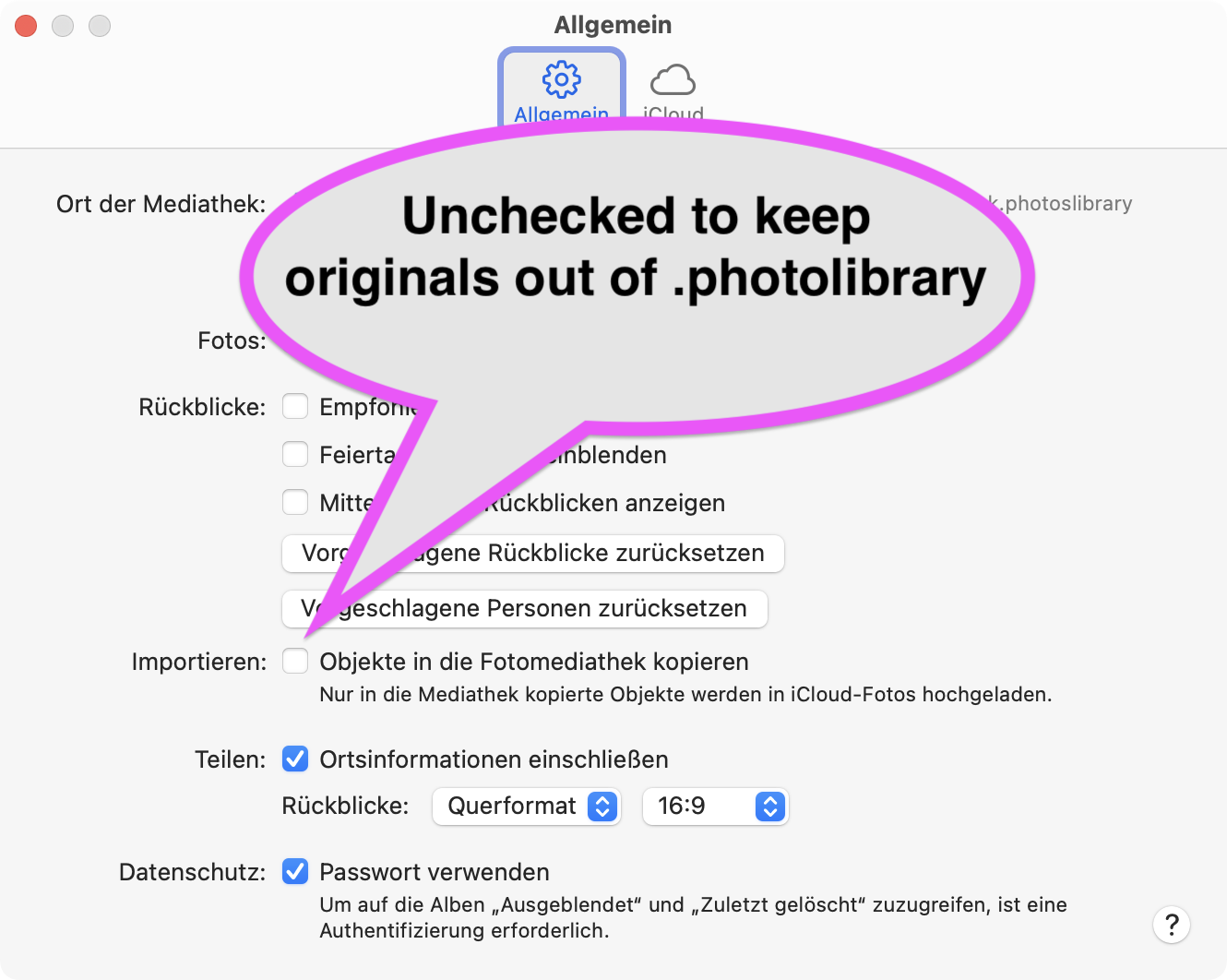
source images NOT buried in .photoslibrary
Photos.app only used for sharing and display
To begin with, set Photos.app to NOT copy images, checkbox in Photos’ settings
Now, read all the rest before you begin
The steps to the new configuration are as follows, and we start with a short test
In Photos.app, export unedited images with “Export” from the “File” menu
→ test with a subset and export options with/without option “moments”
→ choose the option you prefer and export to a new folder (aka archive)
Open the new folder with PhotoLab and see if you got what you need
→ check for captions, ratings, keywords etc.
Repeat until you have set export in a way to deal with “the lot”
The Export:
In Photos, select all images (or subsets thereof) and export
Re-organise the new folder, e.g. year>month>occasion (aka moment)
→ This helps to keep folder sizes reasonable, PhotoLab isn’t that good in handling folders of several thousand images. Hundreds are okay though
Open PhotoLab, select the root of the new archive
Have PL index the archive folder (this includes everything within)
Check subfolder(s), do a few edits…
From there on, you should
copy new photos to the desired location in the new archive,
edit metadata and images in PhotoLab,
export selections of images to Photos.app for show and sharing
Thanks guys. For my purposes it looks like I will likely continue to use Apple Photos as my catalog and just use PhotoLab for editing (if I choose to purchase it).