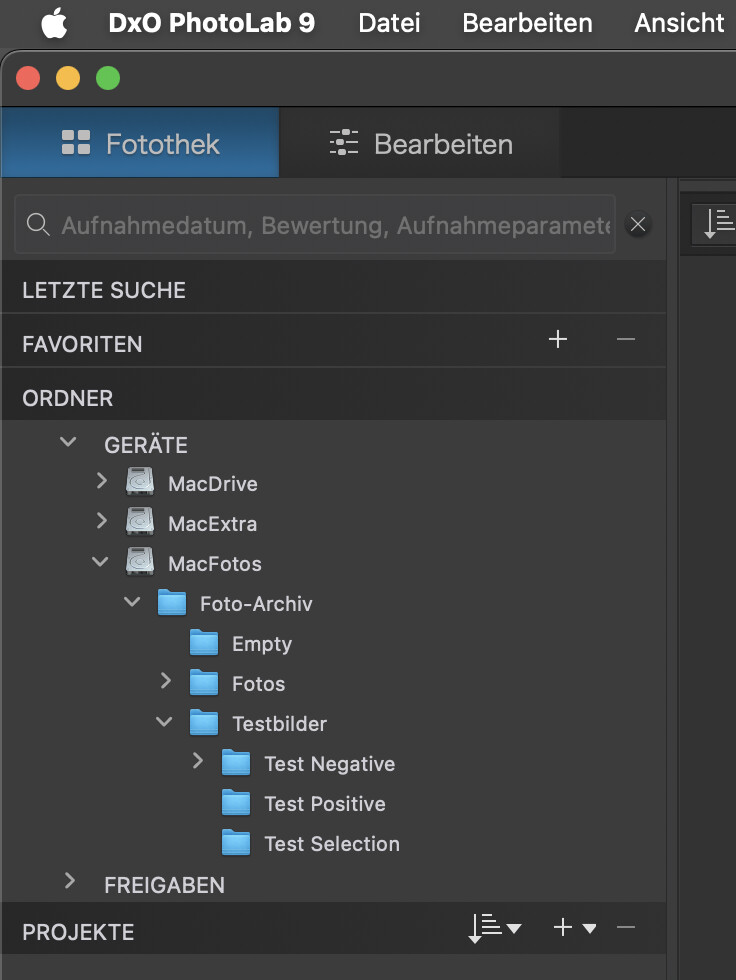
The Folders tab is driving me crazy at the moment, insisting that a whole bunch of folders be expanded no matter what I do. These are unrelated to anything that I can currently working on and if I close them manually they are maddeningly automatically reopened if I quit/restart PL9 or even if I simply drag to move an image from one (unrelated) folder to another.
The result is that trying to use drag-and-drop to move files is a nightmare because the folders view is constantly scrolling thanks to the broken auto-expansion behaviour.
So the question is: is there a configuration file somewhat that is controlling which folders are being auto-expanded? I have looked (grep) but failed to find it. Nuking the database does not help.
For reference, some of the folders that auto expand are system folders, such as Downloads or Documents. But many others are not. I suspect that these are locations that at some point in the past DxO viewed an image.
I’ve had this annoying effect in several cases and versions of PL, but as far as I’ve worked with PL 9.10, the folders open exactly as I left them when I closed PL. Note that I’ve re-installed my Mac recently. The database is containing all of the 25k image files from re-indexing after having removed the database.
I keep my photos on a separate internal volume (MacFotos) and away from the “normal” volume that is called Macintosh HD by default. This has been my solution for a while, not for said issue, but for easier testing of and migration to new macOS releases.
My guess is, that over time, some crud causes PL to keep folders open…and then, editing the preferences files might be worth a try. This might need to be repeated too: I got the impression that certain things need two mods and restarts before taking effect.
The solution was eventually just to delete the main preference file, which on macOS is ~/Library/Preferences/com.dxo.PhotoLab9.plist.
Inside the preferences there is a section that somehow encodes the expanded/collapsed state, though it was not clear how this was causing the problem. Deleting the whole preference file and tweaking the few key settings that were lost manually worked.
While digging, I also found that there is telemetry going to mixpanel.com (wikipedia). It is somewhat depressing to see that this being used, but at least it can be blocked via the firewall.
Hey Mark, thank you for this. I’ve been having exactly the same issue as the OP and was about ready for the “rubber room”. Your solution worked great for me. Much appreciated.
lmolter54
(Larry [Nikon D750, Mac Mini M2 Pro, Hobbyist])
5
Mark, what app do you use to sniff outbound traffic? Wireshark?