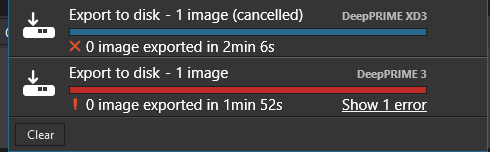
Export on macOS keeps getting stuck for me. It just stops with the time still ticking up, as per the attached image. While it is stuck, there is no CPU or GPU loading from DxO - it is just idling.
These were very basic images, with no AI masking and outputing sRGB jpegs.
Is anyone else seeing this? Does anyone have a work-around?!
I seem to hit this problem repeatedly at the moment. Force-quitting and restarting gets it working for a little while longer, but eventually it just jams up again.
There have been several recent posts here about PhotoLab 9.10 failing to export. Please report it to DxO at support.dxo.com. I’m still running PhotoLab 9.8.1 which is not causing me problems.
I think that you can work around this by either never exporting more than one image at a time, or by setting the maximum number of simultaneously processed images (advanced settings) to 1.
I have had this exact problem on updating to the latest version of PL9 (9.1). All exports (print, post process in NIK etc) fail. I have submitted a bug report but rolling back to 9.6 build 631 fixes the issue. This was the only build left in my recycle bin, so cannot test a newer release for compatibility. I have asked dxo for a later build to test but not really expecting much joy!
fyi my gpu is a amd RX 9070 xt with a ryzen 7 5700x cpu
Hmm, I just exported 24 images with plenty retouching of different kind with no issues. This from the latest PL version and a PC with a Ryzen 5800X /32GB with an RTX 5060TI/16GB
No, I did try switching HW acceleration off which worked but was just too slow. Also, reduced the number of concurrent image edits to 1 in the hardware performance tab to no avail.
I did uninstall and reinstall the latest version twice between using the earlier build. Not sure what will have happened to my database but PL complained each time I downgraded. If I get a chance I will try as you suggest but, for me at least, 9.1 is broken and 9.6 works.
I changed GPU from nvidia a month or so ago, maybe that had an effect, though I cleared out all the nvidia drivers etc.
Well, DxO have replied to my support request requiring further info etc. So I Guess I will be reinstalling 9.1 and trying what you suggested John
It is definitley the denoising algorithm Deep PRIME/X3d that is hanging up for all the raw formats I use (nef, raf). Processing tifs works fine as no AI denoising happens. The loupe also seems to work, which I didn’t expect.
Switching to compatibility mode seems to have solved the export issue for me. DxO replied to my support request quickly and also suggested I try the compatibility mode. I have offered to send further diagnostics using their tool and performance mode switched on, if they require them, but overall pleasantly surprised by the tech support service of DxO.
Hi, thanks for your help & feedback on this matter…
FYI..DxO Support has advised me that they’ve identified the root cause of the issue and their team is working on a fix. They mentioned that the solution will take some additional time to develop and deploy.
In the meantime, they’ve recommended reverting to an earlier version of PhotoLab (V.9.9.0.712) which I have done and appears to have worked…
I have had a couple of replies now from DxO Support. The first acknowledged the issue and provided a link to an intermediate version that solved the issue for me. They also mentioned that the problem had been identified and a solution was in the works.
Today, They contacted me to say that an update has been released (v9.11.0 build 758) which fixes the AMD specific issues. Having downloaded and tested (briefly) this version i can confirm that my image exports are now working as expected!!
My GPU is an AMD 9070XT with 16GB vram
Thank you DxO, I have been very pleasantly surprised by my experience with your technical support team. Keep up the good work!