Not that I need it often, but do I need View Point 5 to be able to Flip horizontally and vertically? If I remember correctly, I had that option in PL 8 or PL 7 with Viewpoint 3
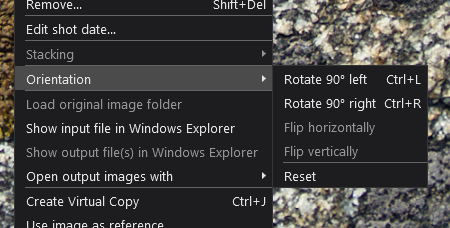
in PL5 + VP3 = only rotate
in PL6 + VP4 = rotate + flip
and the same thing in VP3 and 4 standalone

2 Likes
@TorsteinH You must be misremembering because I have PL7 and VP3 and I can only rotate, the flip options are greyed out.
In other words, you need VP4 or greater to be able to flip.
I suppose I must have misremembered, but I’m quite sure I had that option once upon a time. I have used PhotoLab since V4…
Workaround: Rotate the images and save the .dop files.
Edit the .dop files and replace the value for the orientation by what you need, values can be found on the exiftool homepage. Here’s what they are today:

You can also use exiftool directly to edit the orientation tag.
exiftool -n -orientation=1 20140626-8376.cr2 ; use the values above as needed
Reference: orientation 1 shows all images in landscape orientation. Start from here. It helps to edit a reference image with an easy to recognise local adjustment.

Third option: if there is an .xmp sidecar with an orientation tag…do as above.
Neither PhotoLab nor Lightroom Classic show a change of orientation in history. Keep track of it yourself - and with the help of some text (if any) in the image (or add it yourself as shown above.
More about flip: Does PL8 Elite include the ability to flip? and other threads/posts
1 Like
I’ve a feeling that if you go back to the days of OpticsPro then you could both rotate and flip. I can’t check that though without going out to my garage and booting up my old Win XP machine.
Thank you for the elaborate answer.
It’s a bit strange that you can do it with an edit of the dop file, but not from the user interface, even if you have VP3 and not VP4. I imagined that it was a bug in PL9, but I guess DxO needs another reason for users like me to upgrade.
Anyway, I can always do that fast and efficiently in Affinity after I have finished in PhotoLab.
You can also flip/flop tiffs or jpegs using ImageMagick, for free.

Physical copies with orientation set by .dop-editing.
…Ox… in the name corresponds to the image’s orientation flag value.
Note that orientation descriptions (above) reference to “normal” orientation.
PhotoLab blocks access to the tools without a valid activation,
but access to the functionality isn’t blocked in this case.
CAVEAT:
The flags shown above are for photos taken in normal landscape orientation only.
Captures taken in other orientations have different tags values. For such cases, find the one you need by experiment or systematic testing.
- Flags shown above = 1, 2, 3, 4, 5, 6, 7, 8 - for normal landscape orientation
- Flags not shown
= 8, 7, 6, 5, 2, 1, 4, 3 - for photos taken “grip up”