Thanks - I have uploaded three along with the JPEGs the camera produced.
1079 - used flash
1083 - interior lighting (I can’t remember what sort)
1111 - sunny day.
Bug report: if you add six files and then click send on the Flash version, nothing seems to happen. You then notice the ‘up to five’ bit, but there’s no way to remove a file from the queue.
for now we support only dng with no compression and if Exif is correct, @HalfBaked, you used one.
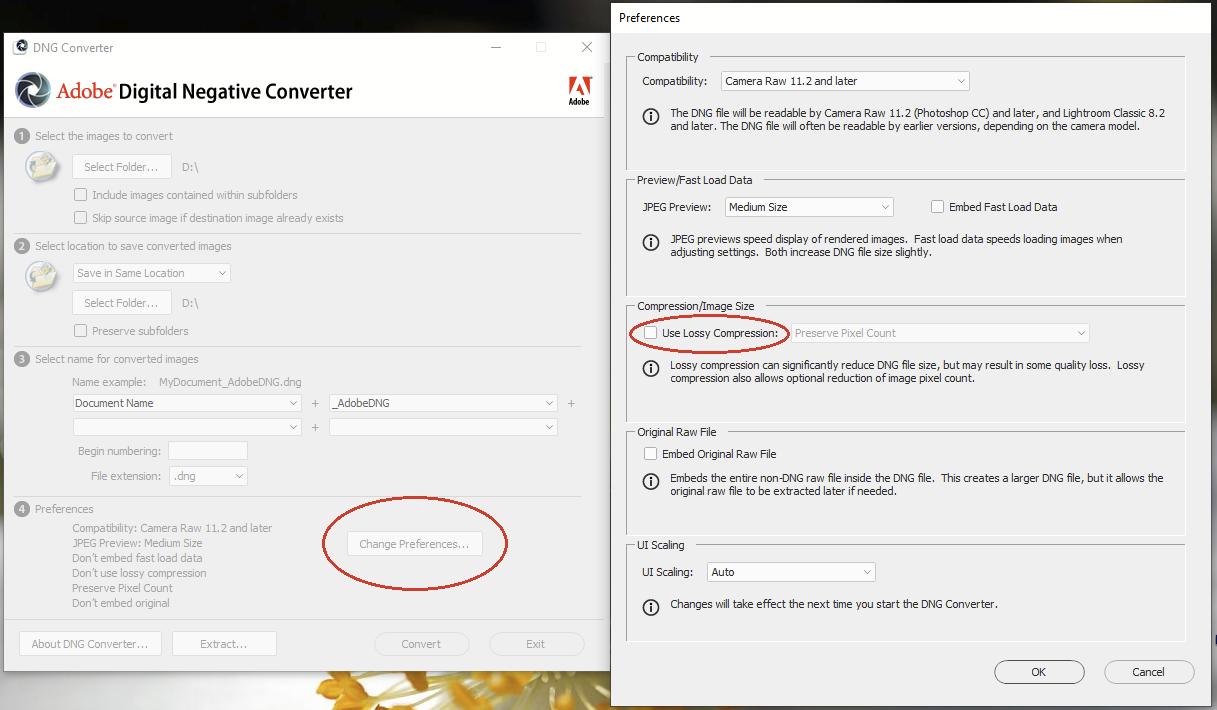
When you convert images in dng option “Lossy compression” in preferences must be unchecked.
Here is what it looks like in Adobe dng converter:
It would surprise me if lossy compression was used - the check box in the program used to create them (dng4ps2) says it’s lossless - but it also happens with uncompressed ones - I’ve just uploaded one.
I don’t know how dng4ps2 creates dng, maybe compression isn’t optionnal. In Exif of the image it’s clear it’s a RGB one and not a RAW one, and there are also lot of missing Exif tag we need to process an image.
So maybe you can try to use Adobe dng converter for a test ?