I’ve edited photo, soft proofed it, and exported it as a .tif. Now I’d like to open that .tif with Epson Print Layout.
But I haven’t found a way to select the file and Open With… from within PhotoLab (9 trial). Am I missing something?
I’ve edited photo, soft proofed it, and exported it as a .tif. Now I’d like to open that .tif with Epson Print Layout.
But I haven’t found a way to select the file and Open With… from within PhotoLab (9 trial). Am I missing something?
Just right-click on the file in Finder and select “open with” from there.
Either that or drag the file from Finder to the main window of the app.
That’s no problem if I don’t mind hunting around the Finder for a file named _2067743.tif, or the like. So I’d like to be able to do it from within PhotoLab where I see the file I want. Not possible?
Doesn’t seem so. At least there is a “Reveal Image in Finder” option if you right-click the thumbnail, so you don’t have to hunt around for it.
That is helpful. Thanks.
Wouldn’t the solution be to use Export to Application? (Either the output TIFF or the original photo with adjustments.)
Not if the file has already been created. Export to Application wants to create another file.
Check the settings. It doesn’t have to create another file if you don’t want it to.
That would be good, but all I see is 'Export file without processing`. That does what it says, just exports the file, doesn’t create a new one, but doesn’t include any PhotoLab adjustments. Otherwise I have to pick JPG, TIF, or DNG.
Am I doing it wrong?
Hi Bob,
while I’m on Windows, it should be similar with your OS
and as you might guess, there are a multiple options.
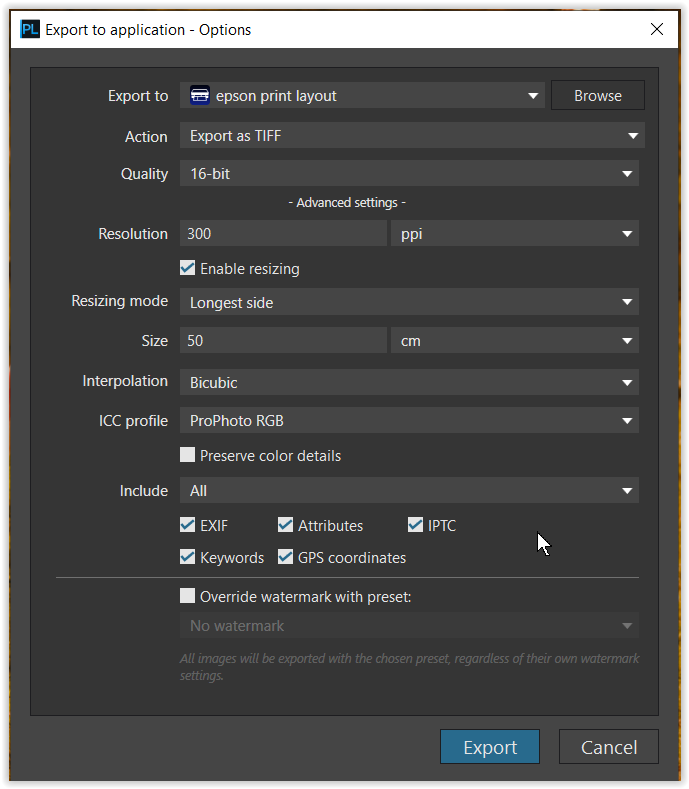
You can Export a processed raw-file from PL to Application (e.g. EPL)
You can Export a processed raw-file from PL to Disk
again setting up to a certain print size, while you add some sharpening in PL
(not bicubic sharper from the export menu).
.
You will receive a pre-sharpened output file (e.g. TIFF) in the final print size,
which you then export to Application (e.g. EPL), but now without processing,
then opening up in EPL, where you adjust the appropriate settings and print.
In both cases you generate a TIFF file in the final print size (w/o additional scaling).
Without setting the final print size (case #1), you leave the scaling to the print application, an option I do not recommend … whereas I would then simply use PL’s print engine. 
Yes. Select the TIFF file that you already created via export in PhotoLab. Export that to your application without processing. Does that accomplish what you want?
You can also create the TIFF via “export to application” as Wolfgang described, which is just like export-to-disk (creates a TIFF) but then opens that TIFF in the selected application.
Ah, yes! That should do it.
Easy and works.
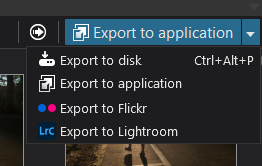
Export ot Application →
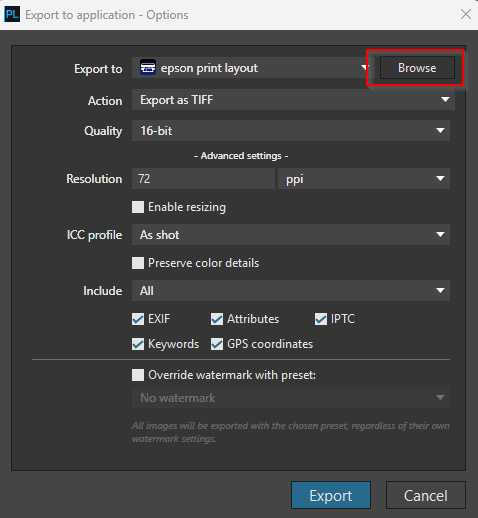
Browse the Epson stuff
I use Windows 11, but i guess similar in Mac.
Usually something like: C:\Program Files\Epson Software\Epson Print Layout
Choose Epson Print Layout. exe
Setup the export to Tiff, etc.
Export → Print Layout opened with the tiff.
Also works with multiple files.
I understand to use Epson Print Layout, I also use it (Epson SC-P600).
For those less familiar with and ask why this open with EPL nice: in LR/PS it has a plugin alike, you can choose in directly from the Export dropdown “Epson Print Layout”. Practically the same as this ‘Export to application’, but just put to the dropdown list without application browsing and so on.