
And this is just one of the anomalies that have just surfaced…
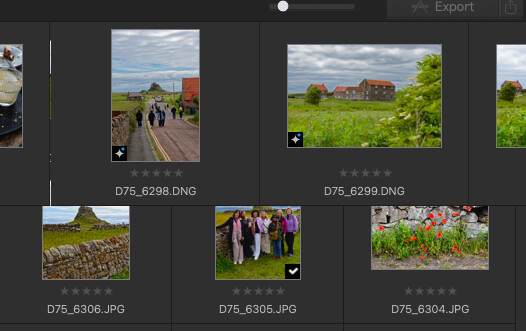
Notice the top row of the Photo Library grid. When I changed the size of the icons to be smaller, the top row did not change. And prior to changing their size, the icon on the far right was cut in half. All other icons fit on the screen. I changed their size to be able to see them all, but the top row refused to have it. The screenshot was taken from the far right edge of the screen – there’s nothing more to the right. And PL9 was maximized to fill the display.
Another anomaly, and it’s hard to describe, is in the ‘filmstrip’ along the bottom when in Customize mode. Sometimes when I choose a photo from the filmstrip, PL9 jumps back to the first photo (or maybe a random one) on the strip and displays it in the big edit window. Not always, and I haven’t figured out what the exact sequence is to make PL9 not choose the photo I clicked on.
Similar behavior in the PhotoLibrary grid. When that view comes up, the first photo has a light grey box around it (selected?) sometimes. If I click another photo in the grid, PL9 jumps to the first photo in the grid and displays it. I would say that this behavior happens over 50% of the time. And I have not yet seen any correlation to keystrokes or anything else that exacerbates this goofiness.
This is all new behavior that I’ve noticed has crept in in the last week or so. Yes, I have previously changed the Acceleration method from CPU to Apple. I think I had some rendering delays with ‘CPU’ and decided to try the Apple GPU. This was before the latest odd behavior started.
I have also installed trial versions of FilmPack and Viewpoint if that makes any difference.
Mac Mini M2 Pro, Mac OS Tahoe 26.5.2, 16GB RAM and 110GB free on 512GB internal SSD, and GPU as defined above. External 512GB SSD used as local cache for editing.
<< addendum >> Changing the Acceleration mode to anything else (CPU or Apple Neural) had no effect.
<< addendum 2 >>
A support ticket was opened with DxO support. I’ve sent videos of the troubled areas and I’m awaiting their reply.
On a side note, I had a long discussion with chatGPT detailing the behaviors of PL9.10 and its consensus was that there is some issue with mouse click tracking as selecting photos from the filmstrip works without incident if the arrow keys are used and not the mouse. It was AI’s opinion that PL9.10 loses track of which photo was clicked and which one to display. Maybe this is peculiar only to Apple Silicon in the M2 family of Minis.
Please, no harassment for asking AI for help.