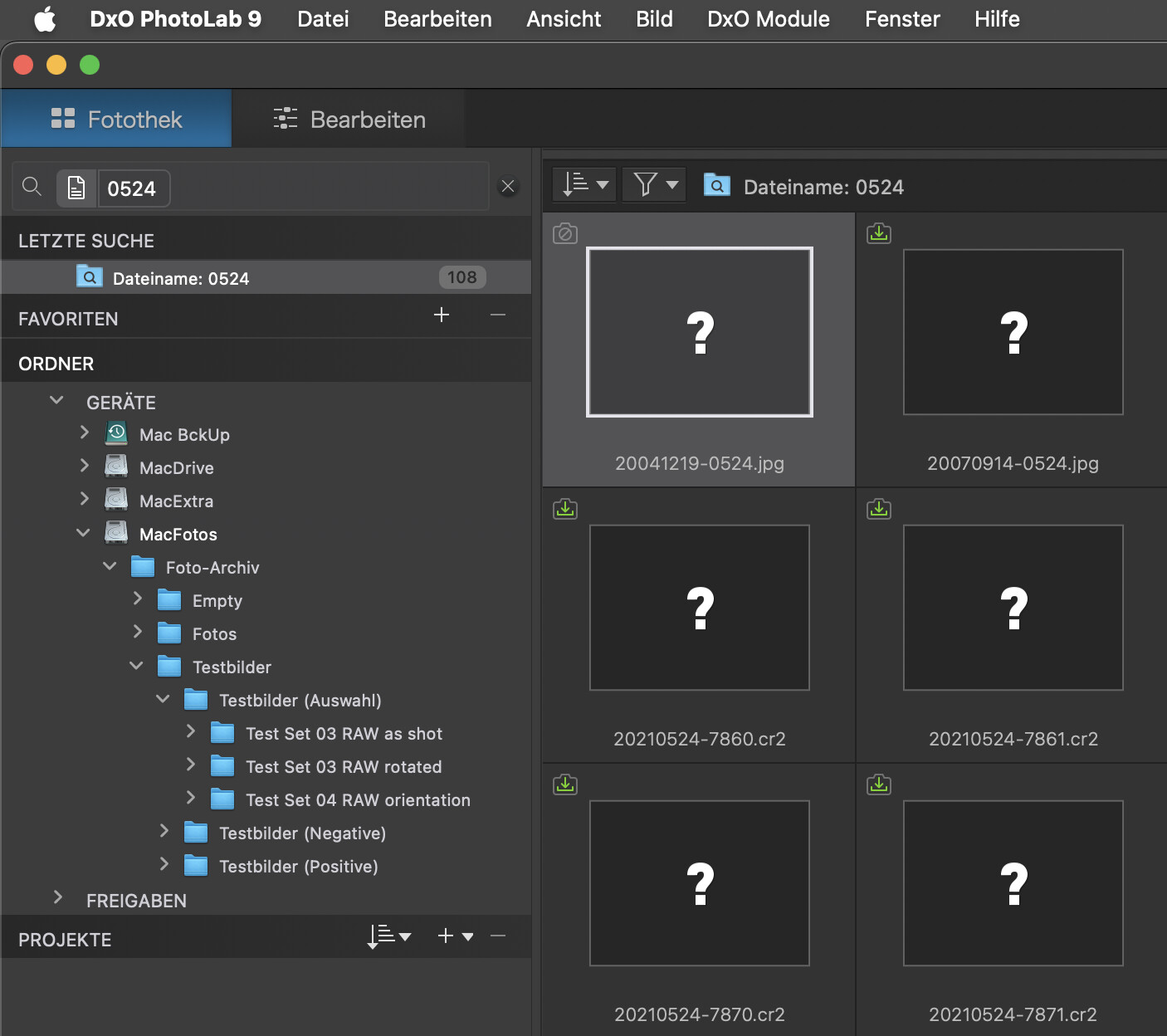
I had to restore the photo archive onto a new volume. And as such, it got a new UUID and PL lost the connection. All images already in the catalog are hanging in the air.
Indexing the archive again just doubles the number of images, half of which are shown with a question mark.
Tried it, but the new volume wasn’t listed in the database and there were some duplicate volume names too.
Therefore, and because PL can’t fix its database, I decided to simply trash the DB and index the whole lot from scratch. It was all done by PL9 in less than 10 minutes for 25k image and 25k dop files plus about 15k xmp sidecars.
BTW, I had PL7 and PL8 index in parallel. This is certainly not optimal for benchmarking, but that was not the goal anyways.
Checking the presence of files and sidecars on Mac is best done with the CLI, e.g.
Most people will need to replace the path by the one that corresponds to their own config. Writing results to a file is optional, all it takes is the part up to and including “-print”
I had a support conversation with DxO about this. It was one of the weirdest ones I have had, and more than anything else that has happened so far, made me lose faith in their support team. It’s a long thread, but I think it’s funny/interesting to show it all because of how ludicrous it is:
Me:
Per the product page, with PL9 “it’s now easier to relocate folders that have been moved.”
How do I accomplish this?
If I move a folder, it simply disappears from the folder tree, so there are no actions I can take on the folder. The only thing I am able to do is perform a search for some keyword or timestamp that I know relates to images inside the moved folder(s) and then relocate the images individually. But that becomes tedious / next to impossible to handle the entire folder relocation if the folder had a bunch of subfolders.
Also, I believe the ability to relocate an image singularly already existed before PL9 so I’m going to assume this is not the new feature being pointed out on the PL9 product page.
Them:
Thank you for reaching us.
In DxO PhotoLab 9, when a folder has been moved outside of PhotoLab (for example, using Finder), the software will mark it as missing in the database.
The new “Relocate Folder” option allows you to easily reconnect PhotoLab to the folder’s new location without having to reimport or manually relink each image.
To do this:
In the PhotoLibrary tab, locate the missing folder in the Source Browser (it will appear grayed out).
Right-click the folder and choose Relocate Folder.
In the dialog box, navigate to the folder’s new location and confirm.
PhotoLab will then update the internal links for all images and subfolders within that directory.
If the folder disappears entirely from the folder tree, it means PhotoLab no longer has a database record for it. In that case, navigate manually to the new folder location in the Finder and open it through PhotoLab once, which will reindex its contents. You can then use the Favorites section to keep frequently used folders visible for quick access.
We appreciate your feedback about how the current behavior differs from your expectations, and we’ll forward your comments to our team for consideration in future improvements.
Me:
Unfortunately in every single scenario that I move a folder, it disappears from the folder tree so I cannot perform this “new function” – so it may as well not even exist. I’m not sure why it’s even being advertised on your product pages as I can’t even do this with folders that have existed in PhotoLab for a few days (meaning it should be in the database?).
I thought the purpose of the “relocate folder” function was to prevent the database from accumulating “dead” files that show up when you perform searches, so just navigating to the folder newly doesn’t fix the core problem that I assumed this feature was trying to solve.
Them:
This is a follow up message from the Team,
My sincere apologies for the confusion the new function stated does not exist and I confirmed it to the Team and they mentioned nothing had changed,
Also, if we check the drive and folder names of the screenshot added to the original post, there is (and was) no sign whatsoever that these items had been “relocated”.
In the case of the (time machine) restore I did, the names remain unchanged, but the volume gets a new UUID…which breaks the whole story.
Still - and I do hope that DxO will fix this bundle of omissions - PL is NOT ready for pro or even advanced use in which managing assets (reliably) is as important as tickling out the last puff of noise vs detail. As an engineer, I understand the obsession to get beyond 20/80 in this area, but from a practical and “image with a message” point of view, no one cares about losing the noise. After all, this world is not (yet) fully made from hi-gloss polymers…and when it will be, adding grain will be the artistic fad for everyone.
Yeah, because the source tree dynamically updates based on your hard drive, it just doesn’t work the way you think it would. What I do think is odd is that there was ONE time, early in my trial of PL9, that I saw a moved folder remain in the source browser and I right-clicked on it and saw this “relocate” menu item. But never since.
It’s crazy to me, though, that in asking support about it, they gave me detailed instructions of how to accomplish this feature, and then turn around and tell me the feature doesn’t even exist. Uh… What??
Honestly my favorite part of PL9 is the usage of the FP8 presets with all their simulated grain glory
I almost always add grain into my images; I don’t like the “plastic” look of a totally grain-free image. However, I generally appreciate the look of added grain rather than noise from a digital sensor, because, well, it’s not technically grain. So on higher-ISO images often I do apply PL9 noise reduction and then add the amount of grain I want back in. Plus I like color images to have color grain (which FP grain options provide) rather than just b&w speckles
It seems to me there’s an “in between” to be had there. Just don’t be agressive on the noise reduction.
Personally, if I have images with large swathes of flat colour, particularly skies, I hate anything too obvious. But I agree if you take it ALL away it can look a little ‘plastic’.
No, it’s not, but if you take pictures of big metal birds and you aren’t super close (Hi!) then there are a LOT of smooth, shiny surfaces.
Back to the relocation function. I could have sworn I used it, but it was not a case of finding a moved folder, rather moved files.
Funny thing, though. I knew I had seen a bunch of “?” thumbnails recently and had been puzzled when I looked for the represented images, only to find them right in the folder PhotoLab said it was looking at. I left it at the time, but decided to take a look again in the context of this thread.
I found the “?” images and… every single one of them began to render. Multiple folders of them. It wasn’t just a case of impatience before, either, as I had left a folder open for several minutes while convincing myself the files were exactly where they should have been.
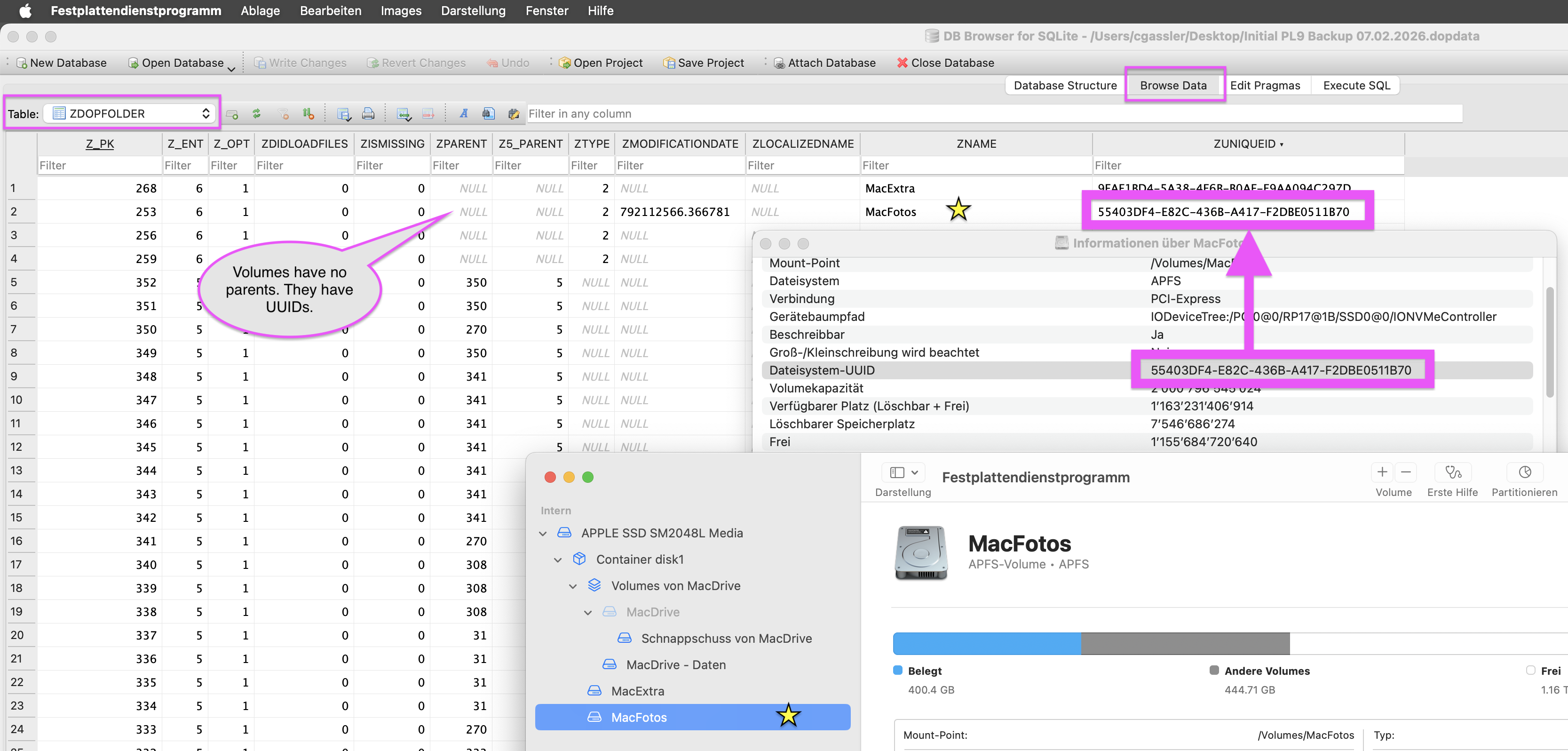
This can happen (after a cache cleaning and other load on the system?)…but in my case, the “?” files were disconnected due to that UUID change. Looking at the ZDOPSOURCE table and parents/folders/volumes and respective UUIDs, the case was clear.
Maybe I could have reconnected the assets by giving the target volume a different name, but re-indexing was risk free, quick (<10 minutes) and a no-brainer.
I was facing to the same problem ~8 years ago. At that time the developer support team was very helpful and made a special service for me. I uploaded my recent Database to make them available. They opened the file in an SQL editor and modified the UUID to the recent HDD. Downloaded the revised file and all of my images became editable again.
I proposed than. it would be necessary to make such an action available users, because it is a quite frequent case, I have to move my files to another HDD, NAS, SSD, etc. I can not say, they promised.
However, that can do it inside DxO support, with a “replace data” in an SQL editor. If you are brave enough, the free SQL Lite browser give a chance to see all data ( UUID too ), however to find the correct substitution value …. not easy.
Changing a database field has so far been my approach and I usually changed the “parent” entry of the root folder of the photo archive. Haven’t tried to simply change the UUID though - stupid omission
On Mac, the UUID of a drive can be found with Disk Utility (or with the CLI)
→ Select the drive, get its info and copy/paste the UUID.
Hint: first back up the database with PL. Then, modify the backup and restore it with PL.