Still not ready to go with PL without the above tools, use a radial filter frequently, as well as the levels tool in C1.
2 Likes
Jerry
Much more precise than a radial filter and just as quick to use; draw with the brush.
Pascal
Radial Filter
Control points of increasing or decreasing size can create an approximate effect, or use the brush as @Pieloe said. I appreciate the radial filter is quick and intuitive though, and wish DxO would add it or let us modify control points to emulate it.
Levels tool
The global Tone Curve and Selective Curve tools do a good job. Only Selective Curve adjustment is available in masks (no local tone curves) but for this reason I don’t think a dedicated levels tool is needed. It would be nice to be able to click and specify the absolute black and white points, though.
White Slider
Not sure what you mean here. There’s white balance adjustment, and it’s possible to adjust midtones (whites) via the Selective Tone and Curve tools.
Creative Vignette
This exists, you can find it in the FX panel but only if you have the FilmPack add-on, as DxO decided it was good business to make you pay for FilmPack as (basically) an essential, in addition to PhotoLab.
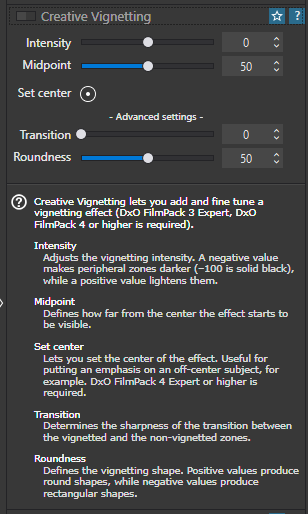
The next version of PhotoLab is expected to be released sometime this autumn.
If you are interested, check back then and give it a try—with or without FilmPack and ViewPoint.
One often sees reference (by C1 and LR users) to sliders to set black and white points … I’m guessing that’s what Jerry is referring to.
- I find a better but completely different approach (- esp. for new-to-PL users) is to use Smart Lighting with judicious placement of Spot-Weighting rectangles.
2 Likes
There are workarounds for all of these issues, but as they are all what many, non DXO users consider editing basics, it would surely be a better solution for DXO to add these tools. You can have a radial mask in DXO NIK, but not in Photolab. Siri, make it make sense?
2 Likes
Now it seems that to have luminosity masks one must also purchase FilmPack, this results in a more expensive solution then Capture One with includes all PL is missing. At this point I think sticking with C1 would be a better fit for me at this time. Thanks for everyone’s comments.
Yes, this practice of holding basic tools for ransom, forcing you to buy another program is really annoying and I think most people find this objectionable.
The question is how many people would buy/upgrade Filmpack just for the film emulations and not for the luminosity mask and Tonal Contrast sliders that Filmpack “adds” to PhotoLab?
If a program can’t stand on its own merits users shouldn’t be forced to purchase it to obtain basic functionality in another program.
4 Likes
I have zero need for FilmPack in terms of the emulations. I simply don’t use them. DxO make it a necessity and that’s a money-grabbing choice, nothing less.
Ahh I see, I think there’s another potential solution to this too, which is to start with a blank Tone Curve (e.g. no changes made to it at all):
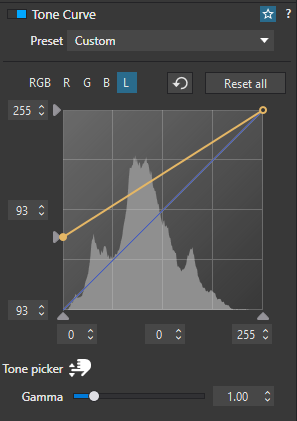
In this case I’m “holding” the absolute black point up at +93 just so you can see the actual image tone curve beneath the line.
By default it extends almost completely to 100% black, but not quite. It doesn’t extend to 100% white at all.
Now if I do this…
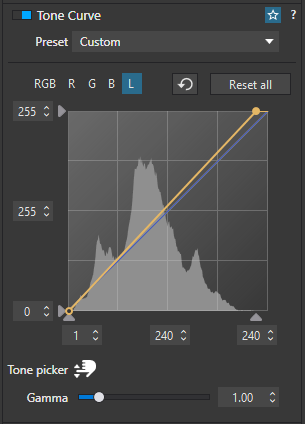
I’ve moved the black point to +1, and the white point down from a possible +255 to just +240.
I have shadow and highlight clipping enabled, so I can see when I start clipping detail from the image by adjusting these values. +1 black and +240 white brings the start of my blacks to 100% black, and the end of my whites to 100% white. Anything else sits within that range, but lower.
I can then mess with the tone curve within those two points to set up any S-curve etc. that I want.
It’s not a black point or a white point as such, but it works I believe.
1 Like
Sorry, also wanted to say that your measured decision is understandable.
PhotoLab can be a very powerful tool and arguably capable of putting out sharpest and best-denoised edits out there. It was wiping the floor with Adobe’s denoising attempts before Adobe even got started (and I believe it’s still faster).
However, in some areas it’s clunky, poorly designed, lacking in features or suffers from a certain greed on the part of DxO (see: the whole FilmPack thing).
I’m no C1 expert, but have tried it, and I found it much quicker to edit in and I really like C1’s approach to colour, especially for skin tones. The colour wheels are a joy compared to PhotoLab (and PL is still lacking a tool to control mid-tones in split toning). However, I couldn’t get images out of C1 that were as sharp as PhotoLab and I struggled to edit the way I wanted, consistently. That is down to not spending enough time with C1.
I do find PhotoLab slow in its own way though. I struggle to get consistent edits across a gallery of shots, and Adobe has better ways of syncing and normalising e.g. exposure across a gallery.
For me, PhotoLab is an imperfect scalpel for editing one image at a time…
Lightroom is efficient, feature rich and good for editing projects of work consistently.
C1 falls somewhere in between.
Then there’s the matter of cost. Although DxO doesn’t have a monthly subscription, you do have to pay every year to upgrade to the latest features, IF you want them. This means it’s not a whole lot cheaper than a year’s Adobe subscription (depending on when you buy, LR/PS for 12 months are actually cheaper!)
Ultimately I think all three are viable image editors but there are compromises to be made.
Absolutely!
Except when you buy FilmPack (and ViewPoint) you are not actually “buying another program”. You are buying key(s) that unlock more features that are already part of PL. That’s a very subtle difference and further obfuscated by DxO’s marketing of FP and VP. Hence @jerrysdean43 reaction of feeling held to ransom
In summary, PL is only truly PL when you pay for PL+FP+VP. Yes that does make it pricey.
3 Likes
That is correct. Anything less than all three pieces gives you an incomplete and hobbled experience. I have used every version of all three components of PhotoLab since 2017 and have never regretted it. I do use the film type emulations, but beyond them there are a number of other features in FilmPack that I use on a regular basis in my workfkow and would not want to go without,
It is a personal decision whether paying for three expensive components is cost effective, but for those not willing or able to do it, perhaps the purchase of a license to one of DxO’s competitors would be a better option for them. If cost is the chief objection, one can always obtain a license to full featured software like ON1 or use the free version of Affinity Photo, However, I have licenses for both of them and still use PhotoLab almost exclusively. Of course there is also LR/PS and Capture One, both of which I have experience using, but I currently don’t have licenses for either.
A very important feature to me I enjoy with C1 is the ability to choose a Fujifilm simulation within C1, and they are very accurate simulations due to the close relationship of Fujifilm and C1. They are included with C1 at no additional cost.
I’m not a Fuji shooter but I believe you can use simulations within Photolab too:
Yes … when images are taken with the corresponding camera.
→ e.g. from the PL8 readme file:
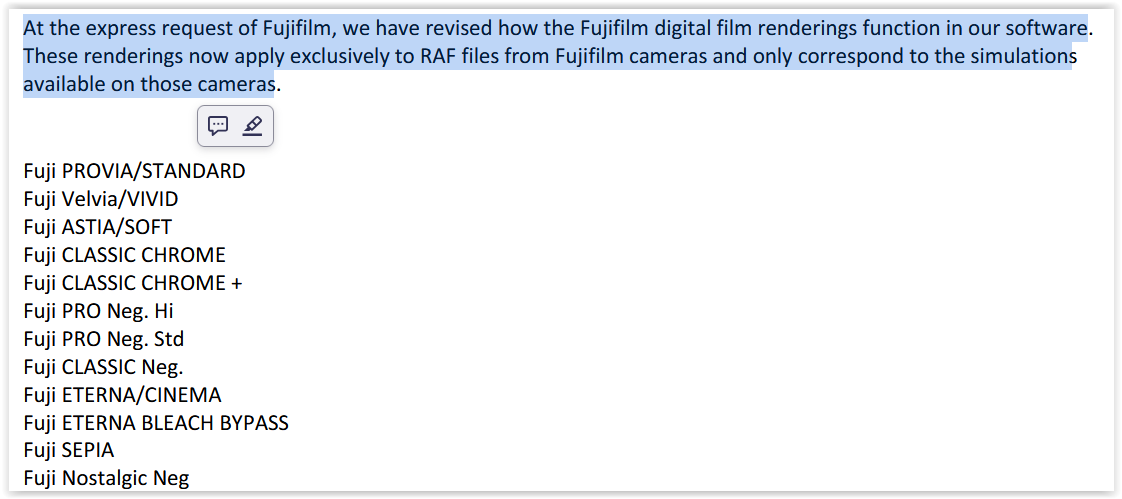
→ e.g. from FP8 readme file:
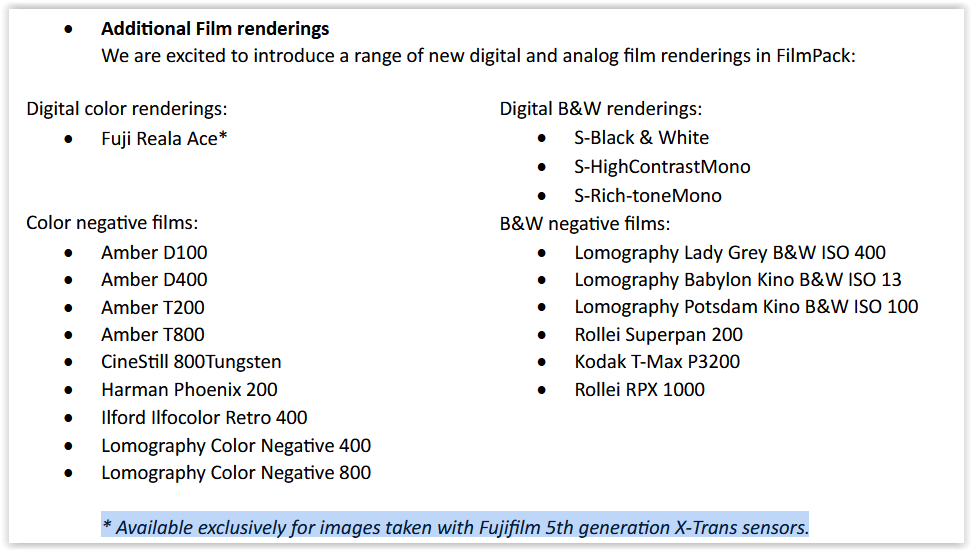
to add
I only mentioned it so as not to raise false hopes.
3 Likes
Wolfgang is right when he makes the above statement.
I didn’t say otherwise 
Who said you did? Wolfgang simply provided another key piece of information.
Guess I’m a little confused as to why you tagged me to tell me something someone else had just told me. Seems a little superfluous 
Moving on
Yes, you are using Curves to emulate a Levels adjustment, although strictly Levels is a simplified Curves tool.
If you take an image with a narrower histogram it is easier to appreciate why a Levels tool is useful. Here is the image with no levels adjustment:
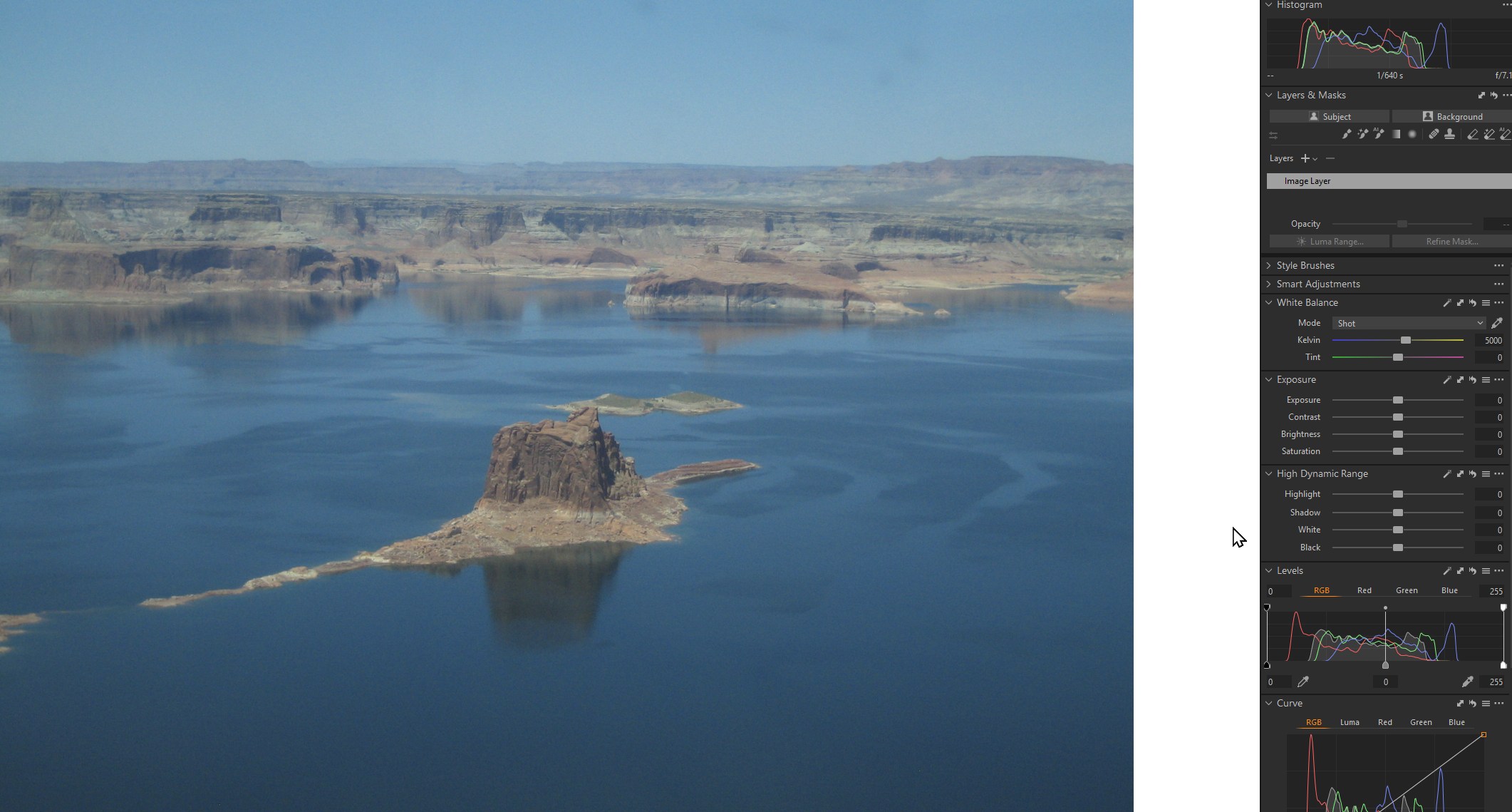
Simply moving the black and white levels to the start of the histogram will stretch the image data and expand the dynamic range to the full 0-255 range. This creates a natural, tailored contrast which is different to adding contrast with a contrast slider which usually pivots at the mid range ie 128. Thus pixels above 128 are brightened and pixels less than 128 are darkened. This is also why when you add contrast in a selection you often don’t get the results you expect if the selection contains primarily lighter or darker pixels.

This is also why a levels or curves adjustment that can be applied to a selection, rather than globally, is so useful. The Curves tool is the most powerful tool in any photo editor. Most of the sliders in the app are there to provide a less complicated way of accessing Curves functionality. Hard to believe now but back in the day we had whole books published on how to use Curves.
My biggest wish is for DXO to add the curves adjustment as a local adjustment. Yes, you can futz with Selective Tone but DXO could also choose to do it right? If a tool can be applied globally, why can’t we use it locally? Lightroom, C1, ON1 etc can all manage to code this functionality for curves in local adjustments. That’s just to demonstrate that asking for Curves in Local adjustments is technically possible and therefore DXO choose not to implement it, as for radial gradiants. If they explained why that would at least help with understanding their position. DXO Photolab is an excellent product and I have used every version they produced, but I want it to be even better.
2 Likes