I have Photolab 8 with FilmPack 7 and I’m planing to upgrade to Photolab 9 when it comes out.
Will the FilmPack 7 features work within Photolab 9, especially Fine contrast and Luminance Masking?
Film Pack 7 is the latest version so there is no reason to suspect it will not work with PL9. That said, until version 9 is announced only DxO have the definitive answer. In the past the versions have carried over just fine and it would seem odd if that were not the case this time. Personally, I am not at all worried.
3 Likes
Check interoperability here: https://support.dxo.com/hc/en-us/articles/4406551767825-DxO-PhotoLab-DxO-PureRAW-DxO-FilmPack-DxO-ViewPoint-compatibility-with-OSes-third-party-software
Please note that there is no consolidated info that I know of that covers interoperability on a per-feature level. Reading the respective manuals can shed some light on dependencies.
It should absolutely work. I would not be concerned.
Mark
Right, otherwise DxO would leave their customers out in the rain with paid - but unusable - FilmPack functionality in PhotoLab.
It has also never been a problem in the past. FilmPack’s upgrade cycle does not always match PhotoLab’s. Even if a new version of FilmPack were to be released, the previous version would still work but without any newer features.
Mark
There are limits on how far back interoperability goes. Check out the tables linked in my earlier post.
I am not surprised by that, but I believe that not only will FilmPack 7 continue to work but also FilmPack 6, and probably even FilmPack 5. For versions prior to FilmPack 5, I wouldn’t want to hazard a guess.
Mark
I expect FilmPack 8 to be released this year (the cycle is now two years), so there will be another “new feature” missing from Photolab. Nevertheless, all features from version 7 will continue to work.
Have a look:
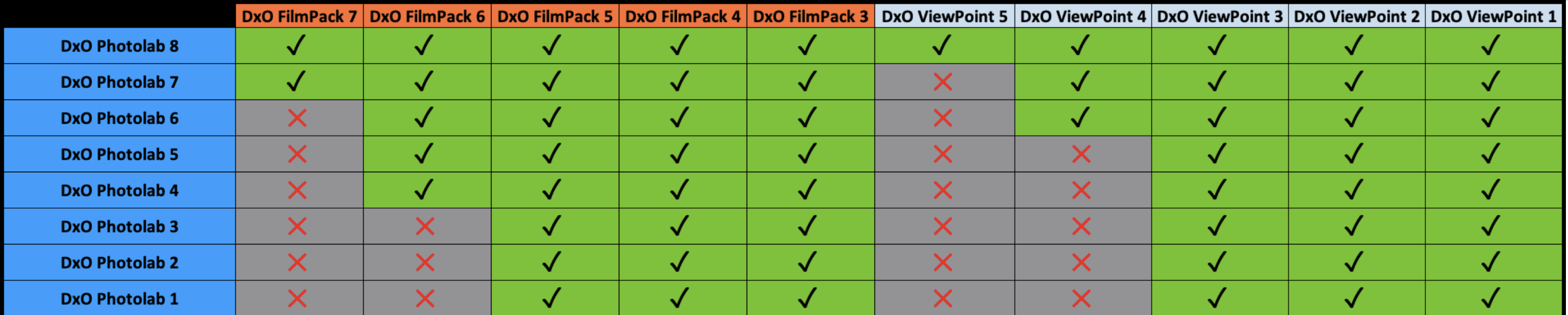
The table says that PhotoLab 8 should work with any version of FilmPack. But even though I have a valid FP 6 license. PL8 does NOT offer to trial FP6, it wants FP7.
Be that as it may, FP7 is the current version as is PL8 and whether/when a new version of FP will emerge remains to be seen. Until then…
I propose that all who feel concerned download the current installers from their shop accounts and keep these downloads at least as long as it takes to run the trial of a new FP or PL release.
Not forgetting that, if you plan to only use FP from within PL, you don’t need to either download or install it. Simply activate it
1 Like
If ever DPL9 wouldn’t allow to activate FP7, I’d install and activate it separately and checked that PL accepted the activation.
As of now, PL8 offers to activate a FP7 trial. I could test how far back an activation can go because I have all the installers, but doing this is definitely too boring and I’m therefore limiting my input to ideas that might be worth trying.
@all
These incompatibilities “depend” on major changes and their integration
into the corresponding PL version, e.g.
- PL4 / FP6 → “Time Machine”
- PL6 / VP4 → “ReShape” tool
- PL7 / FP7 → “Luminosity” mask
- PL8 / VP5 → “ReShape Fusion” tool
Two things to consider
- Activating a version of FP (or VP) that does not show up in DPL’s main menu
- Differences of feature sets
Item 1 has been addressed sufficiently imo. Item 2 might need a few more words: Activating a before-current release of FP or VP will not magically enable features that are new in current releases of FP and VP. So much should be clear
Example: You’ll not get the luminosity mask if you only have a license for FP6.
(If you do, DxO messed up or decided to hand out a free upgrade or whatever…)
1 Like
That’s not true, I’ve activated it (even VP1).
You just need to enter the corresponding activation code. And because it is not the latest version, the menu item remains active.
read carefully. PL does offer to trial one version. Using a key that activates an older version is welcome though. Anyways, whatever works, works and if you have tested activating an old FP in a new PL successfully and write about it, it helps everyone here. Thanks for that.
All of the above is based on assumptions or tests with PhotoLab version 8 or earlier.
We’ll see what PL9 will do - once it is available.
I think (pretty sure) the reason why PL actual version works with all previous FP → PL core code always contains the latest FP code (just the code). FP install ‘just’ add to PL: presets, film emulations/grain emulations, etc. + unlock the feature in the PL (with the installed FP version features) + and off course the FP standalone version.
Seems logical. And with this, you can ensure FP purchase is always works.
No worries.