It does seem that VRAM usage is an ongoing concern. My 1080Ti has 11GB of VRAM and holds its own well in most applications (even gaming, provided I don’t expect RTX!)
Hopefully we’ll see further work on stability and reducing overheads. A lot of people don’t have, and aren’t in a position, to simply upgrade to a GPU with 12GB+ VRAM.
It’s worth bearing in mind that Capture One and Adobe Lightroom seem to also use local AI processing for masking, so they’re on the same playing field as DxO, but better, and still leading in performance (and DxO’s performance concerns aren’t just limited to AI masking).
@Stenis Its more likely that your tests are not using the same image as mine!
@mwsilvers and @Stenis I was about to say that none of my “complaints” were solely about DxO but that is not entirely true and DxO are far from blameless!
We had a rushed release which should have been tested by the Beta Testers on the latest drivers available at the time, and the problems would then have emerged or did that happen but for various reasons DxO went ahead and released the product anyway!?
I find your apologies for/to DxO and condemnation of a frustrated userbase ill phrased, to put it politely. You are using the “classic” supplier response “you have been using this so what did you expect”.
The users are suddenly to “blame” for discovering a gaping hole or two (or more) in the product. Plus DxO have been conspicuous by their absence on the forum and any communication with a frustrated user base. Is a stable release going to be a Christmas present to the users!?
NVidia has at least provided an apparent fix, which I don’t think is all it is cracked up to be, i.e. it may be better for some or possibly all users but it doesn’t fix all the problems, or so my tests lead me to believe.
Alternatively, in the examples I provide below the drivers are now functioning correctly but the DxO export code is at fault!? Either way I as a user are impacted or I would be if I was doing this for real rather than just testing the software.
The older drivers seemed immune to the problems (actually they are not) and the 5000 series cards seem to be fine on the latest drivers, although I haven’t yet tested my 5060Ti(16GB) on the new drivers.
So here goes.
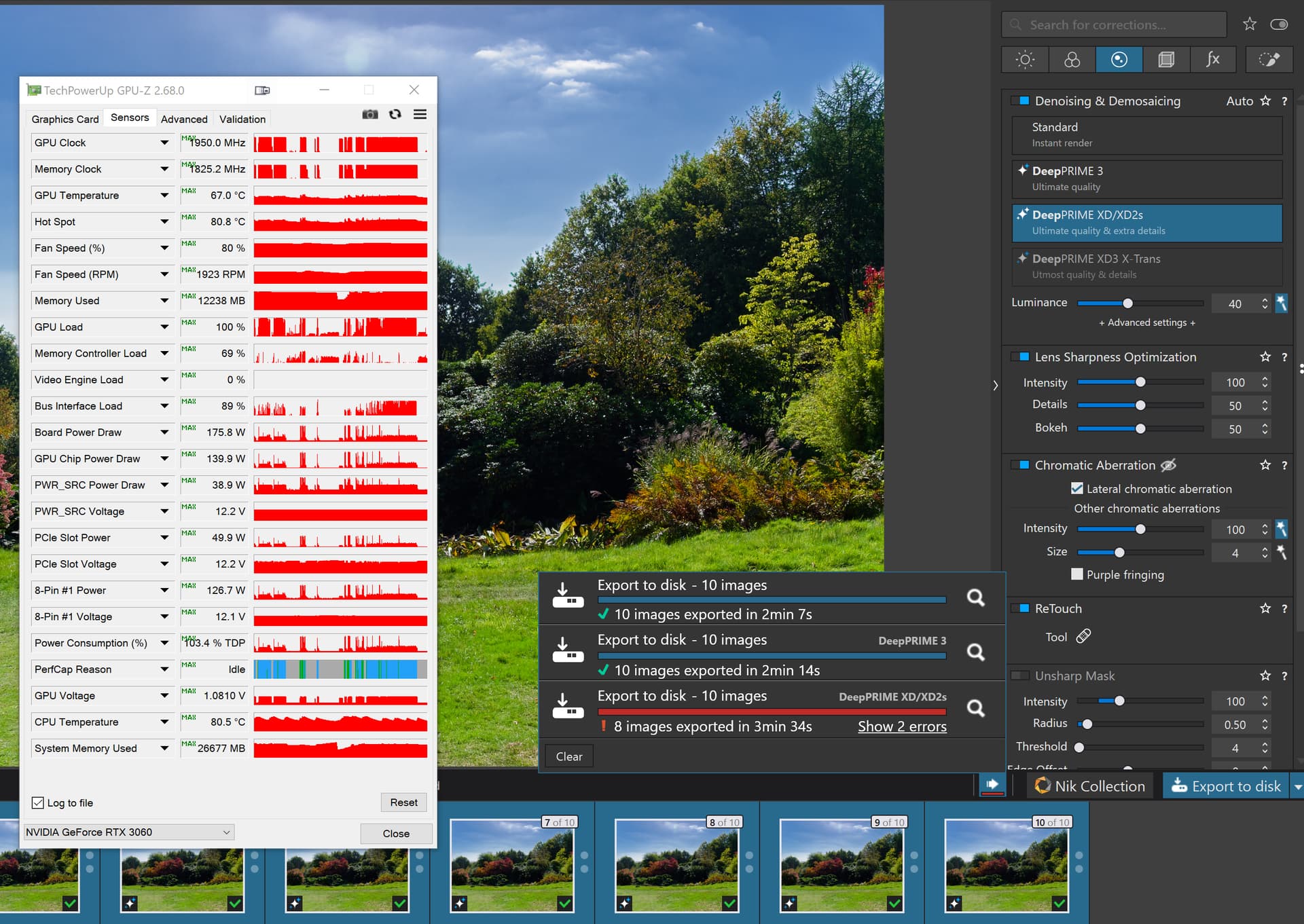
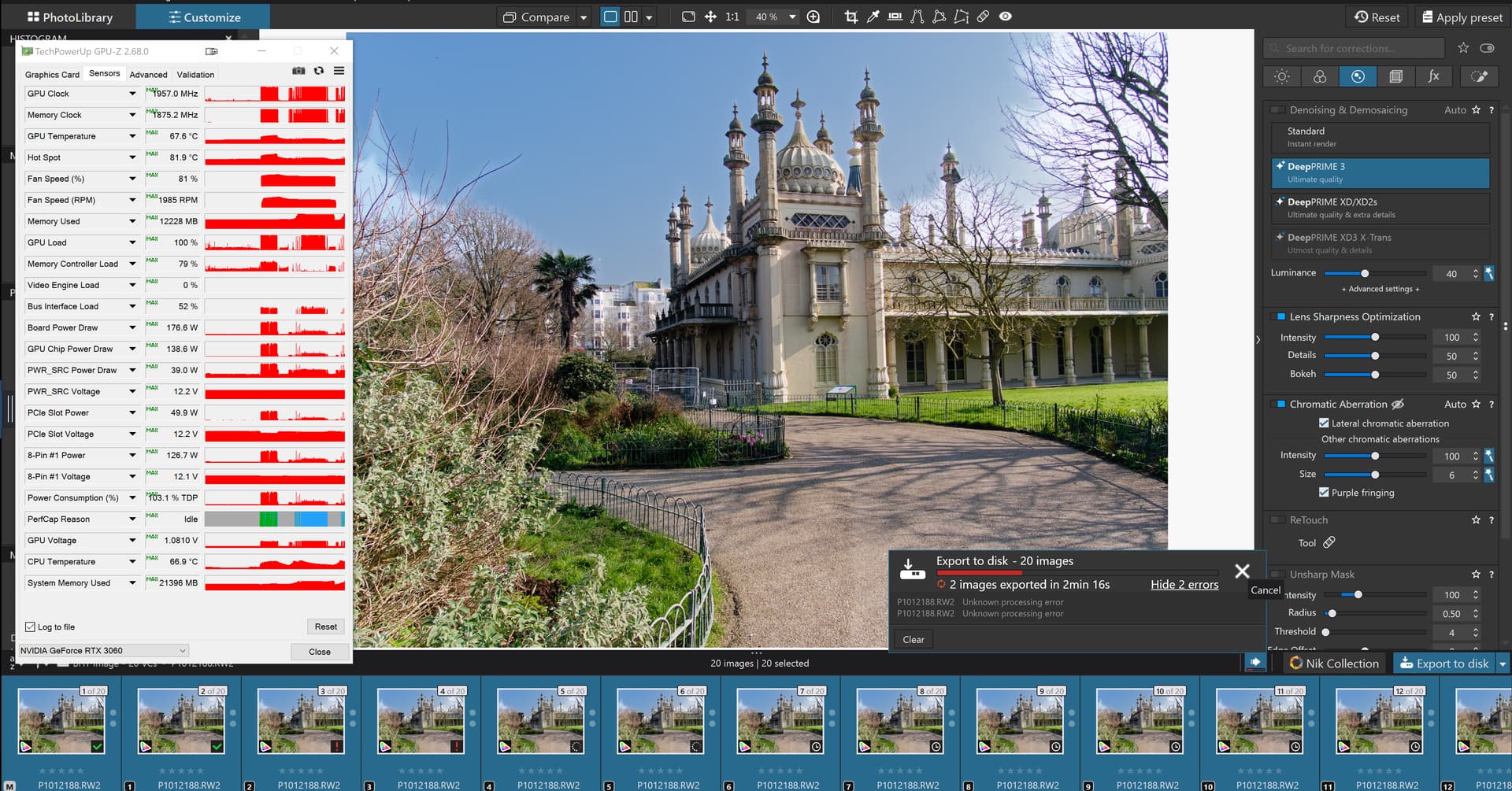
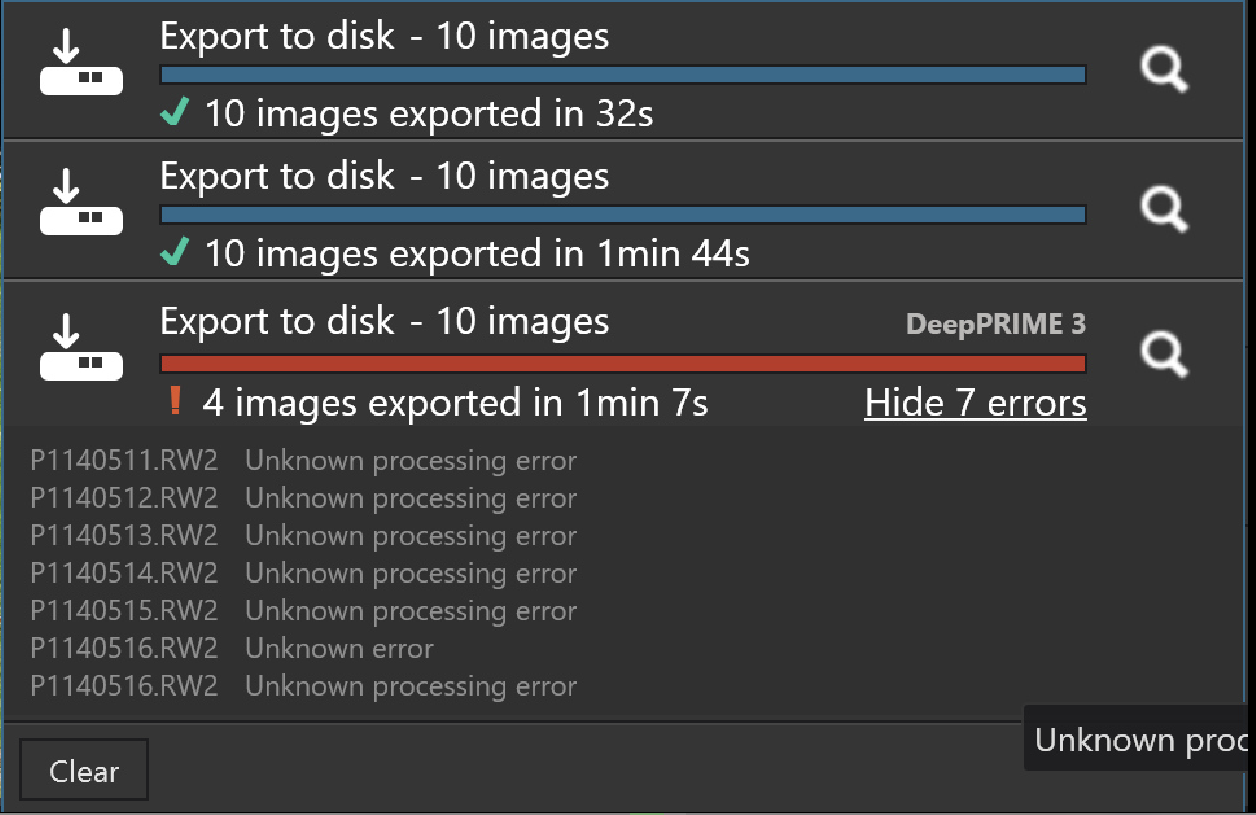
The problem I am reporting here was first discovered on my 5600G 3060(12GB) on the “recommended” (workaround) drivers for that card (572.83) and then repeated on the latest drivers on the same machine (581.57).
The image is here so you can see if the 3060Ti(8GB) survives when the 3060(12GB) fails, and that may well be the case!?
I finally ran the test on the 5900X 5060Ti(16GB) this morning, the other tests were done last night, and no matter what order I repeated the tests on the 5060Ti(16GB) I could not induce a failure on that GPU.
The test is on a single image with 9VCs and goes
Run an export run with all images set to NO NR (please check that is the case because in one of my tests it looked that way but they were actually still set to XD2s - the test failed anyway but …)
Set all images NR to DP3 and export again
Set all images NR to XD2s and export again
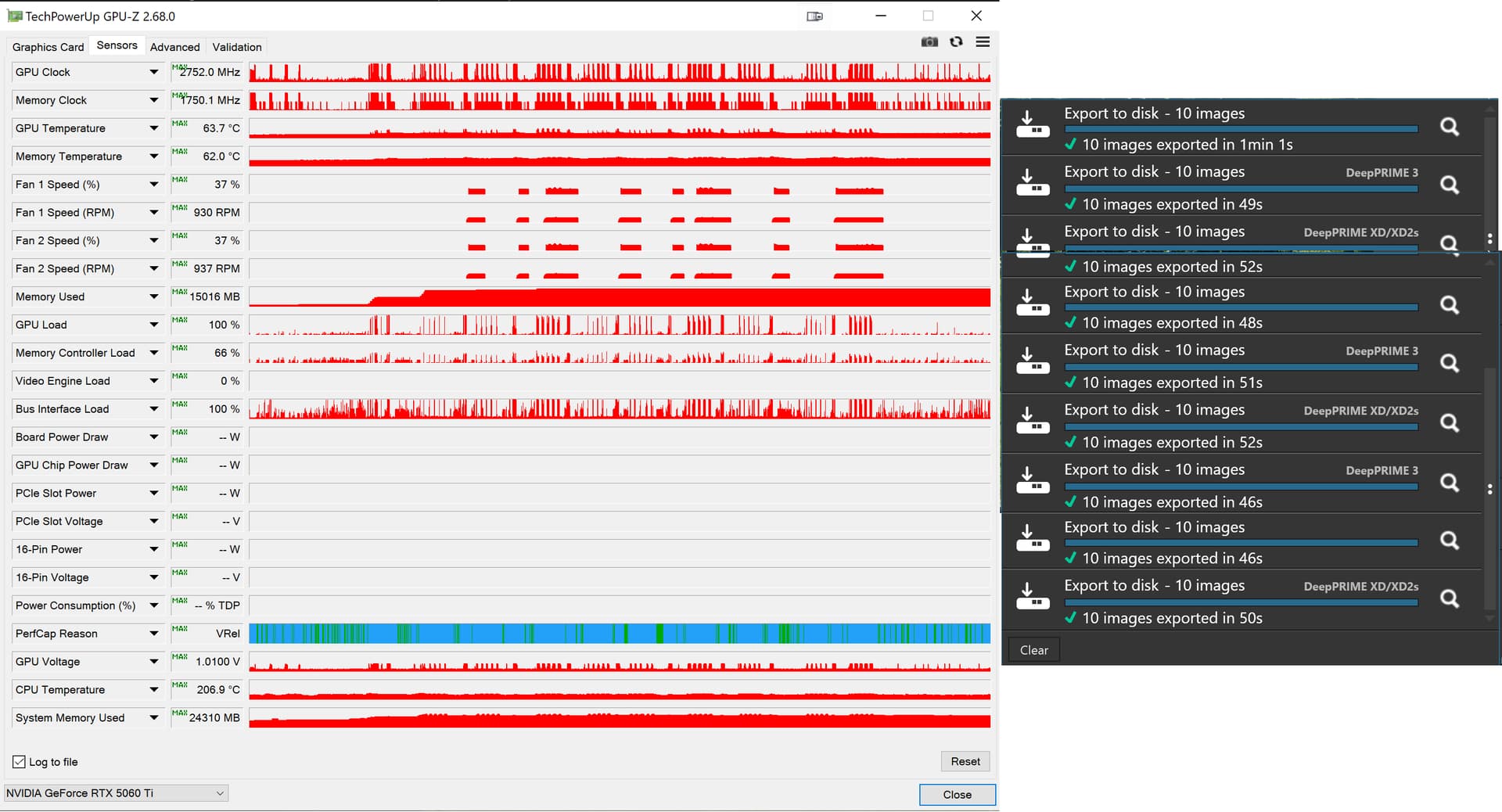
On the 5060Ti with the Studio version of 581.57 (NVidia kindly informed me when I turned that machine on that there were newer drivers available) we have
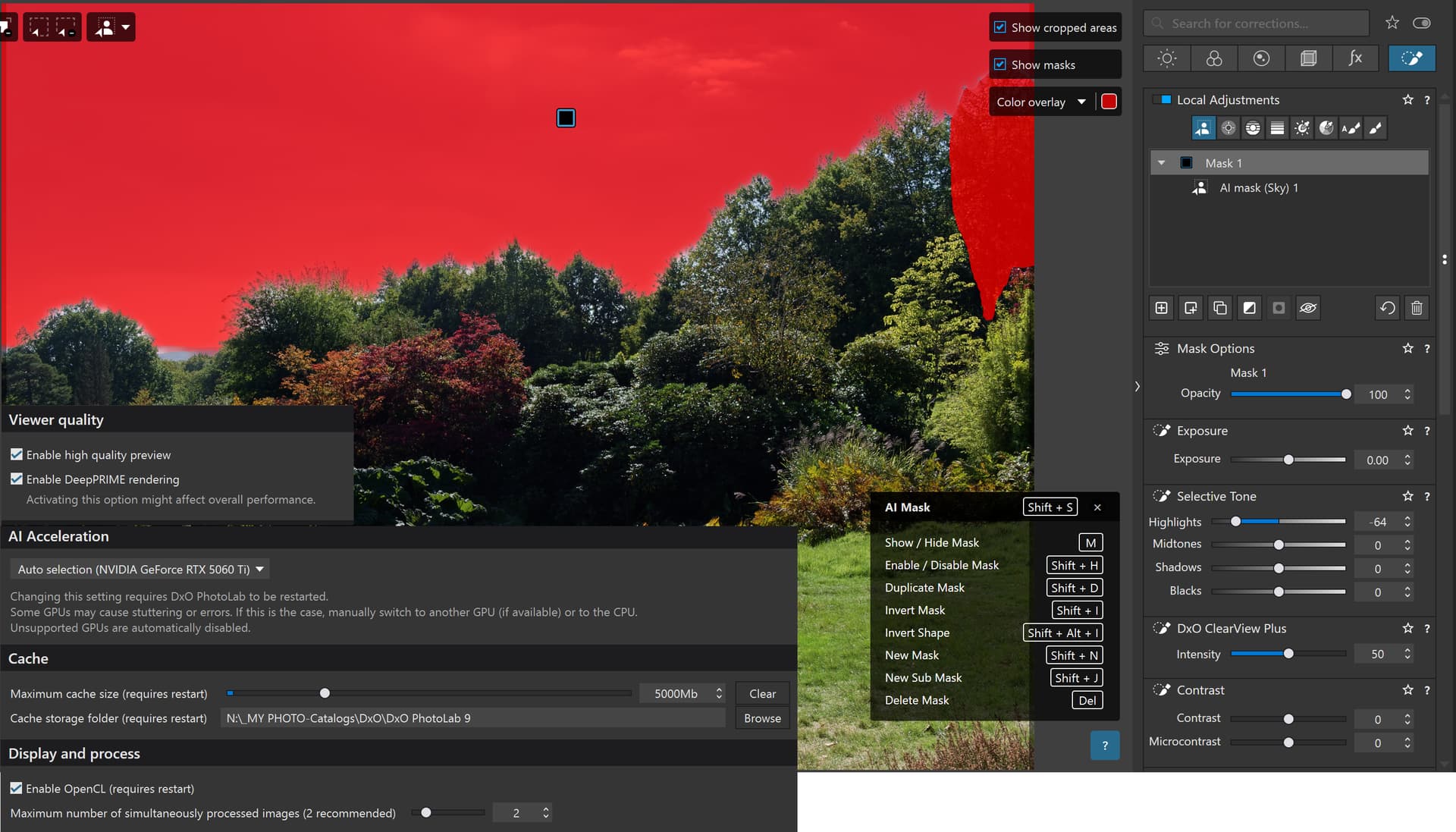
Note that there is a simple “Sky” preset selection and the highlights have been reduced and Clearview set to 50 so that I can visually see that the AI has been applied and to give the export process something to do with the AI selection.
No matter what I did the 5060Ti(16GB) held up perfectly. It consumed nearly all the VRAM but that appears to be the case on both my 12GB 3060 and on the 16GB 5060Ti, my tests seem to result in the VRAM consumed being always close to the limit!?
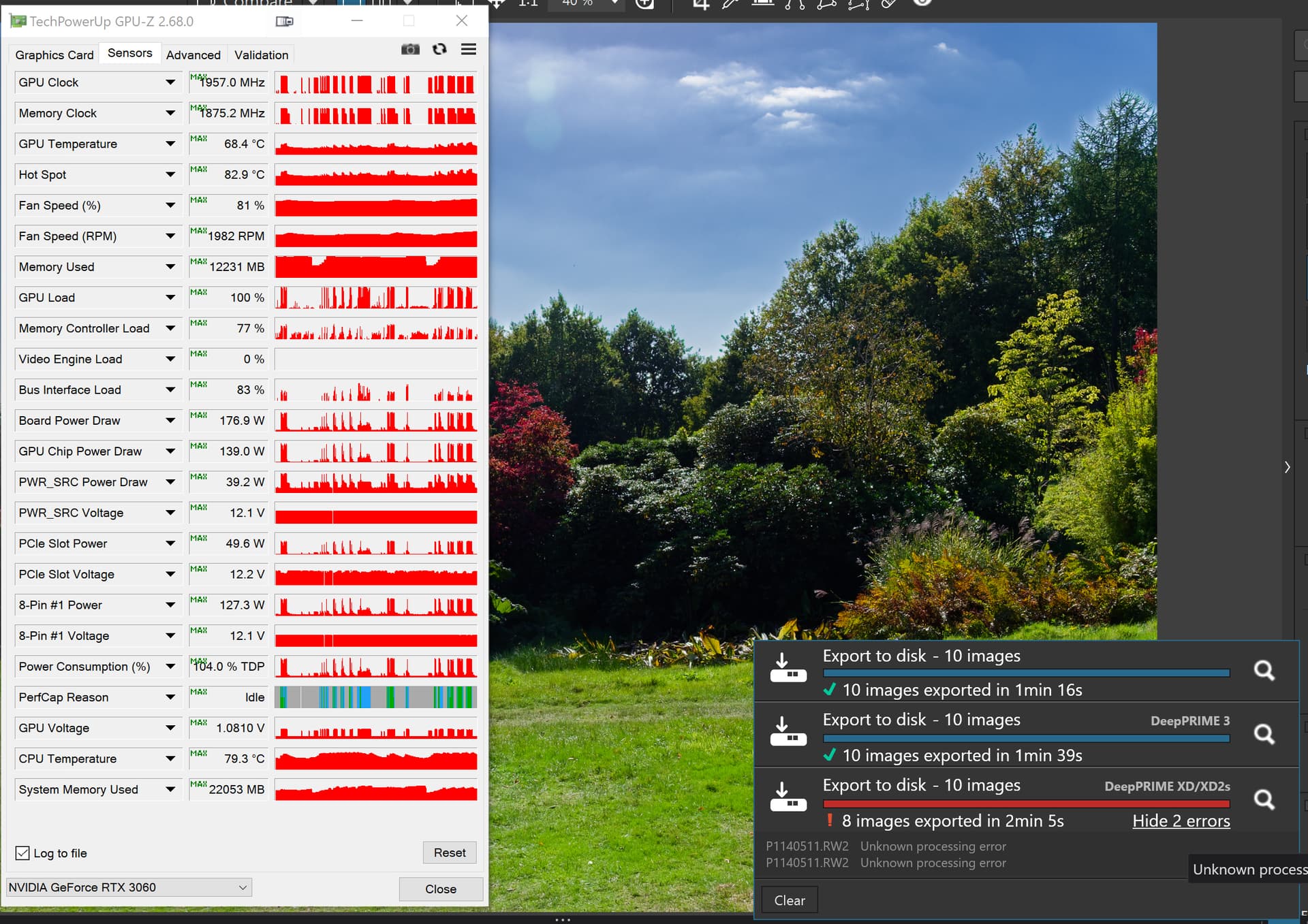
Please note that the failure is not attempting to open the image but rather during the export and after repeated exports have been completed successfully.
Test 2 on the 3060(12GB) on 581.57:-
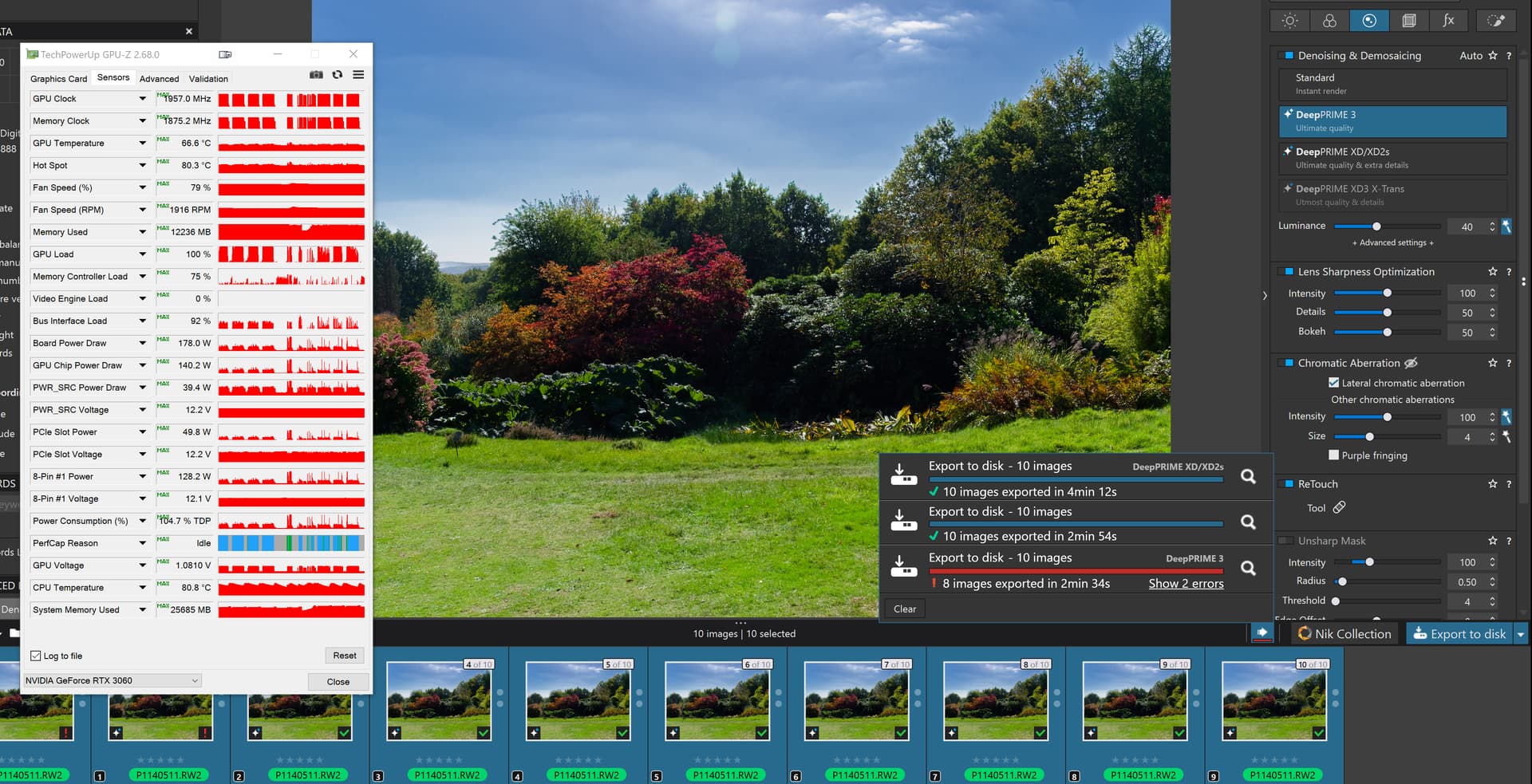
Yes I got the test order wrong but it still failed (on the third export, what is special about the third export!?)
I had to re-run the test in the correct order. For the tests on the 3060(12GB) I not only deleted the database between tests but also restarted the PC.
581.57 might work for you but on this simple test it doesn’t work for me.
I just turned on my 3060(12GB) machine (having let Microsoft update the 5060Ti machine before I turned it off it to conserve energy - so no foot warmer then) and went straight into a “NO NR” test on my “problem” image and
Yes, fixing all related problems may take few months, I’m afraid. NVIDIA fix was probably quick and dirty workaround only for some obvious problems. Meanwhile, it would be nice to have a filter for ‘AI masks (not) used’
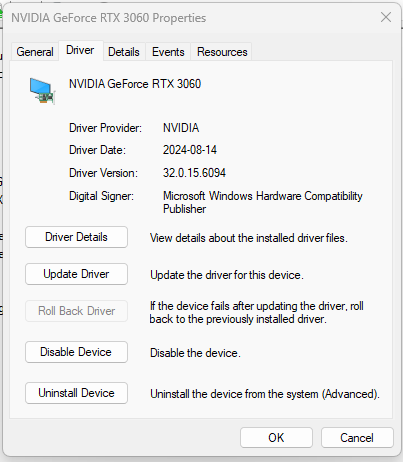
I am confused about the version numbers. Here is what Windows 11 says the version number of my driver is. I know it’s a year old, but the version number makes no sense compared to what is being mentioned in this post.
I am having no issues so far with Photolab 9 so will likely just leave the driver as is.
32.0.15.6094 corresponds to 560.94 in another “version numbering space” (just read the last 5 digits and put a dot after third). It was released in August 2024 afaik. There was a later driver 566.36 (December 2024?) which is generally considered to be the most stable, at least on NVIDIA forums. It was released just before GeForce RTX 50 series went into market.
As far as I remember there were some important performance fixes in NVIDIA drivers, but it was back in 2023 (?). If you are happy, don’t update now.
EDIT: Found this link for NVIDIA official driver numbering scheme: NVIDIA Driver Help|NVIDIA UK
It says there ‘The last 5 digits are the NVIDIA driver version number’
@Stenis is right, 3060 Ti 8GB is about 1.3 times faster than 3060 12GB for most computational tasks. However, you are also right, since if there’s VRAM shortage, everything can happen.
1 Like
Stenis
(Sten-Åke Sändh (Sony, Win 11, PL 6, CO 16, PM Plus 6, XnView))
28
When one reads about all the fixes Nvidia seems to do on the various drivers for different applications I get pretty stunned - they have a lot to fill their days with :-).
Stenis
(Sten-Åke Sändh (Sony, Win 11, PL 6, CO 16, PM Plus 6, XnView))
29
3060 Ti 8GB VRAM seems to have better parallell processing capabilities and a broader bandwith then 3060 with more VRAM.
@Wlodek I know that the 3060Ti(8GB) is faster than the 3060(12GB) but at the time I bought the 3060(12GB) you could have any size you liked as long as it was 12GB, now there is a 8GB version available. I considered that the 3060Ti(8GB) or even the 3070 were too expensive for my budget.
The good news about a “proper” PC is that it can be upgraded and fortunately all my machines are fitted with Seasonic Platinum power supplies, albeit one is 650W (in the 5900X with the 5060Ti) and the other two are 550W, fitted in the 5600G with the 3060 and the old i7-4790K.
So when I decided that I needed to improve on the 2060(6GB) I went for the largest card I could afford and found a good deal on the 5060Ti(16GB).
It is a “hedge bet” trading speed for VRAM size.
Hopefully DxO (and NVidia) will reduce the memory requirements and then my "hedge bet will be unnecessary.
But a lack of speed means I will have to wait a bit longer and have another slice of cake while I wait for an export to complete, a lack of memory would potentially mean not being able to do what I want to do to an image.
@stenis what is your “fixation” with the fact that your 3060Ti(8GB) was the right choice and is better than my 3060(12GB), it probably was at the time you bought it just as my new 5060Ti(16GB) is the best choice that I I could afford now.
It is actually slower than a 4070(8GB) but also cheaper.
@Stenis and @Wlodek I am well aware of the relative speeds of the various GPUs and until PL9, DxPL’s use of memory has been “tiny” then suddenly it is filling larger VRAM.
@Wlodek Although the site I have quoted above is using a gaming benchmark to evaluate the relative performance, I believe Tech Power Up do a similar thing, I think the values given are a fairly accurate measure of relative performance for DxPL Noise reduction but prior to AI coming on the scene.
There will be more funny things ahead. For example, some nvidia GeForce RTX 5070 users felt cheated because certain features were available only in 5080 or 5090. If I find time, I’ll try to recall the details – might be related to games only. The whole AI thing will change the hardware as we know it.
@Wlodek Nvidia is a marketing company and packages its products to hit certain price points and make lots and lots of money in the process. But that is what businesses are for!?
PS:- having bought a new GPU I am no about to buy another one!
Most of us do not have an unlimited pot of money to indulge ourselves or if we do the reason we have that pot of money is because we have been frugal (mean) with money in the past!
Whatever I think of NVIDIA as a whole, it sounds unfair. It has highly technical core with visions but their business practices is another story, like with Adobe.
Don’t underestimate the need to make great things and creativity, which some have. Obviously it’s quite complex with no simple answers, unless you are a pop-politician.
Stenis
(Sten-Åke Sändh (Sony, Win 11, PL 6, CO 16, PM Plus 6, XnView))
38
I don´t have the 3060 12GB card. I have the 3060 Ti 8GB that is has about a 30% higher performance I think.
What I also have checked is the size and configuration of my swap file size in Windows. I have that set to 16 GB at start and to a max of 24 GB (which is a recommended size for graphical work with Topaz and RAW-converters and I have increased the “Cache”-size in Photolab 9 to 16 GB too. I have also reinstalled the last driver too just to get a fresh start.
I don´t know if it makes any good but there is a command for clearing the VRAM on the Nvidia card (Windows) Ctrl+Shift+Windows-button+B. That restarts the driver.
Stenis
(Sten-Åke Sändh (Sony, Win 11, PL 6, CO 16, PM Plus 6, XnView))
39
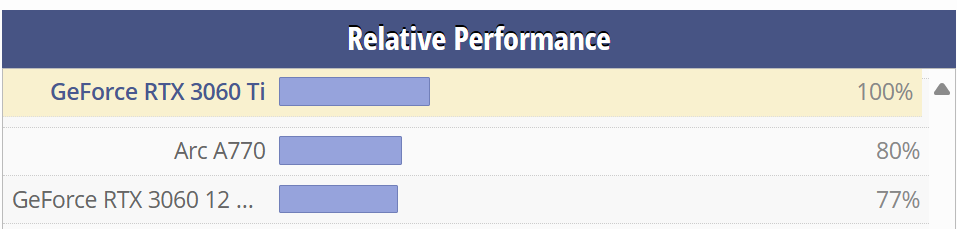
Where did the polite tone go BAYT talking about “fixation”. I just happen to have the card I have and that is 3060Ti 8GB and if index is 100% for that card the performance of 3060 12 GB is 77%. (TechPowerup.com)
I have no “fixation” what so ever but I have been focused on fixing a working work-around that might work for me and many others. That was why I started to systematically test older drivers and found the 572.83 working the best for my card. The version DXO suggested was not available for 3060 Ti - that´s all behind that. If the DXO recommendation had worked for me too I might not have needed to be as “fixed” or “focused” as you might think I have been :-).
I definitely have an other stance than you when it comes to technical problems. My stance is to solve them and when that might not be possible given the conditions I rather concentrate on fixing a work around instead of just complaining. I think it has been to much of a focus on the last stance here to be all that fruitful.
100/77 gives about a 30% (29,87%) higher performance level, which is a significant difference that just may explain why I have no problem and the users of 3060 have.
In fact I have personally been able to do whatever I have pleased with my pictures with Photolab 9 , just leaving the premade AI-presets to rest until a proper fix is presented. For me the last driver has fixed even that problem and I also can see a far better performance than before exporting pictures with premade AI-preset masks even including both Deep Prime 3 and using High Res.-previews on.
When I tested to export these kind of pictures I got an average time of 15 seconds per picture (24MB) without Deep Prime 3 and High Res. With Deep Prime and High Res. on I got an average of 22 seconds. No crashes.
Given that it really seems at least for me that it was Nvidia who had the ball in this case and not DXO and when they finally kicked it the knot was open. That does not mean that DXO doesn´t have some tuning to do in order to get it to work even more efficient than it is now.
Maybe it can give a perspective on the spinal reflex we first saw here when a lot of users were really quick (me too initially) to throw all the shit on DXO when there were more parameters in this case. We should have saved most of that menure for Nvidia instead or just kept some for DXO too for later use when they need it better than today.
For me it seems to work too. It does not crash, but it is still very slow when using AI masks. The “Full preview in progress…”-message can show up for 1.5 minutes for some images that contain AI masks. This is on an ASUS ProArt P16 with 64Gb RAM and NVIDIA 5070.