Habe eben auf die neuste Version aktualisiert. Nach der Installation startet das Programm kurz , danach ist es weg. Hat noch jemand den Fehler?
Bei mir ruckelt Youtube wenn ich DxO starte nach dem Update 
Und auch meine Wallpaper Engine
Yes, I have the same problem. I get the loading screen, then something pops up for a second and the program closes. version 6.5.0.10
I tried uninstalling/re-installing but the issue remains 
Check the hidden icons in the bottom-right corner. Has it been minimized to the system tray by default?
Thank You , No, there’s nothing in the tray.
It’s definitely crashing for me. Trying to make sense of the crash dump txt file. Right before the errors at says “NVIDIA GPU does not support raytracing, skipping CUDA execution provider registration”
Odd, because it does support it. Guess I will try updating the graphics card drivers, maybe that will help
edit: updated graphics drivers. still the same, crashes.
Is it not a Nvidia problem, my AMD Onboard GPU has the same Problem
Ik heb hetzelfde probleem
SO I am here because … guess what? I have the same problem. I really would like to know why these updates always have some drama or the other. VERY frustrating. It is only because the noise cleanup is good that it is still on my computer. And I paid good money for this software. I do hope that Customer Support is watching this thread and is aware.
I had no issues with the previous version which worked fine for me. Now I have to go and see if I can downgrade. 
Same here, PureRaw doesn’t start
You should send the logs to customer support for them to handle; the game is crashing on both NVIDIA and AMD graphics cards.
Where do I find this log?
If you contact customer support, they will provide an executable program; running it extracts logs that you then send back to them. Everyone should report this issue so that an urgent fix can be implemented.
Glad to hear it isn’t just my computer. Was working fine, now 6.5.0 build 10, splash screen and crash. Nothing displayed when launching from command line and I can’t see any command line options for displaying debugging or log info. Reported this issue last night but haven’t received a reply with the executable for extracting logs. Why isn’t this program simply included with the distribution? Or downloadable from the support page? Things that make you go….hmmmm.
Did you find a previous version to install? I poked around but couldn’t find anything.
There is none listed on their website. They remove the previous version as soon as they release a new version. I don’t want to publicly post what I think of that strategy. 
I just posted a thread of my own with more details on my experience. I was forced to do that because it appears that they are not accepting Support tickets either (“Submit“ button does not work).
Somehow, I feel a review video coming on …
Same story here.
Contacted Elli from support…. they are working on it…
If you wanna launch it anyway run it in Windows 8 compatibility mode.
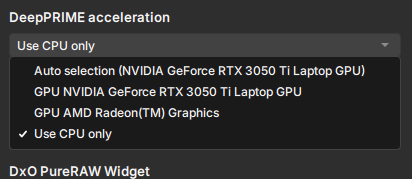
Than in app settings switch to USE CPU Only.
Than close app completely and deselect compatibility mode and run again.
Program will run with super low efficiency on CPU.
Good for one picture - do not count on any batch processing…
What a waste…
Appreciate the update. I hope that they can fix this nonsense ASAP. I just to have my old version back!! I don’t need the new version and I certainly don’t need the aggravation. I have an update in my own thread about how screwed up this is.
Hi buddy. Try this: https://www.softpedia.com/get/Multimedia/Graphic/Digital-Photo-Tools/DxO-PureRAW.shtml#download
I will give a try.
I’m getting the same issue. I’ve thrown the crash logs at Claude and it’s suggesting there is an issue with ProRaw and Windows AI dll modules. So I’ve fed that back to DxO (I’m sure they have Claude access too  ).
).
Hoping they fix it soon.