Mask presets would be very useful indeed. This does mean that if one uses a named mask, then the attributes change everywhere. Unexpected consequences are a danger. This would be powerful magic.
1 Like
The only reason I wont get rid of photoshop. As soon as an AI removal tool is part of Photolab then I can drop Adobe.
1 Like
It’s not quite as ‘intelligent’ but I’ve had good results from Affinity’s free version, especially the Inpainting Brush tool.
There’s generative AI tools too, but they’re locked behind a paid plan. If you find them as potent as Photoshop, they could be a good alternative:
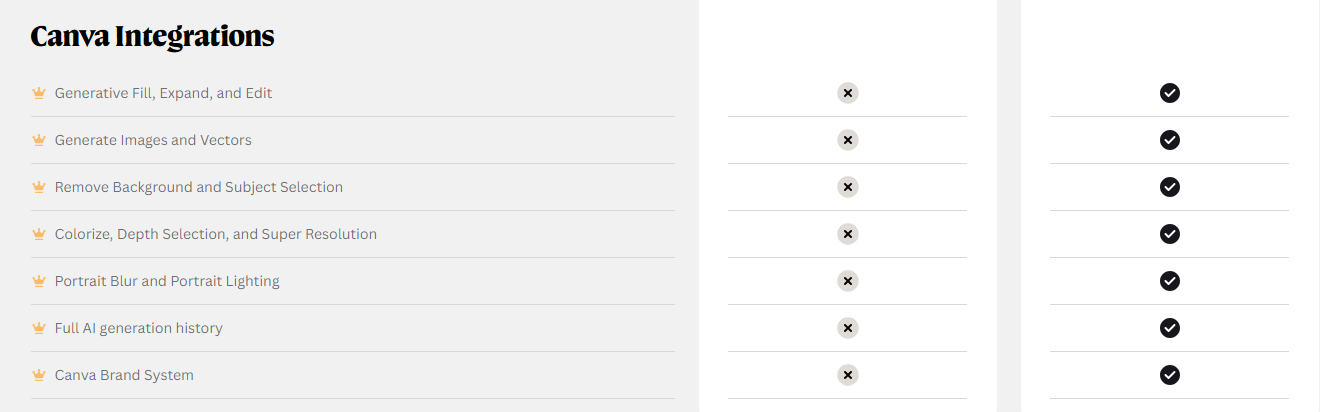
(Check out the “What you’ll get” section at the bottom of this page): Get Affinity | Pro Power with No Strings Attached
3 Likes
I did a trial of affinity AI and the tools are nowhere near good enough yet - if DXOI could offer some AI upscaling and aI removal I would cancel my only other subscription which is topaz photo.i will try affinity again in maybe a year to see if AI tools are better but the basic free version is very powerful and more than adequate for my needs. also I can now use Nik collection from it
2 Likes
Starter for 10…
A proper DAM, not the Mickey Mouse BS they have right now. Ability to import images off cards, rename, check for duplicates etc. Support for multiple catalogues. Fast review & cull of images, with AI to help pick out duds, score image sharpness etc. For me, I would be happy if this was an optional module you can chose to pay extra for, as I realise a lot of people are happy using other tools for this, or happy with PL as it is. Things like FilmPack are bolt-on extras, why can’t a fully featured DAM be one as well if DXO don’t want to include such a thing in PL as standard? This would really close the gap on LR. AI key wording would be great too, smart albums based on keywords, faces, locations etc
Masking…. radial gradients, intersecting masks, proper portrait masking
PL is great at raw processing and capable of producing excellent output, but designed for people that shoot small numbers of images and have a small catalogue, but as mentioned elsewhere not great at doing things at scale. But… I guess it comes down to what their target audience is. I work full-time, photography is my main hobby outside of work and shoot a variety of different genres, I don’t have the time or patience to use lots of applications, mess around moving files about etc, I want to get through my photos quickly and efficiently and move on, and PL isn’t very good at that. If I am not the target audience then that is fine, you can’t please all of the people all of the time, but at the moment I can do everything I need in LR which really stops me moving off it, and I would very much like to, especially with stupid AI slop seeming to the best direction Adobe are travelling in and it becoming painfully slow to use.
3 Likes
I support almost everything @AlexK has mentioned before. In particular everything DAM related.
I might add a personal wish: the ability to export photos not just as a JPEG, TIFF or (restricted) DNG but also as a JPEG XL or HEIF.
I regularly have to crop a lot of images and resize them down to a specific maximum size. However, some images are already smaller than the maximum size after cropping.
Please add a checkbox labeled “Do not resize undersized images” during export so that small images are not upscaled. It would really speed up my workflow.
Agree totally with AI removal tool
1 Like
Remove and change background or non-wanted parts of the image.
1 Like
Hi. Well, the only improvement I need and would like to see developed is the ability to recognize DNS files from cameras that are not in the database. I am an owner of Sigma Foveon cameras and I convert X3F files to linear DNG, which are not recognized by DXO. I know it’s technically possible because what DXO seems to look at to resolve opening the DNG are the metadata.
2 Likes
I’m going to add further to this and ask for wider DNG support (I appreciate there is a long thread about this already: Lack of DNG support needs to be adressed - DxO PhotoLab - DxO Forum)
I’ve started to use AI editing tools (pre-process the NEF from my Nikons and export them as DNG (lens corrections and DeepPrime applied), run the DNGs through the AI tool (Aftershoot or Pixieset Photo Editor, for example), export as DNG files for further local adjustment editing.
Unfortunately the DNG files created by the AI tools are not compatible with Photolab (see this help article: Which DNG files are supported by DxO PhotoLab as input? – Help center)
1 Like
Also, support for the new AMD & Intel NPU processors found in Windows computers would be amazing so that exporting files can be sped up in a similar manner that support for the Apple NPU allowed for the M1 and newer processors - this would be great for hardware with less powerful GPUs (ie pretty much all laptops that aren’t designed for gaming!)
I appreciate that support for Qualcomm NPUs would require a lot more work because the entire app would need to initially support ARM processors.
2 Likes
Hi, there is a dedicated thread feature requests.
I think it makes more sense to use this for these topics because
a) it’s clearer
b) there is a vote option
Maybe the DXO team sometimes has a look into that and consider that in their priorities.
I guess, its can be ‘easy’. I even wonder, how its not a thing even now.
- PL (under Windows) use WinML.
- WinML relies on the ONNX Runtime.
- And ONNX connect the ‘Execution provider’ (provided by Intel, AMD, etc…), for example for Intel the OpenVINO
- And OpenVINO target the Intel NPU.
So, in theory its can be already works.
Qualcomm NPUs would require a lot more work because the entire app would need to initially support ARM processors.
Yep. In this case PL need to be port to ‘Win 11 for ARM64’. However, the whole WinML thing the same as under x64.
Doesn’t PL already support Intel Ultra Processors with NPU’s?
1 Like
The Intel CPU part is certainly supported, but is the Intel NPU used by Photolab to speed up the DeepPrime processing? This is something DxO managed with great affect with the Apple NPU on their ‘M’ processors.
It made export speeds massively faster on Apple ‘M’ machines that don’t have their more powerful ‘Max’ and “Ultra’ GPUs.
Yes it is! .. and working fine on my machine and confirmed as working by DxO tech team when I worked with them on test software prior to the release of PL9.6
further details see my post here;- Exported ARW images include unwanted color barcode - #5 by holmes4
DH
This is amazing news! Thanks @dh57
I still have PL8, I’ve just checked and it hasn’t received this Intel NPU update (which is fair enough). I tend to update PL every other release, so I’ll have to wait until PL10 is available to try this out 
You may also wish to have a look at my 2nd post here - direct quotes from DxO technical team on NPU/AI Boost. - PL 9.6 AI masks don't work at all on Intel GPU - #13 by clifforddww
Just a point CHPhoto - you have posted this under “My wish List For DxO PhotoLab 10” - … but in your latest response you state that you are still using PL8 and haven’t in fact been using PL9!
Maybe you could maybe be a bit more diligent in researching the current capabilities of DxO software before posting your thoughts on future DxO releases that are two versions away from the software that you currently use?
Just a thought!
DH
Yes, fair point. I did check out a trial of PL9 a while back but either I didn’t spot the NPU option or it wasn’t available at the time I was trialing it.
1 Like