Adding panorama to PhotoLab won’t improve your workflow.
And that dear friends is why PhotoLab should not include a panorama stitching tool at all.
To make RAW corrections and repairing lens distortion while doing advanced noise reduction at the same time as one stitches 30000 to 120000 pixels together is beyond the abilities of existing computers.
The correct workflow to efficiently create majestic panoramas smoothly is:
- process all the images with identical processing, cleaning out any lens distortion (doesn’t work well with stitching except as a special effect).[1]
- make any local adjustments
- apply noise reduction
- export images as flat files, jpg or tiff
- check the quality of the images carefully (if one still wants to make changes to the core processing go back to step 1)
- create a separate folder for the panorama source images and put them there
- import them to the stitching software
- fiddle with stitching and perspective in the dedicated panorama program until one is satisfied with the panorama
- export panorama
- check again for stitching issues at 100% or 200% with an image viewer like FastRawViewer (€19), Pixelmator Pro (€50) or Affinity Photo (free).[2] If the longest side is shorter than 34,040 pixels (macOS), LilyView also qualifies.
- If there are stitching issues, then rebuild the panorama from the original images.
- If you like the final panorama but would like to produce stylised versions (sepia, faded edges, film burn, black and white), take it into PhotoLab, Affinity or another bitmap editor and create that version.
Since PhotoLab is a RAW editor and manager, including PhotoLab in the panorama process creation makes no sense. Panorama creation is not done from RAW files but from finished TIFF, PNG or JPG slides.
Introducing PhotoLab into panorama creation would be extremely confusing as it would make lazy or neophyte panorama shooters wonder why their panoramas turn out so badly. There would be no end of bad reviews.
If PhotoLab were to introduce a nanny wizard to stop panorama beginners from botching their panoramas, there would be a hullaballoo from those cranky eccentrics (lots of us here in feedback, and among PhotoLab users) who want to deliberately make strange or partially broken images.
If DxO really wants to get into the panorama and focus stacking business, it could certainly do so with an enhanced version of ViewPoint which requires TIFF, JPG or PNG images for processing. Panorama has absolutely no business in PhotoLab. Properly shot focus stacks might work.
I am so weary of the panorama panorama stitch me in PhotoLab crowd. Please read and reread the above until you understand the photographer’s process and what the application does behind the scenes when creating panoramas.
For those who argue that Affinity Photo is a RAW developer too and does panoramas. No, Affinity Photo is not a RAW developer. It’s a bitmap editor with a RAW import funnel. One can do nothing with a RAW in Affinity Photo. One must import it first, at which point it becomes a bitmap image. Bitmap images are what one needs for panorama creation. The same logic applies to Photoshop.
In the meantime, there are no end of great panorama tools on every street corner. Affinity Photo seems to rate about a 3 (my own experience is 4 as its limitations don’t affect my own panorama work). Hugin and Autopano are free and apparently work well. Photoshop’s panorama tool was excellent when I last used it more than ten years ago.
There’s a very good free app in the Apple app store which is drag and drop, Panorama Stitcher Mini. It only allows five files but otherwise is fully featured with no watermark. This is fantastic for small panoramas (what most of us create). The big brother is all of €15. I’ve tested the free version and after a few more tests, I’ll probably buy the full version. It’s drag and drop and just works and has the different alignment (Spherical vs Planar), crop (Superscribe, Inscribe, Manual) and projection (Rectilinear vs Equirectangular vs Stereographic). Just playing around with one random panorama has shown me I’m missing out on a lot without a projection switch which includes stereographic.
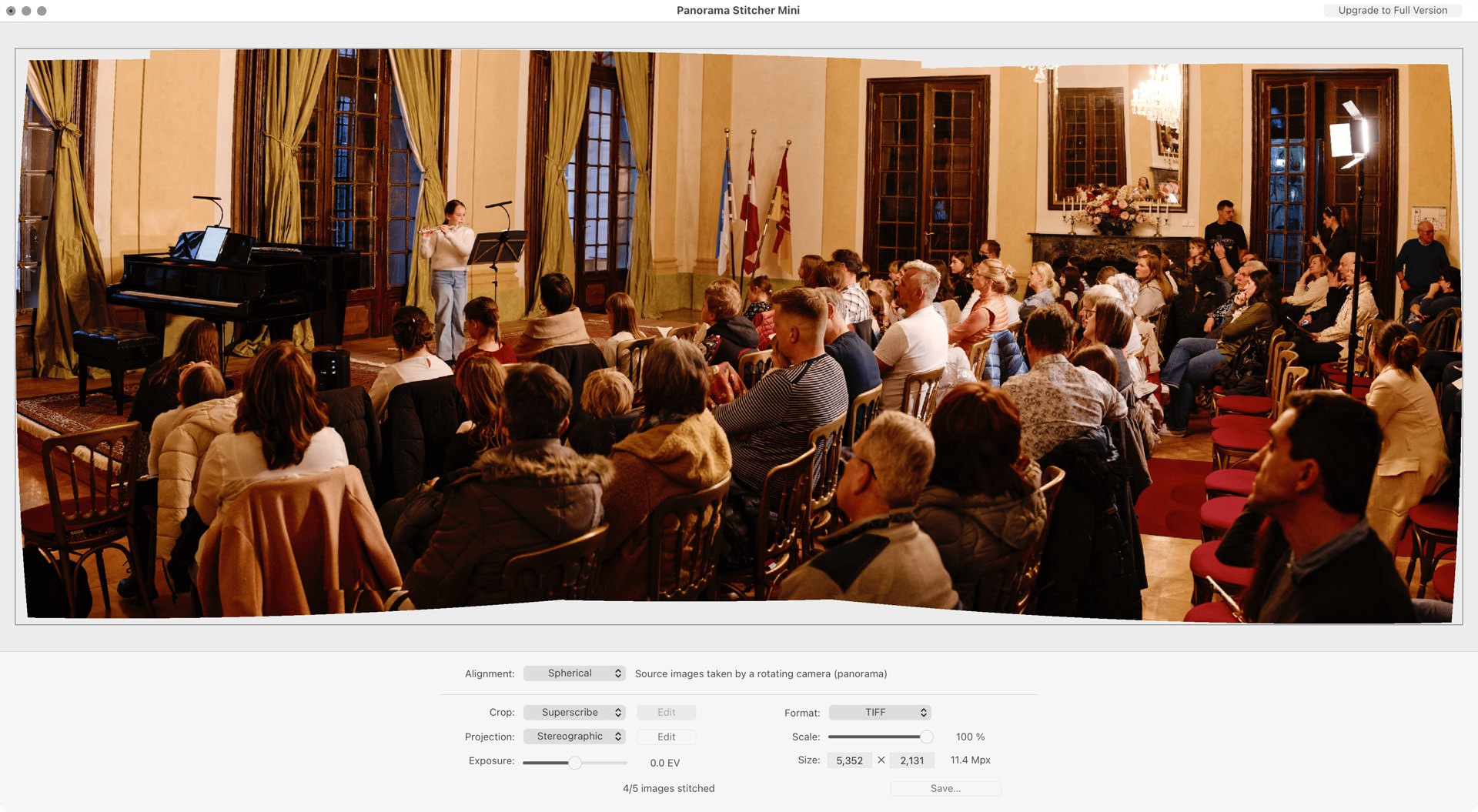
One could push the free version further by creating three panoramas and then stitching those together if one only very occasionally makes larger panoramas.
Then there is PTGui but it’s expensive (personal license €175 + VAT). I don’t think I’d like the interface, it’s very technical in an ugly and unpleasant way but it’s incredibly powerful.
In short, if one wants to work with panoramas there are excellent tools available for free (or already included in the other tools you own). There are panorama tools for every size of panorama and with a simple (Panorama Stitcher, Affinity Photo) for smaller panorama or complex (PTGui) interface for massive 80 image panoramas.
This is an Apple limit. The core image engine (the one used in Preview and Finder) cannot display an image larger than 34030px on the widest size or manipulate an image larger than 30000px. Exactly what you ran into.
PhotoLab would have to completely rewrite its image handling routines from scratch. It’s possible (Pixelmator Pro, Affinity Photo and FastRawViewer have all done it) but it’s a huge architectural change. Since the Phase One IQ4 150 maxes out at 14,204 × 10,652 pixels (Fujifilm GFX
100 II and Hasselblad X2D 100C max out at 11,656 × 8,742) there’s no rush for a RAW developer to change its image processing pipeline to accommodate images above 30,000 pixels on the longest edge.
All the panorama photos must be shot in full manual mode with no exposure changes or the stitching will look like a patchwork quilt just based on light alone. Affinity Photo seems to make some small tweaks to exposure to match the images, as did Photoshop but automated exposure adjustment often fails. ↩︎
XN View will show these very large images but is slow and clunky, if you have any of the previous three, they are much more responsive when viewing giant images. Free is expensive if the software doesn’t work well. ↩︎