Because the followings (at least in may opinion) this ‘full preview in progress’ happen:
- The ‘preview cache folder’ jpg file is not 1:1.
- DxO provide full quality (and not just some jpg quality, think about users start to complain about that)
- And i think because few things cant be done without this (see later in the ‘Compare button’ section)
In my opinion (and based on my check), seems the ‘preview cache folder’ jpg does only one (1) thing: PL display this until its read up the RAW file (RAW image part) and create the full 1:1 preview ‘in-memory’. I think this its ‘preview cache folder’ jpg only for ‘fill the void’ - avoid ‘empty image on the screen’ until PL render the photo to 1:1 (in-memory). Created ‘preview cache’ folder jpg’s size around: 1366x972 (created from 4:3 .ORF) → so, its definitely not 1:1 preview.
At general (main points) the followings happen (as far as i check) in PL when you open a folder (RAW files). In this example the folder was never opened, no raw touched, edited, no geometry applied, no some preset applied, etc. First photo is opened in large by default (if no filter and similar applied).
- Scan the folder for files (like raw) - check creation date of the file and similar’s (not the photo, the file)
- Scan the folder for files (raw) - read up photo (image) metadata (like Exposure settings, lens info, etc).
- Check for lens info, etc - to check (and may download) DxO modules for lens+body
- Try to check for .dop files and also for xmp files. (what is not exist in this example)
- Create to the thumbnail’s jpg to the ‘thumbnail cache folder’ - but only for photos what in the ‘filmstrip’ (so, not for all photos in the folder if you have more than in the ‘filmstrip’)
- Create preview jpg to ‘preview cache folder’ only for the main/displayed photo
- Read the embedded jpg from the RAW file - and display it → you can see for a second
- Read the RAW file ‘RAW image’ content and render 1:1 to the memory (RAM) - Its the ‘full preview in progress’ → that’s what you see in the end.
If you click to another (like next) photo the followings happen (some points similar with the previous points):
- Re-Write the previous (displayed) image ‘thumbnail cache folder’ jpg. I think its logical and smart (as its already in-memory).
- Create preview jpg ‘preview cache folder’ for the ‘new’ main/displayed photo.
- Read the embedded jpg from the RAW file - and display it.
- Read the RAW file ‘RAW image’ content and render 1:1 to the memory (RAM) - Its the ‘full preview in progress’ → that’s what you see in the end.
Ok, what happen with this example when you close PL, and start again (in main points):
- Its read up the ‘thumbnail cache folder’ the thumbnail jpg’s (and display in the filmstrip)
- Its read up for the selected photo the ‘preview cache folder’ related preview jpg and display it - but display only for the small time until the next point is done.
- Read the RAW file ‘RAW image’ content and render 1:1 to the memory (RAM) - its the ‘full preview in progress’ -When its done, its display this 1:1.
In the cases of .dop, edited photos, things going a bit more complex, but basically the same happen (please see the ‘Compare’ section below, but basically its render 1:1 preview in-memory for 3 (three) instance if you has geometry correction and some local adjustments)
At general if you click on one photo, seems PL always does ‘full preview in progress’. Because its does full quality to memory.
I think this ‘full preview in progress’ happen also due the following reason:
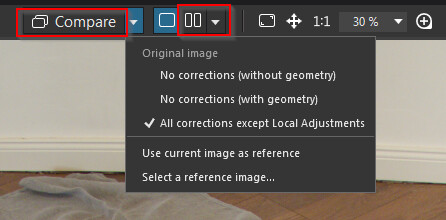
Yep, the ‘Compare’ features
I think PL create multiple version of 1:1 - in-memory
- No correction wo geometry
- No corrections
- Except Local adjustments
- And of course for compare with another (reference) photo - in this case the reference photo also in-memory.
That’s why is so fast when you click on ‘Compare’
Note: i not check jpg , tiff or similar source photos - only for raw, but it think its some similar
It must be good enough to skip that initial scan. Already today I can scroll over my open folders pictures without the system starts to refresh all previews of those pictures - in fact it just refreshes the picture you stop at to start the editing.
Where you ‘scroll over’? In the ‘filmstrip’?